19

Is it possible to use Matcap materials as an actual material for a model so that I can render with it? There are certain parts that I want to apply specific Matcaps textures to but I want to actually use them to render and not just for sculpting purposes.

Is this at all do-able?

Stewie
  • 1,381
  • 2
  • 12
  • 17

1 Answers1

23

For Blender Internal it's as easy as making a material shadeless and mapping the Matcap texture with Normal mapping:

enter image description here

For Cycles you need to stack some nodes to get the correct mapping:
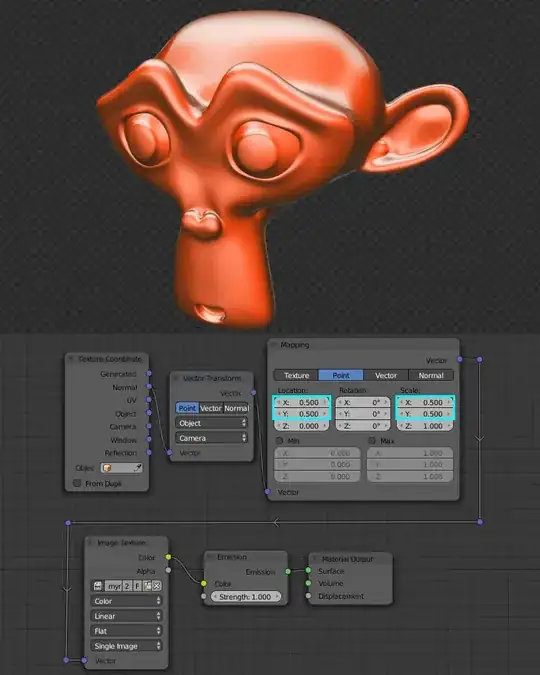
enter image description here

Note: In versions 2.76rc3 and earlier this doesn't work when Open Shading Language and CPU rendering is enabled. The Vector Transform gives invalid output. This is a bug that has been fixed in the latest builds.

Important Update: From version 2.76 we now must change the Vector Transform Node's vector type from Point to Normal. Apparently it should not have worked with Point before, but it did because not all location information was being taken into account - now it is.

Set Vector Transform type to "Normal"

Mentalist
  • 19,092
  • 7
  • 94
  • 166
Jaroslav Jerryno Novotny
  • 51,077
  • 7
  • 129
  • 218
  • Thank you, Jerryno! I had been looking for a definitive answer on how to create an accurate Cycles matcap for the longest... I tried your node setup and it worked perfectly! Just curious though, why the values of 0.5 on the Mapping node? Also, how did you find the right settings for the Vector Transform node? – Mentalist Oct 06 '15 at 02:22
  • 2
    @Mentalist You can visualize the Normal Tex Coords when you directly plug them into emission shader. You will see a surface direction relative to the object's space, what we need is surface direction relative to the view - that's why the conversion from object-space to camera-space (any other conversion doesn't make sense and that's where similar setups failed). Doesn't matter if the type is Point/Vector/Normal, but it matters for the Mapping node so I kept it consistent. – Jaroslav Jerryno Novotny Oct 06 '15 at 09:16
  • 1
    @Mentalist As for the Mapping node: the converted normal vectors go from -1 to +1, but the texture is expected to be mapped from 0 to +1. That's why it's first offsetted and then scaled up to cover -1,+1 mapping range. Scale of 0.5 will make the texture 2x larger (similar setups failed at trying to scale 2x with putting 2.0 into the scale value). – Jaroslav Jerryno Novotny Oct 06 '15 at 09:21
  • 1
    @Mentalist You will also get correct result with Mapping node set to: Texture and offset values of 1.0 (x, y location) and both x and y scale values: 2.0. That will make the same transformation as the node set to Point and with values 0.5. But I like how it can be consistent and all set to and be done around Point vector math. – Jaroslav Jerryno Novotny Oct 06 '15 at 09:38
  • I appreciate you going into more detail on this. You stated "You can visualize the Normal Tex Coords when you directly plug them into an emission shader." I did this and then tried your setup minus the Image Texture. Adding the Vector Transform node made the material go black. Then when I added a Mapping node with the 0.5 values it went all yellow - although changing X or Y location values shifted the color (and direction) to something else. Do you happen to know: why black and why yellow - and how can I interpret what's happening with the vectors based on this kind of color feedback? – Mentalist Oct 06 '15 at 14:06
  • @Mentalist when it's black the values are probably below zero. Same goes with white, it's usually more than 1. The viewport is limited what you can see. The normal vectors are 3 dimensional, same as you have 3 channels in color - when plugged into color what you see is X dimension as red, Y as green and Z as blue. When you transform the vectors into camera space, they became represented with vectors where the Z is pointing in direction of camera and so you only see X and Y. And mixing red and green produces yellow. – Jaroslav Jerryno Novotny Oct 06 '15 at 14:51
  • Thanks again! I just experienced something strange. The node setup stopped working and I can't figure out what's wrong. Would you mind letting me know if this .blend loads for you with a matcap? I upgraded Blender to 2.76 RC3 today and I want to make sure nothing has changed regarding mapping. – Mentalist Oct 06 '15 at 17:09
  • @Mentalist The problem is OpenShadingLanguage. The Vector Transform node doesn't work in any Blender release when CPU rendering and Open Shading Language is enabled :(. It gives incorrect results. – Jaroslav Jerryno Novotny Oct 07 '15 at 09:53
  • Wow! I probably never would have figured that out! Thank you SO much! I enabled OSL in my startup .blend because I do use it once in a while and plan to use it more and more. Ironically for stylized toon shading I wanted to use both matcaps for fills and OSL-generated strokes together. I hope the devs will soon fix that bug(?) or a toggle switch gets added to the Vector Transform node for OSL-mode/regular-mode. Or maybe someone will figure out how to build an OSL script node that does exactly what the Vector Transform node does (although it shouldn't have to come to that). Cheers! – Mentalist Oct 07 '15 at 13:21
  • 2
    Update: I reported the OSL bug (thanks to you tracking down the cause) and Campbell and Sergey got right on top of it - was fixed within a day! Would never get that kind of response from Autodesk, lol. Man, I love Blender! – Mentalist Oct 08 '15 at 17:27
  • 1
    @Mentalist About the update: Yeah it was very weird this node gave the same result in all the modes :D Glad it is fixed now, and I have a feeling you had something to do with it by bringing this to devs attencion with the bug report, so gj – Jaroslav Jerryno Novotny Nov 05 '15 at 21:01
  • Cheers m8! Yeah, all the modes giving the same result was one of the things that initially added to my confusion about how to do this correctly. It feels really good to have this matter sorted out now so that we can use matcap Cycles materials without fear of them breaking. Many thanks for your answer which, as far as I know, is the only clear and accurate explanation on the web on this topic right now. – Mentalist Nov 08 '15 at 18:47
  • @Jerryno Hi. I wonder, could you please take a look at my question here? It seems that the answer to my question is somehow relevant to the answer you have provided here as someone suggested, but I'm not sure how. Would appreciate if you can take a look. – Amir Feb 21 '18 at 17:47
  • @Amir Use this setup to render the matcap texture properly inside Cycles. Download the matcap normal ball and use it as a texture with mapping from this answer on your model and you will get the result you see in viewport when using matcap shading. This fixes the problem stated in your question: "...But I cannot use this method to get renderings..." – Jaroslav Jerryno Novotny Feb 21 '18 at 19:02
  • @Jerryno Thank you. Do you have any ideas on getting view-invariant surface Normal renderings? – Amir Feb 21 '18 at 19:08
  • @Jerryno I may emphasize that I am not trying to obtain **Normal mapping" as discussed here. I am trying to obtain surface Normal maps which is different than Normal mapping. I have a feeling that your answer is mostly related to this since you suggested that I should use Cycles. – Amir Feb 21 '18 at 19:18
  • @Amir Oh, then the example with matcap in your question confused me, I thought you wanted that and you wanted to render that. I see, I will continue under your question and ask for clarification. – Jaroslav Jerryno Novotny Feb 22 '18 at 08:25