4

I have a request to setup a doc lib to capture all emails for a particular project and file it in a particular folder within the library. Here's the a quick run thru:

  1. I have a doc lib called BCDL with the incoming email option enabled. The email address for the doc lib is bcdl@mydomain.com.
  2. The user will, in advance, manually create folders with naming convention of "Proj-XXXXX" where XXXXX is the project number
  3. All emails (with or without attachment) going to bcdl@mydomain.com will be forwardedto the BCDL library. The subject of the email will include the "Proj-XXXXX" text in it. Note, the position of this text can vary is it is a response to an email.
  4. After the email arrived, a workflow or task of some sort needs to parse the subject and look for the "Proj-XXXXX" and move that email to the "Prox-XXXXX" folder which was pre created in step 2.

In summary, I want to setup a Doc Lib where all incoming email will be filed to the respective "Proj-XXXXX" folder parsed in the subject line.

Not sure where to start. I have look at the doc lib, one of the issues I am seeing is that email to a doc lib MUST contain an attachment or it will not accept it. A custom list does not have incoming email option.

Update 20/11 after answer and comments:

The problem with grouping is that I can't apply permission to it. Someone would have to apply the permission to each entry. With folder, the user would apply the permission when the folder was first created.

Red
  • 504
  • 1
  • 5
  • 19

1 Answers1

3

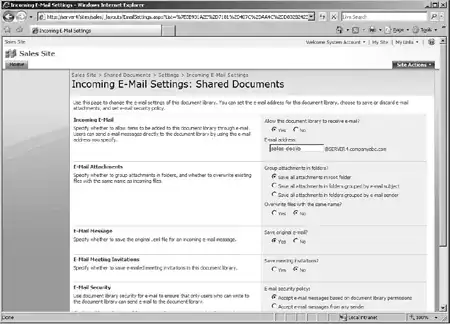
email to a document library MUST have an attachment? Don't think that's true.

Screenshot

Check out the screenshot above (it's a bit small, sorry). Ensure you have set the "Save Original Email" set to true.

Let's assume for now that would fix it, you have answered a large part of your question already. I would implement an event receiver to handle the parsing of the email + moving the file.

Jaap Vossers
  • 5,040
  • 2
  • 24
  • 28
  • Thanks Jaap. I was hoping I don't need to go thru the programming route... obviously I am not a developer. Wonder if there's JQuery or Sharepoint Designer solution for this. –  Nov 18 '09 at 16:41
  • A SharePoint Desginer workflow would be nice to use, but I don't think you can parse out the Subject line. You can see if something is contained there, but not actually parse it. – Marc D Anderson Nov 18 '09 at 17:02
  • What I did was I added a calculated column (called ExtractProj) to parse/extract the "Proj-xxxxx" from the subject and that part works. SPD sees this calculated column. What I need now is a way to copy or move the document to a the pre-created "Proj-xxxxx" folder.

    Why Microsoft don't extend the option to folders is beyond me.

    –  Nov 18 '09 at 17:31
  • 1
    Jaap's suggestion and the column you've created is the only possible solution I think. Presumably you are grouping by that column to create "faux folders". – Alex Angas Nov 19 '09 at 09:51
  • Yeah, grouping by your calculcated column sounds like a really good idea (if your client is willing to be flexible on the requirements) – Jaap Vossers Nov 19 '09 at 10:40
  • The problem I have with grouping is that I can't apply permission to the entire group... need to do one at at time. With folder,I can apply permission to the folder easily and that it. –  Nov 20 '09 at 16:46
  • what about setting up several document libraries, each with their own email address and security settings. Then have a central email address where documents get sent to, and do some clever email rerouting based on the subject contents within exchange (I am assuming exchange can do this - correct me if I'm wrong). – Jaap Vossers Nov 20 '09 at 18:02