6

Can we query the info from "Data Management -> Storage Usage" through SOAP API? If so how? Actually, I need the count of records in all the objects in the org, and the size. (Also would like to know how the size [in KBs] is calculated for a record ?)

**Edited**

Am actually looking for something like this :- Like for ex (C# code) :-

String[] SOQLS;

SOQLS[1] = "Select count(id) from accounts";

SOQLS[2] = "Select count(id) from contacts";

QueryResult[] qrarray = binding.query(SOQLS[]);

would I be able do something like this so that i can pull the count of all the objects through api (partner wsdl)?

Sathya
  • 3,202
  • 6
  • 36
  • 48

2 Answers2

5

First off, please vote for the idea: Access Storage Used per Record Type information through the API


The short answer would be that no, you can't get the same information directly via the SOAP API.

Trying to get the counts via a SOQL query will be problematic as the number of records goes past the governor limits (50,000 records I think). If you do hit the limit in a query you will get the OPERATION_TOO_LARGE error back.

The reason for this, as given by Salesforce:

OPERATION_TOO_LARGE
The query has returned too many results. Some queries, for example those on objects that use a polymorphic foreign key like Task (or Note in your case), if run by a user without the "View All Data" permission, would require sharing rule checking if many records were returned. Such queries return this exception because the operation requires too many resources. To correct, add filters to the query to narrow the scope, or use filters such as date ranges to break the query up into a series of smaller queries.

In your case a count() query is the same as returning every record at the DB level so if your count returns > 20K records then it is really the same as returning all that data from the DB perspective. After all, the access grants still have to be calculated to return an accurate count. [Source]


There is currently no Partner API call that will allow you to run multiple SOQL queries in one go.


If you are prepared to get your hands a bit dirty and accept the associated risks you could screen scrape the data off the page. The risks being that it isn't supported by Salesforce and could easily break if they make changes to the page.

The URL would be something like:

https://<instance>.salesforce.com/setup/org/orgstorageusage.jsp?id=<Your Org Id>

At the time of writing the key prefix appears in the class for the span containing the sObject label. This should be unique(mostly).
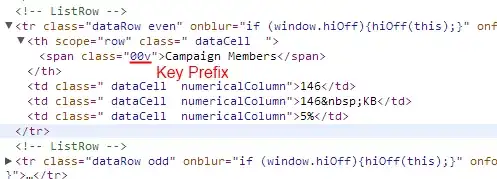
Key Prefix in HTML of Storage Usage

The keyPrefix should match up with the DescribeGlobalSObjectResult.keyPrefix.


How is the size of an individual record determined?

I was going to suggest adding up all the byteLength values from DescribeSObjectResult. This will get you close, but for some data types the value isn't populated (boolean).

Turns out I was way off with this. @ca_peterson points out in the comments that the record size is fixed by Salesforce based on the record type. The addition of custom fields makes no difference. See What are the various record sizes? This seems counter-intuitive coming from a SQL Server background, but it is right there in the docs.


How salesforce is able to show the information in storage usage page without storing it anywhere / calculating it dynamically without any problems?

They don't have to play by the same rules we do. With direct access to the underlying database they could perform queries without limits or sharing rules. They may maintain any number of additional structures to track usage. It is hard to say when dealing with a black box.


As of Spring `15 there is the Limits Resource in the REST API. Unfortunately this currently doesn't give the storage breakdown by object type. Only an org wide overview.

Daniel Ballinger
  • 102,288
  • 39
  • 270
  • 594
  • 1
    All records, with some exceptions for standard objects (case comments are 0KB, campaigns 3KB, etc.) consume 2KB of storage regardless of the underlying data size. – ca_peterson Mar 12 '13 at 02:50
  • @ca_peterson. Interesting. It that a minimal record size? I assume they could grow larger with the addition of multiple fields. Especially rich text fields. – Daniel Ballinger Mar 12 '13 at 03:06
  • 1
    Nope - you can stick 1.4MB of long text fields (+ lots of 255 char text fields) on a record and it will still only consume 2KB on the storage usage page. Take a look at http://help.salesforce.com/apex/HTViewSolution?id=000003631&language=en_US – ca_peterson Mar 12 '13 at 04:34
  • Thanks DanielBallinger and @ca_peterson am looking for querying the counts of all objects in one statement from C# (through API - Partner wsdl). Like we create array of sobjects and insert or update it, do we have a way to query it as well using a single statement? – Sathya Mar 12 '13 at 22:33
  • @Sathya As per my answer, no, you can't using the Partner API. If you have more than 50,000 records of any one type you can't use the count aggregate function due to the governor limits. – Daniel Ballinger Mar 12 '13 at 22:58
  • @DanielBallinger in that case will it just return the count as 50000 for that object only? or in other case assuming i dont have 50000 records in any of the objects (just for the count of records in each object), can I query it in bulk, like querying array of sobjects, like we insert an array of objects through api. If its possible can you give me an example? – Sathya Mar 12 '13 at 23:08
  • @Sathya If you go over the SOQL record limit you will get an OPERATION_TOO_LARGE error. See the explanation here. You would need to use SOSL to query across different sobjects but I don't know if it has the kind of aggregate functions you would need or what the limits are. I suspect it won't do what you want. – Daniel Ballinger Mar 12 '13 at 23:35
  • oh ok @DanielBallinger thanks for the information.. but am just wondering how salesforce is able to show the information in storageusage page without storing it anywhere / calculating it dynamically without any problems. – Sathya Mar 12 '13 at 23:59
  • hi @DanielBallinger I have screen scraped the information but am having some problem now, i have all objects queried thru partner wsdl in a dictionary<objectplurallabel,object> and while scraping am getting the corresponding object from the label obtained from the screen and setting the storage count and size properties of my object. but now am having a problem, there are more than 1 objects having same label. So while pushing into the dictionary from partner wsdl am having a problem. how else can i associate the record count and size with the correct object retrieved thru partner wsdl? :( – Sathya Mar 14 '13 at 18:51
  • Welcome to the wonderful world of screen scrapping @Sathya. I had a quick look at the pages HTML. The key prefix appears in a span around the sObject label. That should help. – Daniel Ballinger Mar 14 '13 at 19:37
  • oh thanks @DanielBallinger thats a pretty useful piece of information.. i see starting 3 characters of an object, to which property from describeresult should I compare this? hoping there should be an object id and i should take out the first 3 characters and compare.. is that right?? – Sathya Mar 14 '13 at 23:56
  • I've updated the answer to reference the DescribeGlobalSObjectResult which contains the keyPrefix. This question/answer is starting to cover a wide range of (related) topics. It would more constructive to create new questions for any future specific problems you are having. – Daniel Ballinger Mar 15 '13 at 01:08
4

From Summer '17 release notes, you can now get count of records using REST API Limit object.

Below is the example:

Example: Retrieving record counts for Account and Contact

Example request

/services/data/v40.0/limits/recordCount?sObjects=Account,Contact

Example response body

{
   "sobjects" : [ {
     "count" : 3,
     "name" : "Account"
   }, {
     "count" : 10,
     "name" : "Contact"
   } ]
}
Ashwani
  • 22,582
  • 4
  • 38
  • 72