Battle System 2.0
Battle System 2.0 is an updated battle system introduced during the 6th Anniversary of Granblue Fantasy. Battles using Battle System 2.0 differ from others in that they make use of new features such as Omens, Guarding, and Fated Chains.
Quests and raids that use it are indicated by a "V2" icon.
Fated Chains
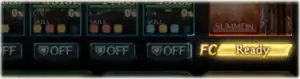
Fated Chains (FCs) are activated manually, by tapping the FC bar once it has reached 100%. The FC activated will correspond to the MC's element.
Upon activation, FCs will deal fixed elemental damage to all foes and inflict a debuff that boosts the foes' damage taken by 20%One of the following debuffs based on the Fated Chain's element:
Strength: 20%Duration: 1 turn Local status effect
Strength: 20%Duration: 1 turn Local status effect
Strength: 20%Duration: 1 turn Local status effect
Strength: 20%Duration: 1 turn Local status effect
Strength: 20%Duration: 1 turn Local status effect
Strength: 20%Duration: 1 turn Local status effect
Boosts damage and damage cap by 20%. Stacks multiplicatively with Seraphic modifiers..[1] The debuff ends after one turn or 30 hits, whichever comes first, so try to make the most out of this window of opportunity.
The FC bar fills when allies use charge attacks, with a bonus for every charge attack used after the first each turn.
Guarding
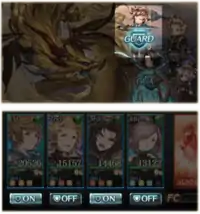
Underneath each main party member's portrait is a Guard button, which can be toggled ON or OFF for that turn (default OFF). Allies with Guard have 90% reduced damage taken1000% boost to DEF after taking DEF buffs and damage cuts into account. While an ally is Guarding, they will be unable to perform normal attacks or charge attacks during the attack phase.
Tapping and holding any ally's button will instead toggle Guard status for all allies at once, of those currently able to Guard.
However, an ally cannot Guard if they meet any of these conditions:
- They are unable to attack at all
- They are under a status effect that prevents Guarding (such as

or
Takes 25% more damage)
Even if they are prevented from using normal attacks, they can still Guard if they can use charge attacks, and vice versa.
Overdrive and Break
The mode bar is removed in V2. Overdrive and Break modes instead appear as the status effects 
Local status effect and 
Local status effect respectively. They typically last a certain number of turns.
Effects that are supposed to affect a foe's mode bar, such as 
and Mode Bar CutCut to foe's mode bar
, have no effect in V2 battles.
Omens and Special Attacks
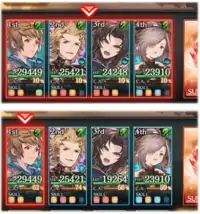
Foes have two types of special attacks, indicated by Omens that appear on the turn they will be used:


If an incoming special attack is due to the foe's charge diamonds being full, the charge diamonds will flash white. If it is instead due to an HP trigger or some other special condition, the charge diamonds will not flash, even if they are full.
A special attack's target is indicated by red borders around your allies. If all allies are targeted, a single border will surround all four. If a special attack randomly hits multiple targets, the allies that will be targeted will have their own border. When skills that affect targeting (such as 
(Excludes all-foe all-ally attacks)
or 
) are used, the indicator will update to reflect that.
When Do Omens Appear?
Omens will appear only at end of turn, on turns where the prerequisites for a special attack have been met. Multiple Omens cannot be triggered in a single turn.
Omens will not appear after the following actions:
- When items are used, such as potions
- When summons are called
- When a foe's charge diamonds are filled, even to max, through the effect of a skill or similar
- When an Omen with a special trigger, such as an HP trigger, is canceled while the foe is at max charge diamonds
Canceling Special Attacks
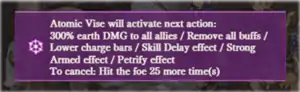
Upon cancelling an attack, a 1.5~2 turn2 turns if cancelled before the attack phase, 1.5 turns if cancelled during the attack phase debuff (e.g. 
Duration: 1.5~2 turns2 turns if cancelled before the attack phase, 1.5 turns if cancelled during the attack phase.Local status effect or 
Duration: 1.5~2 turns2 turns if cancelled before the attack phase, 1.5 turns if cancelled during the attack phase.Local status effect) is inflicted on the foe regardless of its debuff resistances.
Status Effects That Prevent Special Attack Activation
In Battle System 2.0, status effects such as 
Local status effect and 
Takes 10% more damage
Local status effect that disable special attacks become status effects that prevent Omens from being displayed.
However, any special attacks with an Omen currently displayed will activate even if such status effects are applied in the same turn.