38

I have a PostGIS table of polygons where some intersect with one another. This is what I'm trying to do:

  • For a given polygon selected by id, give me all of the polygons that intersect. Basically, select the_geom from the_table where ST_Intersects(the_geom, (select the_geom from the_table where source_id = '123'))
  • From these polygons, I need to create a new polygons such that intersection becomes a new polygon. So if polygon A intersects with polygon B, I will get 3 new polygons: A minus AB, AB, and B minus AB.

Any ideas?

fmark
  • 9,381
  • 9
  • 39
  • 45
atogle
  • 1,742
  • 3
  • 15
  • 22

4 Answers4

31

Since you said you get a group of intersecting polygons for each polygon you're interested in, you may want to create what is referred to as a "polygon overlay".

This isn't exactly what Adam's solution is doing. To see the difference, take a look at this picture of an ABC intersection:
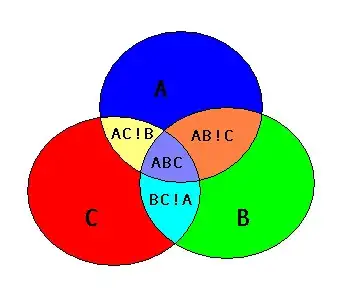
ABC intersection

I believe Adam's solution will create an "AB" polygon that covers both the area of "AB!C" and "ABC", as well as an "AC" polygon that covers "AC!B" and "ABC", and a "BC" polygon that is "BC!A" and "ABC". So the "AB", "AC", and "BC" output polygons would all overlap the "ABC" area.

A polygon overlay produces non-overlapping polygons, so AB!C would be one polygon and ABC would be one polygon.

Creating a polygon overlay in PostGIS is actually pretty straightforward.

There are basically three steps.

Step 1 is extract the linework [Note that I'm using the exterior ring of the polygon, it does get a little more complicated if you want to correctly handle holes]:

SELECT ST_ExteriorRing(polygon_col) AS the_geom FROM my_table) AS lines

Step 2 is to "node" the linework (produce a node at every intersection). Some libraries like JTS have "Noder" classes you can use to do this, but in PostGIS the ST_Union function does it for you:

SELECT ST_Union(the_geom) AS the_geom FROM (...your lines...) AS noded_lines

Step 3 is to create all the possible non-overlapping polygons that can come from all those lines, done by the ST_Polygonize function:

SELECT ST_Polygonize(the_geom) AS the_geom FROM (...your noded lines...)

You could save the output of each of those steps into a temp table, or you can combine them all into a single statement:

CREATE TABLE my_poly_overlay AS
SELECT geom FROM ST_Dump((
    SELECT ST_Polygonize(the_geom) AS the_geom FROM (
        SELECT ST_Union(the_geom) AS the_geom FROM (
            SELECT ST_ExteriorRing(polygon_col) AS the_geom FROM my_table) AS lines
        ) AS noded_lines
    )
)

I'm using ST_Dump because the output of ST_Polygonize is a geometry collection, and it is (usually) more convenient to have a table where each row is one of the polygons that makes up the polygon overlay.

Jeff
  • 446
  • 3
  • 4
  • 1
    Note that ST_ExteriorRing drops any holes. ST_Boundary will preserve the interior rings, but it will also create a polygon inside them. – jpmc26 Jan 18 '19 at 18:42
  • The union of the exterior rings crashes when there are too many polygons. Unfortunalely this "straightforward" solution works only for small coverages. – Pierre Racine Mar 15 '19 at 15:12
13

If I understand correctly, You want to take (A is the left geometry, B is the right):

Image of A∪B http://img838.imageshack.us/img838/3996/intersectab1.png

And extract:

A∖AB

Image of A∖AB http://img830.imageshack.us/img830/273/intersectab2.png

AB

Image of AB http://img828.imageshack.us/img828/7413/intersectab3.png

and B∖AB

Image of B∖AB http://img839.imageshack.us/img839/5458/intersectab4.png

That is - three different geometries for every intersecting pair.

First, let's create a view of all intersecting geometries. Assuming your table name is polygons_table, we will use:

CREATE OR REPLACE VIEW p_intersections AS    -- Create a view with the 
SELECT t1.the_geom as t1_geom,               -- intersecting geoms. Each pair
       t2.the_geom as t2_geom                -- appears once (t2.id<t2.id)
    FROM polygons_table t1, polygons_table t2  
         WHERE t1.id<t2.id AND t1.the_geom && t2.the_geom 
                           AND intersects t1.the_geom, t2.the_geom;

Now we have a view (practically, a read-only table) that stores pairs of intersecting geoms, where each pair appears only once due to the t1.id<t2.id condition.

Now let's gather your intersections - A∖AB,AB and B∖AB, using SQL's UNION on all three queries:

--AB:
SELECT ST_intersection(t1.the_geom, t2.the_geom) 
    AS geom 
    FROM p_intersections

UNION 

--A∖AB:
SELECT ST_Difference(t1.the_geom, t2.the_geom) 
    AS geom 
    FROM p_intersections

UNION

--B∖AB:
SELECT ST_Difference(t2.the_geom, t1.the_geom) 
    AS geom 
    FROM p_intersections;

Notes:

  1. The && operator is used as a filter before the intersects operator, to improve performance.
  2. I've chosen to create a VIEW instead of one gigantic query; This is for convenience only.
  3. If you meant AB is the union, not the intersection, of A and B - Use ST_Union instead of st_intersection at the UNION query in the appropriate places.
  4. The sign is a unicode sign for Set difference; remove it from the code if it confuses your database.
  5. Pictures courtesy of Wikimedia Commons' nice Set theory category.
Adam Matan
  • 6,838
  • 7
  • 37
  • 50
  • My bug ticket on meta: http://meta.gis.stackexchange.com/questions/79/cant-see-images-in-firefox – Adam Matan Aug 02 '10 at 07:50
  • Nice explanation! Results are the same as in scw solution, but his way should be faster (does not compute /or store/ additional intersections of A and B) – stachu Aug 03 '10 at 06:51
  • Thanks! I think I don't store any extra information, as I only create SQL VIEWs, not tables. – Adam Matan Aug 03 '10 at 06:56
  • Yes, that is true, but you compute additional Intersection of A and B, which is not necessery – stachu Aug 03 '10 at 12:21
  • This is a great answer and very useful, but not exactly what I was going for. I apologize if my question was not specific enough. – atogle Aug 06 '10 at 17:19
  • 6
    Images in this answer don't work anymore. – Fezter Feb 02 '13 at 06:39
8

What you're describing is the way that the Union operator works in ArcGIS, but its a little different than either Union or Intersection in the GEOS world. The Shapely manual has examples of how sets work in GEOS. However, the PostGIS wiki does have a good example using linework which should do the trick for you.

Alternatively, you could compute three things:

  1. ST_Intersection(geom_a, geom_b)
  2. ST_Difference(geom_a, geom_b)
  3. ST_Difference(geom_b, geom_a)

Those should be the three polygons you mentioned in your second bullet point.

scw
  • 16,391
  • 6
  • 64
  • 101
-2

Something like:

INSERT INTO new_table VALUES((select id, the_geom from old_table where st_intersects(the_geom,(select the_geom from old_table where id='123')) = true

EDIT: you need the actual intersection of the polygon.

INSERT INTO new_table values((select id, ST_Intersection(the_geom,(select the_geom from old where id = 123))

see if that works out.

George Silva
  • 6,298
  • 3
  • 36
  • 71