1

I am using QGIS 2.0.

I'm trying to import a text delimited layer using lat/lon, but the tool interprets the data as a single line. I've tried saving my csv using several different programs (Stata, python editor, text editor, Excel), but nothing works.

Here is a sample of my data:

n,aqs_site_id,site_latitude,site_longitude
1,17-001-0006,39.93301,-91.40424
2,17-001-0007,39.91541,-91.33587
3,17-019-0004,40.12379,-88.22953
4,17-019-0006,40.12389,-88.24055

And my csvt file:

"Real", "String", "Real", "Real"

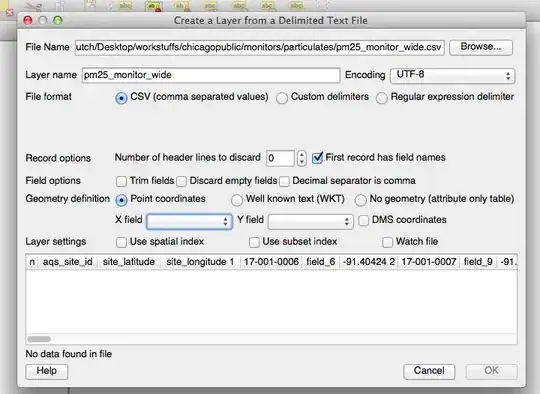
This is what the dialog box looks like when I try to upload. You can see there is no data because everything is pulled into row 1:
.

PolyGeo
  • 65,136
  • 29
  • 109
  • 338
user7420
  • 51
  • 1
  • 4
  • possibly related: http://gis.stackexchange.com/questions/73961/how-to-add-csv-file-in-qgis-2-0-using-delimited-text-layer-plugin?lq=1 – underdark Oct 31 '13 at 23:46

3 Answers3

5

In Mac OS X Excel, save as "Windows CSV" instead of the Mac CSV option and Add Delimited Layer should now recognize the data

Firemaps
  • 101
  • 1
  • 4
4

This is a known issue on OSX. See this bug report for updates: http://hub.qgis.org/issues/8421

Side note: The Add delimited text layer plugin does not use the .csvt file. The .csvt file is only interpreted by OGR - that means when you load the .csv using Add vector layer.

underdark
  • 84,148
  • 21
  • 231
  • 413
2

I should add that the 'save as windows CSV' fix worked for me, except I couldn't just re-save the same file as Windows CSV. For some reason I had to copy the contents of the previous CSV file into a new spreadsheet "save as Windows CSV", and finally it imported correctly into QGIS.

PolyGeo
  • 65,136
  • 29
  • 109
  • 338
Kapeppa
  • 61
  • 3