50

I have a CSV file which has postcode data in a field, but it is non-spatial e.g. no Easting and Northing.

I have a shapefile with postcode in a field and some additional data.

I want to join the CSV with the shapefile based on attributes (postcode fields). I know I can do this in ArcMap, but how can I achieve the same thing in QGIS?

Taras
  • 32,823
  • 4
  • 66
  • 137
gisuser
  • 545
  • 1
  • 5
  • 6
  • How do you do this in version 2.3.0-Master? –  May 13 '14 at 18:47
  • In version 2.8 (and with some earlier versions previously too) I cannot make this work. Trying to join matched on UK postcode data. Using mmqgis I get an error "no geometry in Postcode layer" or something very similar. Using the QGIS join function I get a join of the data but no geometry added to the CSV. Very very frustrated with this issue. – Rostranimin Apr 16 '15 at 16:23
  • 1
    Hi @Rostranimin. Are you doing it the right way, i.e. joining the CSV data to the shapefile data, from the shapefile "Properties" dialog? – stragu Aug 07 '15 at 10:06

4 Answers4

42

The upcoming release of QGIS version 1.7 will have a join feature built into the layer properties. The speed of joins is also quite impressive.

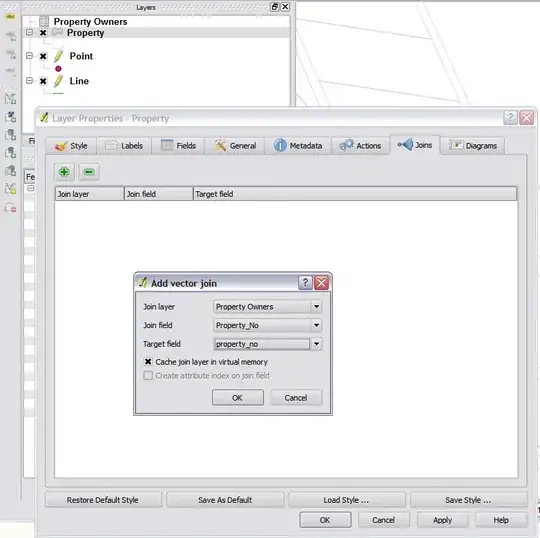
Steps to join:

  1. Open csv via the open vector icon.
  2. Open properties tab on the layer you want to join onto (your map)
  3. Click the Join tab and press the + button
  4. Select the csv layer and the two columns that you want to join on.
  5. Hit ok in the properties dialog.

Join in QGIS

Nathan W
  • 34,706
  • 5
  • 97
  • 148
33

A quick way is to use the "MMQGIS plugin" which will join your CSV file to the shapefile by postcode fields

enter image description here

Taras
  • 32,823
  • 4
  • 66
  • 137
Mapperz
  • 49,701
  • 9
  • 73
  • 132
  • 4
    Hey look! There is my File Browser plugin :D – Nathan W Feb 22 '11 at 22:41
  • 1
    Good Work Nathan - been using it lots, works well. – Mapperz Feb 22 '11 at 22:42
  • 1
    This is working well, just what we needed. Big thank you! – gisuser Feb 23 '11 at 10:49
  • hi, I try to do that but I get the following error Traceback (most recent call last): File "C:/Users/Juan/.qgis/python/plugins\mmqgis\mmqgis_dialogs.py", line 65, in browse_infiles dialect = csv.Sniffer().sniff(infile.read(1024)) File "C:\PROGRA~1\QUANTU~1\apps\Python25\lib\csv.py", line 160, in sniff raise Error, "Could not determine delimiter" Error: Could not determine delimiter –  Jun 05 '11 at 23:36
  • @Carlos: Which delimiter do you use in the CSV file? – underdark Jun 06 '11 at 08:55
  • Drat. Getting the same error too. My file's comma delimited. – R.K. Mar 13 '12 at 14:22
0

If you load your data into MS Access, ftools will allow you to join with an MS Access table.

You start qgis plugin installer, enable 3rd party repos and ftools will become available.

then use the plugin tool by going to fTools > Data Management tools > Join Attributes

relima
  • 2,810
  • 4
  • 26
  • 37
  • Thank you, I don't particularly want to use another programme to get there but I will try this if all else fails. – gisuser Feb 23 '11 at 08:55
0

The fTools plugin for working with Vector data will also give you the same option to "join data on an attribute" even if it's non-spatial.

Archaeogeek
  • 417
  • 3
  • 4
  • It only seems to use the spatial data as the target layer, in this case I would like to add the fields from the spatial layer to the csv. Thanks for the suggestion. – gisuser Feb 23 '11 at 08:54