I am in the process of creating a spatial polygon map for the Valencia region in Spain. I asked the question in StackOverflow (https://stackoverflow.com/q/19791210/709777) and could produce the map.
Now I need to add an additional layer to the map. In my case I have a list of 30 areas with all city codes in the area. I would like to group all polygons in every area to overlay my map. I thought I could subset the 30 areas and then join polygons, maybe then create a shapefile with that 30 polygons to use in other R scripts.
The area-code list is in a different data frame than the polygons so I have to merge/join both of them.
What I'm trying is something similar to what is explained in https://gis.stackexchange.com/a/63696/9227. I just need to overlay a black line on the map showing the new 30 polygons.
Is it possible to group polygons based on a code list?
As suggested by @jbaums I've uploaded code and data.
First the R code I'm using to produce the maps:
require("rgdal")
require("maptools")
require("ggplot2")
require("plyr")
require("stringr")
library("mapproj")
library("gpclib")

gpclibPermit()

# Municipality and province limits
system("cp ../FILES/poligonos* ./",intern=T)

# read cities (just for plotting location of main cities)
main.cities=read.csv("ciutats.csv",header=F,sep=",",col.names=c("zona","codigoine","mean_lon","mean_lat","nombre"),colClasses=c("numeric","character","numeric","numeric","character"))

# read municipality polygons
esp     <- readOGR(dsn=".", layer="poligonos_municipio_etrs89")
muni    <- subset(esp, esp$PROVINCIA == "46" | esp$PROVINCIA == "12" | esp$PROVINCIA == "3")

# fortify and merge: muni.df is used in ggplot
muni@data$id <- rownames(muni@data)
muni.df <- fortify(muni)
muni.df <- join(muni.df, muni@data, by="id")

# read province polygons
prov = readOGR(dsn=".", layer="poligonos_provincia_etrs89")
pr=subset(prov, prov$CODINE == "46" | prov$CODINE == "12" | prov$CODINE == "03" )
pr@data$id = rownames(pr@data)
pr.points = fortify(pr, region="id")
pr.df = join(pr.points, pr@data, by="id")

# Maps for three days

for (k in 1:3) {

name.dat=paste("niveles-dia",k,".csv",sep="") # Level data are in files niveles-diaX.csv
fdat<-c(name.dat)

# read levels data
temp.data <- read.csv(fdat, header=F, sep=" ",col.names=c("codigo","nivel"), na.string="NA", dec=".", strip.white=TRUE)
temp.data$codigo <- str_pad(temp.data$codigo, width = 5, side = 'left', pad = '0')

# merge temperature and muni data
muni2.df <- merge(muni.df, temp.data, by.x="CODIGOINE", by.y="codigo", all.x=T, a..ly=F)

# merge temperature-muni data with cities data
muni3.df <- merge(muni2.df, main.cities, by.x="CODIGOINE", by.y="codigoine", all.x=T, a..ly=F)

# create the map layers
name.png=paste("CV-dia",k,".png",sep="") # Nom del fitxer per día
fpng<-c(name.png)

png(fpng, width = 1024, height = 768, units = 'px') # Start png output
ggp <- ggplot(data=muni2.df, aes(x=long, y=lat, group=group))
ggp <- ggp + geom_polygon(aes(fill=nivel))         # draw polygons
ggp <- ggp + geom_path(color="grey", linestyle=2)  # draw boundaries
ggp <- ggp + coord_equal() + xlab(" ") + ylab(" ")
ggp <- ggp + scale_fill_gradientn(colours=c("green","yellow","orange","red"),na.value = "transparent",
                     breaks=c(0,1,2,3),labels=c("Normal","Moderado","Alto","Extremo"),
                     limits=c(0,3))
ggp <- ggp + coord_map("lagrange")

# Adding main.cities layer
ggp1 <- ggp + geom_point(data=muni3.df, aes(x=mean_lon, y=mean_lat),size=2)
ggp1 <- ggp1 + geom_text(data=muni3.df, aes(x=mean_lon, y=mean_lat, label=nombre), hjust=0, family="Courier", fontface="italic", size=6)
ggp1 <- ggp1 + geom_path(data=pr.df, aes(x=long, y=lat, group=group),color="black", size=0.3)

# render the map
print(ggp1)
dev.off() # close plot and save to disk

remove('fdat','fpng','muni2.df','muni3.df')

}  # End of 3-day loop
Then the data files:
- ciutats.csv: https://www.dropbox.com/s/lycqdmo31zaeqtu/ciutats.csv?dl=0
- polygons (tar gzipped file): https://www.dropbox.com/s/r3kjrlfwxcm7ndb/poligons.tar.gz?dl=0
- niveles-dia1.csv (map levels): https://www.dropbox.com/s/alo7lr8x70d1ra4/niveles-dia1.csv?dl=0
- info-onades.csv (city and area codes): https://www.dropbox.com/s/38qp2r1czfbdzh1/info-onades.csv?dl=0
This is the map I am getting by now:
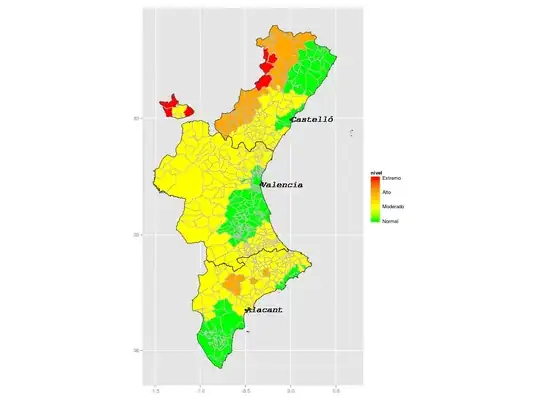
Now I would like to create 30 polygons/lines from data at info-onades.csv to overlay on this map.
Working code, with help from @jbaums
# Loading libraries
library("rgdal")
library("maptools")
library("ggplot2")
library("plyr")
library("stringr")
library("mapproj")
library("gpclib")
library("raster")
library("rgeos")

gpclibPermit()

# Read info on municipalities and area codes
info=read.csv("info-onades.csv",header=F,sep=",",col.names=c("zona","codigoine","mean_lon","mean_lat","nombre"),colClasses=c("numeric","character","numeric","numeric","character"))

# Subset municipal polygons to selected provinces (province codes 46, 12 and 3)
muni <- subset(readOGR('.', 'poligonos_municipio_etrs89', encoding='UTF-8'), PROVINCIA %in% c('46', '12', '3'))

# fortify and merge: muni.df is used later in ggplot
muni@data$id <- rownames(muni@data)
muni.df <- fortify(muni)
muni.df <- join(muni.df, muni@data, by="id")

# Create muni_area to aggregate municipalities in 30 areas (aggregate by column "zona")
# merge by codigoine to add zona column to muni.new and then aggregate by zona in muni_area
muni.new <- merge(muni, info, by.x='CODIGOINE', by.y='codigoine',all.x=TRUE, all.y=FALSE)
muni_area <- raster::aggregate(muni.new,'zona')

# Fortify and merge to create the data frame ggplot will overlay on the base map
muni_area@data$id <- rownames(muni_area@data)
muni_area.df <- fortify(muni_area)
muni_area.df <- join(muni_area.df, muni_area@data, by="id")

# read and fortify province
prov = readOGR(dsn=".", layer="poligonos_provincia_etrs89")
pr=subset(prov, prov$CODINE == "46" | prov$CODINE == "12" | prov$CODINE == "03" )
pr@data$id = rownames(pr@data)
pr.points = fortify(pr, region="id")
pr.df = join(pr.points, pr@data, by="id")

# Loop for plotting three maps

for (k in 1:3) {

  # Daily data file name
  name.dat=paste("niveles-dia",k,".csv",sep="")
  fdat<-c(name.dat)

  # Read temperature level data
  temp.data <- read.csv(fdat, header=F, sep=" ",col.names=c("codigo","nivel"), na.string="NA", dec=".", strip.white=TRUE)
  temp.data$codigo <- str_pad(temp.data$codigo, width = 5, side = 'left', pad = '0')

  # merge temperature and muni data. muni2.df will be used by ggplot
  muni2.df <- merge(muni.df, temp.data, by.x="CODIGOINE", by.y="codigo", all.x=T, a..ly=F)

  # Daily map file output name
  name.png=paste("CV-map-",k,".png",sep="") # Nom del fitxer per día
  fpng<-c(name.png)

  png(fpng, width = 1024, height = 768, units = 'px') # Start png output

  # Mapping municipalities by level (nivel)
  ggp <- ggplot(data=muni2.df, aes(x=long, y=lat, group=group))
  ggp <- ggp + geom_polygon(aes(fill=nivel))         # draw polygons
  ggp <- ggp + geom_path(color="grey", linestyle=2)  # draw boundaries
  ggp <- ggp + coord_equal() + xlab(" ") + ylab(" ")
  ggp <- ggp + scale_fill_gradientn(colours=c("green","yellow","orange","red"),na.value = "transparent",
                                    breaks=c(0,1,2,3),labels=c("Normal","Moderado","Alto","Extremo"),
                                    limits=c(0,3))
  ggp <- ggp + coord_map("lagrange")

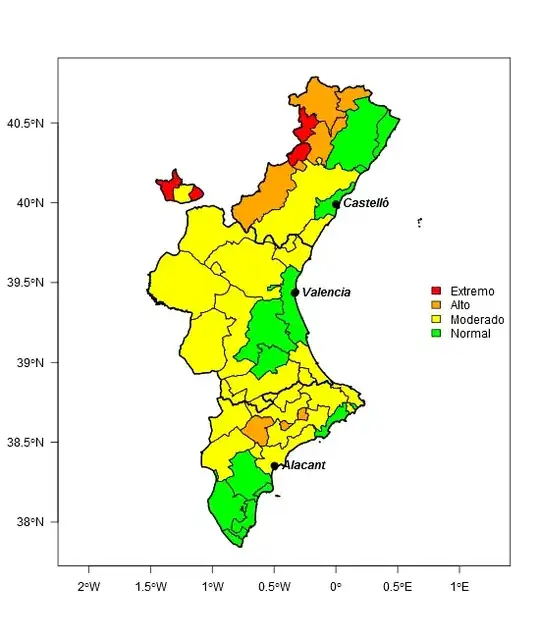
  # Overlay 30 areas
  ggp <- ggp + geom_path(data=muni_area.df, aes(x=long, y=lat, group=group),color="blue", size=0.3)
  # Overlay provinces
  ggp <- ggp + geom_path(data=pr.df, aes(x=long, y=lat, group=group),color="black", size=0.5)

  # Render the map
  print(ggp)
  dev.off() # close plot and save to disk

  remove('fdat','fpng','muni2.df') # clear variables for each map

}
And the final map (removed names of main cities in the prior map)




Error en[.data.frame(y, , by.y, drop = FALSE) : undefined columns selectedbut theby.y='codigoine'is a valid column. – pacomet Jan 29 '15 at 08:17info$codigowith leading zeroes withinfo$codigo <- sprintf('%05d', info$codigo)and thenmerge(muni, info[, c('area', 'codigo')], by.x='CODIGOINE', by.y='codigo'). However, there are two records for code 12004 ininfo(seesubset(info, codigo==12004)). You'll have to remove one of these first. – jbaums Jan 29 '15 at 09:32