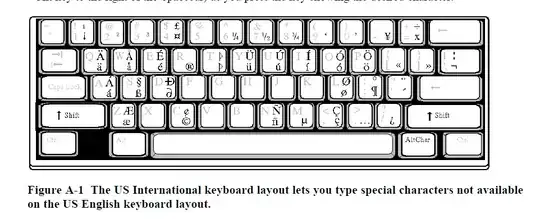
With a QWERTY keyboard I strongly suggest the International Keyboard.
The US International keyboard layout is a variation of the standard US
keyboard layout that lets you type all common characters used in
Catalan, Danish, Dutch, English, Finnish, French, German, Italian,
Norwegian, Portuguese, Spanish, and Swedish. Some of these characters
are typed by holding down a special AltChar key, while others are
typed by pressing a sequence of keys. This keyboard is based on the
QWERTY keyboard layout that is commonly used in the United States.
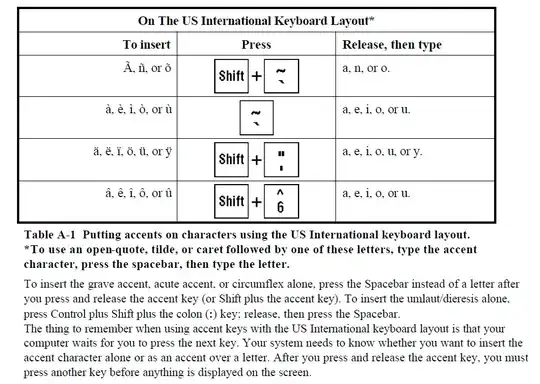
To insert the grave accent, acute accent, or circumflex alone, press
the Spacebar instead of a letter after you press and release the
accent key (or Shift plus the accent key). To insert the
umlaut/dieresis alone, press Control plus Shift plus the colon (:)
key; release, then press the Spacebar. The thing to remember when
using accent keys with the US International keyboard layout is that
your computer waits for you to press the next key. Your system needs
to know whether you want to insert the accent character alone or as an
accent over a letter. After you press and release the accent key, you
must press another key before anything is displayed on the screen.
To answer your question, read the following passage.
Reference: https://www.csbsju.edu/Documents/MCL/resource/use-int-keyboard.pdf
Everything is thoroughly explained in the following link for Windows users:
http://sites.psu.edu/symbolcodes/windows/codeint/.
For Ubuntu users see: https://www.wikihow.com/Change-Keyboard-Layout-in-Ubuntu.
For Mac users see: https://support.apple.com/kb/PH25643?locale=en_US.
See also Can I drop French accents when writing computer text in French?
and the answers therein.


'thenspace? – Toto Jan 04 '23 at 15:18