9

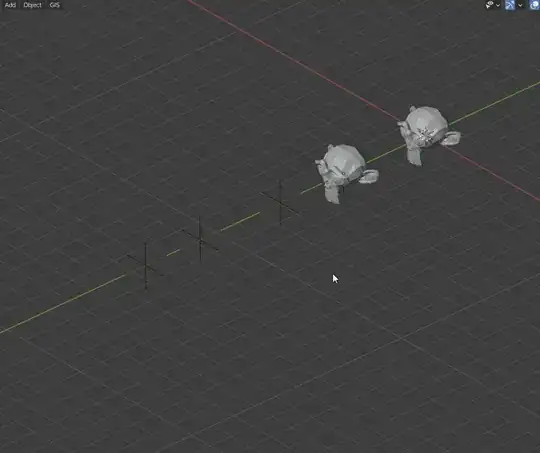
I have a mesh and some empties with unequal distances between them and I want to repeat this mesh and place it where those empties are.

I know that if the distances were equal, I could use an array modifier and object offset. How can I do this for multiple empties with unequal distances?

enter image description here

Timaroberts
  • 12,395
  • 6
  • 39
  • 73
Simos Sigma
  • 413
  • 3
  • 11

1 Answers1

21

Collection Instances

First put your object(s) into their own collection.

Select all your Empties. Go to the Object Properties, expand the Instancing panel.

Now it is important you keep ALT pressed until the end. This will propagate the modifications to all selected objects.

Click on Collection while still maintaining ALT and choose the collection you want to instance.

If you want "real" meshes afterwards, you can use CTRL + A > Make Instances Real or Object > Apply > Make Instances real.

enter image description here

Troubleshooting :

If you don't see any change after these steps:

  • Make sure the empties are not in the collection you are trying to instantiate
  • The Instanced Collection's origin might be different from what you'd expect. You can tweak it by following these steps.
  • ALT + Click doesn't work because you are emulating a 3 button mouse :

Add a collection instance only for one empty. Select all the other empties too and make sure the instance collection is "active" (yellow outline). Then go to Object > Make Links > Instance Collection or use shortcut CTRL + L.
enter image description here

Gorgious
  • 30,723
  • 2
  • 44
  • 101
  • 1
    Wow. Gaping hole in my understanding of Collection Instances. I had no idea you could do it this way round. This will save so much time. – Robin Betts Feb 08 '21 at 19:02
  • 2
    Yup, Adding a collection instance is just a shortcut to manually adding an empty, and then repeating these steps :) mind = blown :D – Gorgious Feb 08 '21 at 19:04
  • 1
    .. and you can follow up with Ctrl-A > Make Instances Real, if you want to. – Robin Betts Feb 08 '21 at 19:17
  • Wow... That was really good!!! But I have an "issue". If I try it to an empty project, with just a cube, it "works". In my project doesn't!!! Instead of repeat the object, repeats only an empty collection!!! Any idea why is this happening? Please take a look here ( https://drive.google.com/drive/folders/1Tfv2zMmZ4zab9XhnQiucUidkDA_J4srm?usp=sharing ). – Simos Sigma Feb 09 '21 at 09:42
  • Make sure your empties are outside of the collection you are trying to instance :) The limitation prevents an infinite loop of instancing – Gorgious Feb 09 '21 at 10:05
  • I have already tried that and I still have the same issue!!! :( Is there any case to have to do with any kind of settings etc? – Simos Sigma Feb 09 '21 at 10:11
  • Maybe share your blend so I can take a look ? https://pasteall.org/blend/ – Gorgious Feb 09 '21 at 10:15
  • Of course, here it is ( https://pasteall.org/blend/16931f10bcc345b2a736e63ac5cfd5e8 ). – Simos Sigma Feb 09 '21 at 10:21
  • @Gorgious I think I found it... Mesh should be placed at the center of world and mine wasn't!!! Or should not? – Simos Sigma Feb 09 '21 at 11:02
  • 2
    You identified the problem :) You have two solutions. Either model at world origin or you can offset the collection origin. See my other post on the subject https://blender.stackexchange.com/questions/137523/how-to-change-the-origin-when-moving-a-collection-instance – Gorgious Feb 09 '21 at 11:04
  • Thank you very much!!! :) – Simos Sigma Feb 09 '21 at 11:08
  • @Gorgious "Now it is important you keep ALT pressed until the end." It seems that this not work if you have activated "Emulate 3 Button Mouse" in preferences because then it only zooms in/out editor while pressing alt. How this ALT pressing should works if I have that "emulate 3 mouse button" settings activated? – Sakari Niittymaa Feb 10 '21 at 09:01
  • 2
    @SakariNiittymaa Added solution to the answer – Gorgious Feb 10 '21 at 15:01