37

I used to modify /etc/lightdm/lightdm.conf, adding the line greeter-show-manual-login=true, in order to allow login for hidden users and root.

Now I've just installed the new Ubuntu 14.04 and the file lightdm.conf is no longer located in /etc/lightdm. It's in /etc/init and has been totally modified.

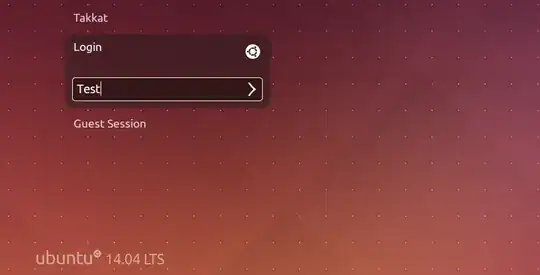
How can I force lightdm login screen to show a field to input a login name?

Danatela
  • 13,243
  • 11
  • 45
  • 72
Bob
  • 871

4 Answers4

30

Ok I finally found the solution, very simple. The file to edit is now located in /usr/share/lightdm/lightdm.conf.d, and is called: 50-ubuntu.conf.

I just added the line:

greeter-show-manual-login=true

and on next reboot I was able to input any user name on the login screen.

enter image description here

Takkat
  • 142,284
Bob
  • 871
10

I also had the same issue with Ubuntu 14.04 installation. But I resolved the problem by following this site.

The solution is to create a file lightdm.conf inside /etc/lightdm/ and put the following contents in it:

[SeatDefaults]
greeter-show-manual-login=true

After a system reboot, I was able to login with other users.

acharyagtm
  • 101
  • 3
  • On the Ubuntu 14.04 64bit the configuration file changed to /usr/share/lightdm/lightdm.conf.d/50-ubuntu.conf But on 32bit is same as before – user3597121 Aug 21 '14 at 15:30
0

Also you should do following step:

update /etc/pam.d/common-session and change the line:

session sufficient pam_lsass.so

to:

session [success=ok default=ignore] pam_lsass.s

After a reboot, my path was ok, and everything seems to be working as normal again.

See the bug report

guntbert
  • 13,134
0

In addition to the greeter-show-manual-login=true option, one could use greeter-hide-users=true. Personally that's that I have in my /etc/lightdm/lightdm.conf : the manual login option is commented out, with only hide users option left.

Sergiy Kolodyazhnyy
  • 105,154
  • 20
  • 279
  • 497
  • If I understand you correctly, this option only allows login as a guest user. – gone Jul 15 '18 at 18:58
  • @gone no, login is allowed for all users, not just guest. You just have to type username, instead of choosing from a list in the greeter – Sergiy Kolodyazhnyy Jul 15 '18 at 19:15
  • Not on my install. There is no where to type a username. There's just a label with Guest Session and the button Log In >, and if you click or press enter, the guest user logs in. Using the up/down arrows does not help either. Switching users after logging in as guest also doesn't work. – gone Jul 18 '18 at 15:45
  • @gone And what version of Ubuntu you're using ? – Sergiy Kolodyazhnyy Jul 18 '18 at 15:48
  • U14.04.3 LTS in a VirtualBox VM on a Macbook Pro with MacOS. – gone Jul 20 '18 at 13:28