49

I am trying to plot with gnuplot on my Mac (OS X 10.8.5). I have installed X11 and XQuartz 2.7.4 and after that I installed gnuplot, but unfortunately gnuplot couldn't plot.

Simple plots like the following fail to render and have no error message to help understand what is amiss:

 [1/10/13 $gnuplot >plot sin(x)
bmike
  • 235,889
Soheil
  • 591

6 Answers6

50

The same thing happened to me, but then I ran

brew uninstall gnuplot; brew install gnuplot --with-x11

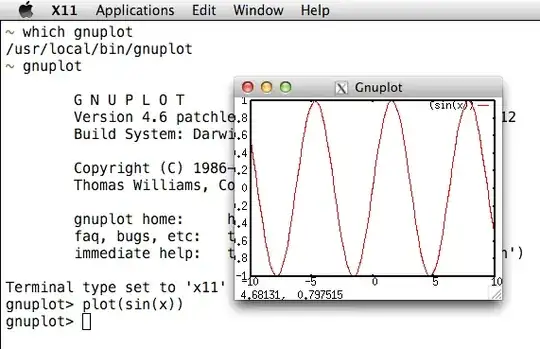
and installed XQuartz. Now gnuplot supports the x11 terminal:

You can also save the output to a file and use qlmanage -p:

gnuplot -e 'set term png; set output "/tmp/plot.png"; plot sin(x)'; qlmanage -p /tmp/plot.png

qlmanage -p shows a sandboxing error in 10.9 and prints some unnecessary text to STDOUT, so I use a function like ql() { qlmanage -p "$@"&>/dev/null; } in shells.

A third option is to use set term dumb for plain text output.

nohillside
  • 100,768
Lri
  • 105,117
  • 1
    Maybe I'm slow today, but I spent a good 15 minutes in the gnuplot docs looking for a simple example like this .. or maybe the docs make some assumptions about the audience and I'm not one of them :) – Jared Beck Oct 23 '14 at 02:17
  • 6
    xQuartz is heavy and somehow homebrew doesn't package it. I went with --qt option instead bew install gnuplot --qt and it works fine now. – Bibek Shrestha Oct 28 '14 at 23:09
  • 3
    Option name has changed to --with-x11 but I cannot make an edit of only two characters. – mgd Dec 08 '14 at 09:22
  • 1
    Note that sometimes you need to log out and log back in after installing XQuartz. (don't know why, but it didn't set the $DISPLAY variable correctly until I logged out) Also, very useful to install XQuartz is http://caskroom.io/: brew cask install xquartz – caesarsol Apr 15 '15 at 10:01
  • doesn't work for OS X Yosemite – Mateusz Piotrowski Sep 21 '15 at 14:26
  • Just so it's clear. You don't need the --with-x11 flag if you want to output to a png (or at least I didn't). – Gerry Jun 14 '16 at 09:26
  • does not work on OS X El Capitan – Steven C. Howell Sep 21 '16 at 15:12
  • Instead of lettings thousands of users install a half-broken version of gnuplot, with many dependencies but many terminals missing, why aren't there binaries available? – Eric Duminil Oct 16 '21 at 09:46
24

In OS X Yosemite 10.10.2 and El Capitan 10.11.2, the Gnuplot does not package with XQuartz. Answer in bibstha's comment. Much more robust window manager is in qt and it works

 brew uninstall gnuplot
 brew install gnuplot --with-qt

Note that using --qt is deprecated now.

5

Are you running this from a Terminal window, or an X11 window? The terminal will launch X11 separately to show the plot, so it may not be immediate (or visible). Does X11 get launched at all when you type your plot command?

If you try it in an X11 window, the result should be more immediate.

Also, if you used macports to install it originally, I would recommend using homebrew instead:

brew install gnuplot

EDIT: To check where the output is going, you could direct your results to a file:

set terminal png
set output 'testimage.png'
plot sin(x)
exit

Then see if a file called testimage.png contains your plot. You could also try specifying the terminal with:

set terminal x11
beroe
  • 3,331
  • 5
  • 26
  • 41
  • Yes, you are right and the last > is not part of my command. Moreover, I am running from a both Terminal window and X11 window separately, but none of them could plot. – Soheil Sep 30 '13 at 18:56
  • Then I would try reinstalling with brew. It is hard to diagnose without knowing more about your installation. – beroe Sep 30 '13 at 19:02
  • (Updated answer with another thing to test...) – beroe Sep 30 '13 at 19:08
  • Why does replacing macports by brew make a difference they both work - both much better than doing on your own – mmmmmm Sep 30 '13 at 19:31
  • In my experience I have problems with libraries and dependencies when I use macports, so have stopped doing so... – beroe Sep 30 '13 at 21:05
1

In Yosemite, Initially, I had quartz and gunplot 5.0.0 installed. However, I could not load my x11 window (everything else was file-X11 was somehow unknown). Here is a workaround that 'worked for me'.

Go to the gunplot source folder

make clean; 
make uninstall

then in the "configure" file under the following lines

# Standard set of common directories for X headers.

# Check X11 before X11Rn because it is often a symlink to the current release.

---added the location of my X11 files also  
/opt/X11/include

now run

./configure
make
sudo make install

worked perfectly for me as you see below

G N U P L O T
Version 5.0 patchlevel 0    last modified 2015-01-01 

Copyright (C) 1986-1993, 1998, 2004, 2007-2015
Thomas Williams, Colin Kelley and many others

gnuplot home:     http://www.gnuplot.info
faq, bugs, etc:   type "help FAQ"
immediate help:   type "help"  (plot window: hit 'h')

Terminal type set to 'x11'.

Jens Erat
  • 2,026
0

Thanks. After downloading gunplot 5.0 and installing under Yosemite 10.10.2, gnuplot couldn't "load" the x11 terminal. After pointing the configure file to /opt/X11/include (reconfiguring, remaking, and reinstalling) every worked fine. (I was surprised, too, that X11 is in /opt/X11.)

0

Most of the advice here shows how to install/reinstall GNUPlot via brew. If you have an installation of GNUPlot and are unsure what terminal its using you can determine this like so:

$ gnuplot <<<'show terminal'

   terminal type is qt 0 font "Sans,9"

At which point we now know we're using the qt terminal type. With thin information now in hand you can decide on which course of action to take, either following one of the other answers to re-install GNUPlot via brew or configuring your existing terminal in whatever way you want via the set terminal .... . command.

slm
  • 4,798