3

I have many pages with lots of text in it. But I will always have two sections of text and I want to prevent one section from appearing in search results, the other section must be indexed.

<p class="please-index-me">text</p>

<p class="get-out">never index me please</p>

I thought that maybe if I load the "please don't index me text" with JavaScript maybe search engines wouldn't look for it. But I am not sure it would work and this is not really nice.

I was wondering if there is a way to tell search engines "hey, this text you can't grab, move on". So, is there a way to do it?

Zistoloen
  • 10,036
  • 6
  • 35
  • 59
BrunoLM
  • 355
  • 1
  • 2
  • 8

3 Answers3

5

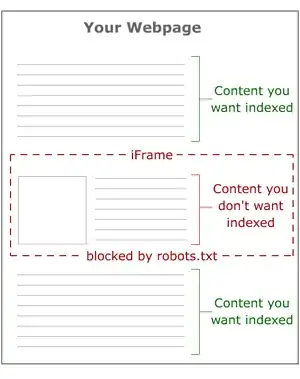
One way I found here, is using an <iframe> and blocking the URL in robots.txt.

block text section

Zistoloen
  • 10,036
  • 6
  • 35
  • 59
BrunoLM
  • 355
  • 1
  • 2
  • 8
0

It may depend on what type of search results, and I think it also depends on the search engine.

From what I can tell, the techniques outlined here only work for the 'Google Custom Search' tool (results within the site, not results on Google).

Also, I can't recall exactly how but I think Yahoo has a method that let's you apply a class to an element (i.e. something like <p class="yahoo-no-index">) to have it excluded from crawling.

I doubt that's exactly what you are looking for but perhaps it'll be helpful.

adam-asdf
  • 2,077
  • 12
  • 16
0

One thing that may be possible is to keep the section you do not want indexing in a collapsed <div>. You can then use some button to trigger a JavaScript/jQuery event and inject the content into the <div>.

$(".get-out").html("Enter the content you do not want indexing here.");

As long as the visibilty is invoked by a user action (i.e. clicking a button) this will not be considered as cloaking.

You may also be able to use a modal box like Facebox. I'm really not sure if this will fit in with your format but it will solve the indexing problem.

QFDev
  • 385
  • 2
  • 8