58

What real-time log analyzer can you suggest for Apache access and error logs?

There is a list of web analytics software on WikiPedia, but it would be great to hear opinions from people with experience without having to try all of them.

Please don't suggest Google Analytics or any other hosted/JavaScript analytics suites, already using them, GA is not real-time and it is missing some data that the logs show. For example 404 errors, script errors, the full query-string of the referral, IP addresses, visitor path through the website, etc ...

Simon Hayter
  • 32,999
  • 7
  • 59
  • 119
Evgeny Zislis
  • 1,412
  • 1
  • 15
  • 26
  • 8
    can this be turned into community-wiki? – Evgeny Zislis Nov 02 '10 at 16:07
  • Real time log analysis is waay different than real time JS-based tracking. The former is difficult to implement and doesn't scale across multiple instances, and the latter is what Google Analytics uses.

    If you're looking for a solid Apache logs analyzer, check out Angelfish. http://analytics.angelfishstats.com/

    – Andrew C Mar 25 '16 at 19:02
  • 4
    I disagree with the policy of banning all opinion based questions. In many cases an opinion is valuable information, especially if the writer has used more than one product. Rather than ban them, opinion based questions should be flagged as such, and answers held to a different standard. – Sherwood Botsford Nov 25 '16 at 14:19

7 Answers7

61

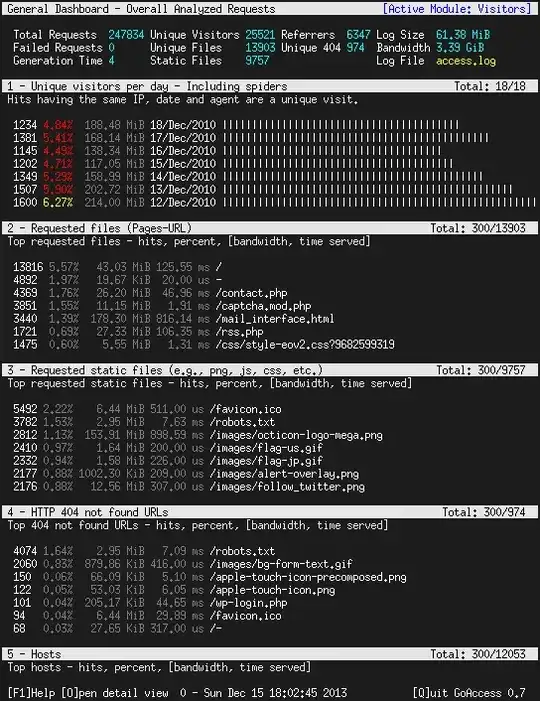
GoAccess is a free text/curses based log analyzer similar to "top".

GoAccess main scrollable dashboard

Evgeny Zislis
  • 1,412
  • 1
  • 15
  • 26
13

AWStats is a good open source solution.

Also see http://www.awstats.org and https://github.com/eldy/awstats

Jay Taylor
  • 101
  • 2
Jeremy
  • 1,065
  • 9
  • 13
  • doesn't support nginx – Jürgen Paul Aug 20 '12 at 03:07
  • 3
    AWStats supports Apache log format, and nginx can easily output in Apache log format, so... it does support nginx indirectly. – Tim Tisdall May 13 '15 at 13:58
  • Tried this. It can tell you what pages were viewed, and it can tell you who visited and when, and if you need to find out which visitor or IP has been methodically working through your site loading page after page as if they're looking for a vulnerability... go fish, because Awstats won't tell you, near as I can figure out. Or, someone's been repeatedly visiting my site from Google.hk search results, want to know who or what they searched? Tough luck. Blech. – John Smith Dec 04 '23 at 06:11
11

Matomo (former Piwik) is a good choice (better than awstats, in my opinion)

so_mv
  • 101
  • 1
  • 2
  • 1
    This is the right link for "Log Analyzer" feature of Piwik: http://piwik.org/log-analytics/ – NickT Feb 05 '13 at 08:28
  • Note: piwik requires that a javascript pixel be added to all your pages. – Jay Taylor Feb 26 '18 at 02:31
  • 2
    Not necessarily Jay, you can also make Piwik/Matomo crawl your logs. The official manual to do this can be found at https://matomo.org/docs/log-analytics-tool-how-to/ – Pete Aug 24 '18 at 08:57
5

This might seem like a bit of overkill, but Splunk offers web log analyzing and much, much more.

scunliffe
  • 449
  • 2
  • 6
4

I was using Urchin before I switched to Google Analyics. The Urchin Project no longer exists.

Simon Hayter
  • 32,999
  • 7
  • 59
  • 119
FrankJK
  • 304
  • 1
  • 3
2

If you're looking for an offline analyzer, I quite like Sawmill:

https://www.sawmill.co.uk

It analyses all sorts of logs, including apache. Has a free trial period.

1

ChartBeat a very interesting service, it is actually much more than log analyst - more like a view of the buzz your blog creates, in real-time. Another tool that shows real-time Apache log streams I found, called A Live Log.

Simon Hayter
  • 32,999
  • 7
  • 59
  • 119
Evgeny Zislis
  • 1,412
  • 1
  • 15
  • 26