7

I have been working on a website which uses #! (2minutecv.com), but even after 6 weeks of the site up and running and conforming to the Google hash bang guidelines, you can still see that Google still hasn't indexed the site yet. For example if you use Google to search for 2MinuteCV.com benefits it does not find this page which is referenced from the homepage.

Can anyone tell me why Google isn't indexing this website?

Update:

Thanks for all the help with this answer. So just to make sure I understand what is wrong. According to the answers Google never actually indexes the pages after the Javascript has run. I need to create a "shadow site" which google indexes (which google calls HTNL snapshots). If I am right in thinking this then I can pick a winner for the bounty.

Update 2:

Since this was posted we have now switched to having static HTML files on our server. This is simple, fast, and gets indexed properly by Google.

corn on the cob
  • 207
  • 3
  • 15
yazz.com
  • 85
  • 1
  • 8
  • 2
    On a side note you might want to look at the W3C validation errors - http://validator.w3.org/check?uri=http://www.2minutecv.com/#!/en_us/home&charset=%28detect%20automatically%29&doctype=Inline&group=0 – Vince P Aug 01 '12 at 15:08
  • 1
    The question is – why aren’t you simply using a normal URI? It doesn’t seem to make sense here that you don’t. – Konrad Rudolph Aug 07 '12 at 13:01
  • #! is not a normal URI or else Google wouldn't need a special indexer for it! Have you set up sitemap.xml correctly according to the #! documentation? Have you tried the Fetch as Google tool (in webmaster tools) to help debug the issue? – Olly Hodgson Aug 08 '12 at 11:36
  • Also, off-topic for this question, but consider making use of the JS history API (where available). You've broken the back/forward buttons. https://developer.mozilla.org/en-US/docs/DOM/Manipulating_the_browser_history – Olly Hodgson Aug 08 '12 at 11:41

6 Answers6

10

The main reason for your pages not being indexed is because there are no html links. You're providing javascript links to the other pages and while the #! denotes that it should be a different page - you're not upholding your end of Google's javascript crawling agreement:

An agreement between crawler and server

In order to make your AJAX application crawlable, your site needs to abide by a new agreement. This agreement rests on the following:

The site adopts the AJAX crawling scheme. For each URL that has dymanically produced content, your server provides an HTML snapshot, which is the content a user (with a browser) sees. Often, such URLs will be AJAX URLs, that is, URLs containing a hash fragment, for example www.example.com/index.html#key=value, where #key=value is the hash fragment. An HTML snapshot is all the content that appears on the page after the JavaScript has been executed. The search engine indexes the HTML snapshot and serves your original AJAX URLs in search results.

(quote from developers.google.com on 17th febr 2012)

Since you do not provide a html fallback by which the crawler can determine what is static vs what is javascript it most likely will refuse to crawl its content.

Secondly, since the non #! urls all point to some 'youcaneat.at' page which bares no resembles, Google's bot is most likely to assume its a 'spam' attack, which will definitely not improve your chances of getting your javascript indexed.


Rule of thumb to keep in mind: stay with html when you can because Google promises you, that it might index javascript, at best.

Jochem.

jbokkers
  • 266
  • 2
  • 5
  • +1 this answer. And just to be clear the OP understands that what jbokkers is saying is that you need to make the non shebang links, the regular html version, also work for example http://www.2minutecv.com/en_us/how_it_works needs to work and show content and not some completely different web site. Hope that clears it up. – Anthony Hatzopoulos Aug 08 '12 at 00:08
  • We do not use # as you described in your answer, we use #! which is what google specifically uses for Ajax indexing – yazz.com Aug 08 '12 at 06:58
  • Frankly it doesn't matter, your still not following Google's AJAX app guide. Check out step 2. Suppose you would like to get www.example.com/index.html#!key=value indexed. Your part of the agreement is to provide the crawler with an HTML snapshot of this URL – Anthony Hatzopoulos Aug 08 '12 at 13:57
5

Do you have any other sites pointing to it? Ironically the fact you've added a link to it from this site will ensure it does get indexed (not 100% but I would put money on)

Any way, it is indexed:

Google Link

Also, your code is poor... You have this code (as an example - this is copied from your site):

<img src="/images/arrow_to_login2.png" style="z-index: 3; top:292px; left: 315px; position:absolute;"></img>

There is no closing img tag, it is self closing... This is just one example, if your site is not coded well, then Google may struggle or fail, or index it only in part. I strongly suggest you put your website name into the W3C Markup Validation and correct it. This will help.

Dave
  • 1,142
  • 6
  • 13
  • Thanks. I am trying to understand the answer. I clicked on the google link you provided. Where can I find the link to the benefits page http://www.2minutecv.com/#!/en_us/benefits page there, or am I looking in the wrong place? – yazz.com Aug 02 '12 at 11:43
  • 1
    No, my point is one of your pages IS indexed. This suggests Google knows you exist. The reason why no other pages are not indexed could be varied - however, starting by correcting the code is a good place to start. – Dave Aug 03 '12 at 12:13
  • That is incorrect, as google knows that the HTML version of my home page is there, but they do NOT index the Ajax version of it. Google recently came out with Ajax indexing where they wait for the Ajax of the page to load "before" they index it. – yazz.com Aug 03 '12 at 12:25
5

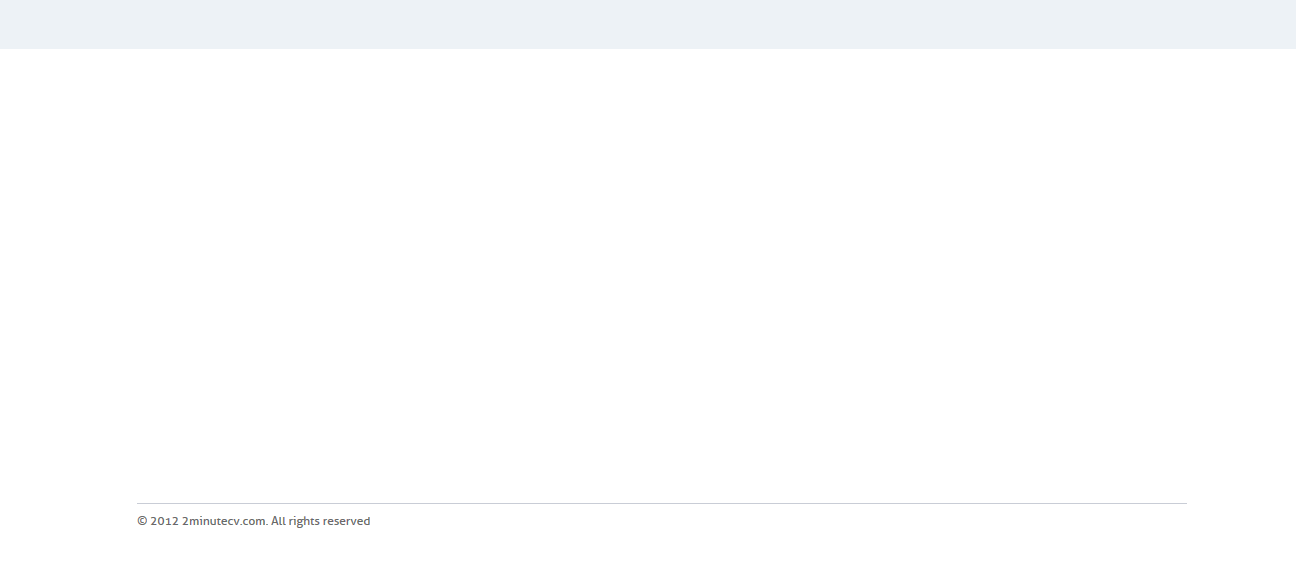
The reason google is not following your Shebang (#!) links is because when the page loads initially they do not exist and they are no where to be found in the source code. In other words with javascript disabled you do not have a single <a> anchor tag in your html source of your page. The only thing that will be indexed is a blank page with copyright. Home, Benefits, How it works, and FAQ links get loaded via javascript. Disable javascript and you get this (which is what google gets):

nothing but a copyright and no links

Google will not index what it cannot crawl. Neither will other search engines. Google can run javascript but don't bank on it being used for crawling content (yet). It will parse some javascript and ajax links. In your case your page source has none.

So you need to add static tags on your page linking to these #! pages AND it wouldn't hurt if you added a sitemap.xml. Which by the way is strangely pointing to another 'youcaneat.at' website all together. http://www.2minutecv.com/sitemap.xml

And if you can avoid it, stop asynchronously loading everything after page load. Your site is not fancy enough to need ajax and there is no real benefit in your case to employ the tactic.

Anthony Hatzopoulos
  • 1,378
  • 10
  • 18
  • Ok, so are you saying that the google AJAX crawling scheme we are using which is documentated is not implemented yet? https://developers.google.com/webmasters/ajax-crawling/docs/getting-started?hl=nl – yazz.com Aug 08 '12 at 06:55
  • 1
  • You have nothing on the page, view source, NO LINKS = NO CRAWL. You need some links for google to crawl, just cause you ajax in everything later is worthless. 2) your non #! links do not work normally and they need to return content. Example http://www.2minutecv.com/en_us/how_it_works needs to return the same small piece of content that http://www.2minutecv.com/!#/en_us/how_it_works does 3) you have not read that developers.google.com document properly and are not following the guidelines. Read it, understand it, look at what jbokkers told you also.
  • – Anthony Hatzopoulos Aug 08 '12 at 13:49