How can I reliably test my site on all old versions of Internet Explorer ranging from IE6 all the way up to version IE11?
Asked
Active
Viewed 2.5e+01k times


15 Answers
88
Hitting F12 on IE8 it should start the Developer Tools that allows you to emulate IE7 (not IE6) using the Browser Mode.
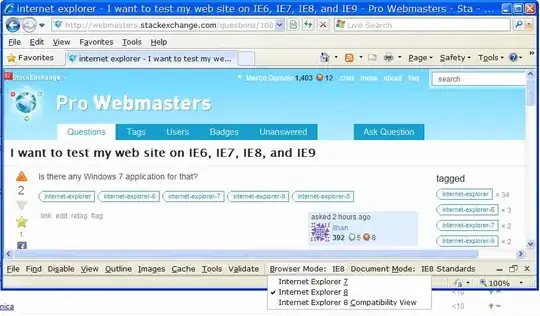
I suppose on IE9 you will be able to emulate back at least until IE7, but I'm only supposing because now it irritates me the simple idea to have to buy W7 in order to test this.
UPDATE: as specified by Jeff Atwood: IE9 emulates back until IE7 too.
UPDATE 2: as suggested by Nick in comments below, if you want to be 100% sure to emulate the old IE browsers you can use VMs provided by Browserling (just the first one I found on Google) (incredibly they are also provided for free). As a side note, keep in mind that testing on VMs is more time consuming than using IE Developer Tools, IMHO VMs testing might be worth when testing something that's JS/CSS greedy like a web app or a complex website, not for simple sites that use jQuery and some CSS.

Marco Demaio
- 6,490
- 5
- 33
- 41
-
3+1 - What perfect timing! An hour of my time was lost forever as I searched the entire company for someone still stuck in 2007 using IE7. Then it took a good 30 minutes to get a screen share with her so we could verify she was actually using IE7 and not IE8. Now, instead of installing Windows XP and IE7 on a VMWare image to fix my bug, I'll use your seemingly obvious, simplistic solution that has for so long seemed to escape my vision ;) How could I have missed this? Thank you!! – jmort253 Mar 19 '11 at 02:53
-
4indeed, confirmed: IE9 lets you emulate IE7, IE8, IE9 and IE9 compatibility mode. – Jeff Atwood Mar 22 '11 at 12:45
-
2Is the emulation exactly the same, or could there be some small differences. – Saif Bechan Nov 20 '11 at 02:26
-
1@Saif Bechan: there could be certaintly differencies considering the thousands of updates released continuosily by Microsoft for both their browsers and their Operative Systems. But think at the other possibilities to test IE: you would have to install 3 VM with Windows, one for IE7, one or IE8, and one for IE9. But also those testing environments might still be different from the final users environments that probably have installed (or have not installed) some Windows/IE/Office updates that you have not installed. – Marco Demaio Dec 22 '11 at 18:18
-
@MarcoDemaio I had been using this option for quite some time, and I have to say, the differences between this and using a VM are HUGE! I have no idea where this option is for but it does not emulate anything. There could still be small changes when using an vm, but I think you get 99.9% close. For proper crossbrowser webdevelopment you can not rely on these tools, you need a VM, or use online testers like browserlab. In all my project, using IE9 with compatibility mode was just useless. – Saif Bechan Dec 22 '11 at 19:31
-
@Saif Bechan: don't know about compatibility mode, my sites use always standard mode (they don't swicth to compatibility mode) and the Tester tool seemed quite reliable until IE8, I admit I still did not try IE9. Anyway thanks for your comment, I will definitely give a try to VPC images suggested by Craige http://webmasters.stackexchange.com/a/10879/1429 – Marco Demaio Dec 29 '11 at 18:17
-
@MarcoDemaio I would say give it a try. It could also be the way I develop my websites. Most of the problems come with absolute posisioned elements and z-indexes, overflows, that kind of stuff. If I use ie9 in ie7 mode everything looks great. Then when I power up my winxp VM's the problems start. It's a totally different world in there, up is down, left is right. Try it, and share what the results are. Maybe if you have really consistent skills it all looks the same. I can only speak for myself. – Saif Bechan Dec 29 '11 at 18:36
-
3@MarcoDemaio There are definitely differences between IE 9's IE 7 mode and the real IE 7. I gave two examples here. – Nick Jul 10 '12 at 16:52
-
@Nick: +1, but the two examples you provided did not convince me it's worth the effort to install 3 VMs (that will become 4 when IE10 comes out) and to test every time running 3/4 VMs. Anyway the link you provided to download VM from MS site is an excellent link. I updated the answer. – Marco Demaio Jul 13 '12 at 17:25
-
@MarcoDemaio Thanks. I agree with what you wrote in your update. Another time when it would be a good idea to test in the VMs is if your analytics tell you that a significant number of your users are using older versions of Internet Explorer. In that case, even if the site wasn't JS/CSS greedy, I probably wouldn't take the risk trusting IE 9 to emulate it 100% accurately. – Nick Jul 17 '12 at 16:06
-
In addition to @Nick's point, I've also run into a couple of more significant JavaScript compatibility issues - in one case, code which worked on IE7 failed even in IE7 compatibility mode because the original code had a bug which IE didn't used to catch. The bottom line is that there's no substitute for testing the real target OS and browser version. – Chris Adams Jul 17 '12 at 19:41
-
@ChrisAdams: i would say the bottom line is that there's no way of testing for IE in all its webkilling flavours. :-) – Marco Demaio Jul 25 '12 at 17:49
-
Painfully true but a stable of VMs is probably the sweet spot for testing vs. expense, particularly as Microsoft is finally being less neglectful in pushing the IE community forward. – Chris Adams Jul 25 '12 at 19:49
-
@MarcoDemaio This is a great guide/tutorial if you're setting up virtualpc for multiple IE testing and doing it on your own instead of downloading prepared vhd. It's also important to note that Microsoft will eventually expire the keys for those. http://ieblog.members.winisp.net/images/InstallingXPMode.htm – Anthony Hatzopoulos Jul 28 '12 at 02:54
-
1Your link to the VMs provided by Microsoft is now a 404 Not Found error page. – Quentin Mar 11 '23 at 08:01
-
@Quentin updated thanks. I'm flabbergasted to see someone still interested in testing IE browsers in 2024 – Marco Demaio Jan 17 '24 at 10:13
24
IE Tester It does IE6, 7, 8 & 9

John Conde
- 86,255
- 27
- 146
- 241
-
2Except for some limitations that already make think it's not a reliable tester: 1. The Previous/Next buttons are not working properly; 2. Focus is not working properly; 3. windows.open does not return the newly created window but null. – Marco Demaio Mar 18 '11 at 17:38
-
1
-
2they are written here as well know issue: http://www.my-debugbar.com/wiki/IETester/HomePage – Marco Demaio Mar 18 '11 at 17:46
-
1@marco, I must be running an older version before those bugs were introduced. Lucky me. :) Still, the browsers themselves do work and will do what needs to be done. – John Conde Mar 18 '11 at 17:49
-
1@marco I have always seen the note about Previous/Next buttons and I suppose under some conditions they may not work but they have always worked properly for me. – joshuahedlund Aug 09 '12 at 21:05
-
I can only recommend to stay away from IETester - one of the worst tools I have ever used. Unstable, unreliable, javascript generally fails and even if it works the output should be taken with a pinch of salt. – loeffel Jan 17 '17 at 14:14
14
Direct from Microsoft for just this purpose:

Craige
- 240
- 1
- 4
-
That link now redirects to a homepage for all downloads that does not appear in include that resource. – Quentin Mar 11 '23 at 08:02
9
Microsoft recently released their own tool for testing compatibility with the IEs. It's supposed to make that process easier. It's called Modern.ie: http://www.modern.ie/

Miriam Schwab
- 471
- 3
- 6
-
That tool appears to have been discontinued. The link redirects to the Edge homepage. – Quentin Mar 11 '23 at 08:00
7
You can also use the browser shots website if you are testing layout. You put in the url and it returns images of your site in a bunch of different browsers.

lovefaithswing
- 938
- 4
- 7
-
1Sadly, it has not worked for IE for a while. You can choose it but it lists the servers as 'Unavailable' for IE in the status page. For IE only testing, Net Render does a simplistic but decent job: http://ipinfo.info/netrenderer/ – Itai Mar 18 '11 at 18:18
-
1@Itai - maybe that was temporary. I just tried Browsershots and it showed me screenshots of my test page in IE 6, 7, 8. IE9 is not an available option there. – mvark Mar 19 '11 at 01:35
-
1@mvark - Damn! I tried today too and the IE factories were offline, I'll try again. – Itai Mar 19 '11 at 02:02
-
1@lovefaithswing: interesting, pity they are just screen shots. But i agree that for free is better than nothing. – Marco Demaio Feb 27 '12 at 12:10
5
Microsoft also released "Expression Web 4" which is for the purpose to compare different IE Versions. But you need to pay for it and you need a Windows XP SP3 or any later Win-version.
Expression Web 3 is available to download for free, but only includes comparisons from IE6, IE7 to IE8. (lacking IE9)

feeela
- 703
- 3
- 8
-
1FYI: they now decided to give out (incredibly for free) some VMs to be used for testing purposes. See comments by Nick to my answer. – Marco Demaio Jul 13 '12 at 17:35
-
1They have done so since years, but those VMs have a usage duration, as far as I remember. – feeela Jul 15 '12 at 12:50
-
4actually they expalin in a NOTE on the same link http://www.microsoft.com/en-us/download/details.aspx?id=11575 to type
slmgr –rearmat the command prompt to reset the images forever so that they basically never expire, even if you won't be able to save anything on those imasges, but for testing could suffice. – Marco Demaio Jul 16 '12 at 14:34 -
2Expression Web 4 is now available for free, but the Expression Web product is no longer being developed. – Jacob Hume Dec 27 '12 at 15:20
4
Crossbrowsertesting was a site I tried for a while. Pretty good, you get a fresh browser install on a virtual machine you access over VNC. Useful, particularly for more dynamic sites.

Thomas the Tank Engine
- 153
- 6
4
If you just want to check the design of your web pages on different IE browsers, try Browsershots or WebPageTest. WebPageTest is basically a free performance testing tool but if you select the "Visual Comparison" tab from their home page & submit a URL to test, the site generates expandable thumbnails of "above the fold" view of your web page and optionally a video of that webpage while it was loading. WebPagetest is an open source tool that you can install locally & run your own instance. WebPagetest lets you test in IE versions 6 to 9.
If you want to manually test the navigation & features of your site and not just the design & layout, install the freely available Virtual PC images of IE 6, 7, 8 on your Win 7 PC. Tools like IETester may not be completely reliable.

Stephen Ostermiller
- 98,758
- 18
- 137
- 361

mvark
- 3,067
- 13
- 20
-
The link you provided to virtual PC images redirects to a generic downloads page now. I can’t find the VMs there. – Quentin Mar 11 '23 at 07:59
4
I use VirtualBox to run copies of Windows XP with each browser installed on it. It's not 'ideal', but it works for me, and is very easy to set up and use. It is also likely the best reflection of what the browser is actually like on a particular OS.

chrism2671
- 638
- 1
- 4
- 8
4
Try
http://utilu.com/IECollection/
You can install IE 5,6,7,8 side by side on a windows machine or virtualbox windows machine.

RogueSkolar
- 41
- 1
3
Microsoft provides, freely and without registration, virtual machines for:
- IE8 on Win7
- IE9 on Win7
- IE10 on Win7
- IE11 on Win7
- IE11 on Win81
- Edge on Win10
For the following platform:
- VirtualBox
- Vagrant
- HyperV
- VPC
- VMware
- Parallels
As of 11 March 2023, Microsoft has removed the VM images from its public CDN. You can try to use the public archive https://github.com/magnetikonline/linux-microsoft-ie-virtual-machines
Stephen Ostermiller
- 98,758
- 18
- 137
- 361

Ortomala Lokni
- 156
- 1
- 5
3
If you're alright with simply a visual check, you can use Adobe's BrowserLab. It's part of the CS Live suite of online services offered by Adobe. Right now you can get 12 months free membership of CS Live, so in the short term it's a good free solution. You can run tests on multiple browser/OS combinations simultaneously and see the rendering differences by comparing them side-by-side.
However, it's always best to have actual test machines (or VMs), as Browserlab can't tell you if the JavaScript is broken or help you debug CSS or markup errors. It will only tell you that the layout isn't rendering properly in a particular platform. But it's nice to be able to type in a URL an get full-size screenshots of the webpage on most major OS/browser combinations in an instant.

Lèse majesté
- 15,296
- 38
- 49
3
There is no substitute to native, hard boxes running the platforms you want. No IE-testing suite is completely accurate, and several will raise errors which don't appear in production (wasting your time on false positives). Virtual machines aren't as reliable as people think - I've seen several VM-specific bugs whilst trying to run IE6 (I think IE6's rendering engine relies on the coordination of certain threads, which VMs can't quite manage properly).
If IE6/7 functionality matters to your organization, I think you can easily make a case for spending a marginal amount on two cheapo WinXP boxes. IETester is slow as molasses and crashes at the drop of a hat, and IE's 'compatibility mode' - whilst handy for a first pass - just isn't up to the muster if your customers really depend on your software working on their legacy boxes.

Jimmy Breck-McKye
- 171
- 4
-
1the problem it's not buying WinXP machines, but the time consumed to test on hard boxes, I would need to phisically move my butt from one PC to another, that's definitely to much of hard work for a programmer. I hardly ever rise my arms on top of the keyboard for moore than 15 degrees. :-) – Marco Demaio Jul 13 '12 at 17:33
-
2
3
There is Browserling which allows testing IE 5-9 and different versions of other major browsers as well, and all that from a browser of your choice!

Atul Goyal
- 161
- 6
-
1They don't seem very reliable, their site shows up all wrong on IE7 and IE8. I mean if they are not the 1st ones to test their site cross-browser, I'm wondering how can I trust their cross-browser testing tool. – Marco Demaio Feb 27 '12 at 12:05
3
I'm using the spoon.net browser sandbox - http://spoon.net/Browsers.
It lets you run IE6-9 on your computer without having to install them. They also have the browser console and work with the IE developer toolbar, which helps with css/javascript debugging.

os2firefox
- 131
- 1