13

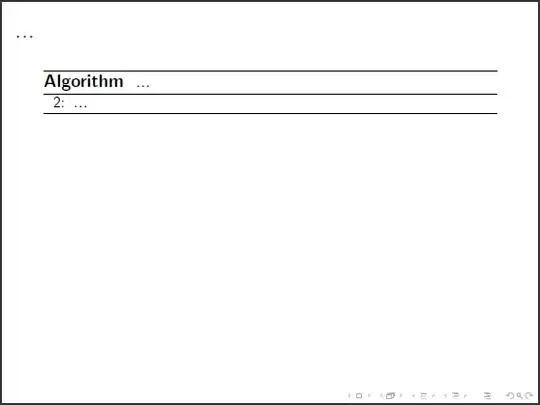
I want to change the first number of the line numbering in my algorithm, but how is it done? This is my example:

\documentclass[12pt]{beamer}
\usepackage{amsmath, amsfonts, amssymb, amsthm}
\usepackage{algorithmic, algorithm}
\usepackage{float}
\renewcommand\thealgorithm{}

    \begin{document}
    \begin{frame}[t, fragile]
    \frametitle{...}
       \begin{algorithm}[H]
       \caption{...}
       \begin{algorithmic}[1]
          \STATE ...
       \end{algorithmic}
       \end{algorithm}
    \end{frame}
    \end{document}

The first state should be numbered with 2 for example.

lockstep
  • 250,273
Stan
  • 133

2 Answers2

12

The line number in algorithmic (from the algorithms bundle) is governed by the counter ALC@line. The following MWE defines \setalglineno{<num>} which allows you to modify the number of any line in your algorithmic:

Screenshot of Algorithm starting at line 2

\documentclass[12pt]{beamer}

\usepackage{algorithmic,algorithm,float}

\renewcommand\thealgorithm{}
\newcommand{\setalglineno}[1]{%
  \setcounter{ALC@line}{\numexpr#1-1}}

\begin{document}

\begin{frame}[t, fragile]
  \frametitle{...}
  \begin{algorithm}[H]
    \caption{...}
    \begin{algorithmic}[1]
      \setalglineno{2}% Set following line number to 2
      \STATE ...
    \end{algorithmic}
  \end{algorithm}
\end{frame}

\end{document}

In fact, \setalglineno{<num>} sets ALC@line to <num>-1, since the algorithm is set in a list, where each line counter is incremented before it is set. So, technically, to obtain a line numbered 2, you need to set the counter value to 1.

A similar setup would be used within the algpseudocode (or equivalent) environments offered by algorithmicx. For these you have to use ALG@line instead of ALC@line though.

Werner
  • 603,163
  • 2
    Is it ALG@line instead of ALC@line? – hengxin Oct 31 '13 at 03:39
  • @hengxin: It's ALC@line. Try the other one and you'll see why. – Werner Oct 31 '13 at 04:46
  • 4
    ALG@line (not ALC@line) works for me. Maybe it is because that I use algpseudocode + algorithmicx + algorithm environments. – hengxin Oct 31 '13 at 05:22
  • @hengxin: Yes, there's a difference. – Werner Oct 31 '13 at 06:00
  • Hi, thanks for an answer. I have a follow up question. What changes should be done to your code, to enable me to pass \ref{} as a parameter to \setalglineno? I want to make a \label at the last line of the first algorithm and the second one would continue its numbering from there. – jutky Jul 19 '14 at 20:13
  • @jutky: For using references in counters you should typically include the refcount package. Then, whenever you have \label{mylabel}, you can use \getrefnumber{mylabel} to retrieve the appropriate label number for use. – Werner Jul 19 '14 at 20:25
  • @Werner Wow, thanks a lot. That is exactly what I need. – jutky Jul 21 '14 at 10:34
  • For algorithmicx, I had to use ALG@line. I did not have to use \makeatletter or \makeatother though. – Lekensteyn May 06 '19 at 16:26
  • @Lekensteyn: Sure. Also, there is no need for \makeatletter...\makeatother here, as you mention, because you're not using @ inside a control sequence. – Werner May 06 '19 at 16:33
  • @Werner Could it also be removed for the algorithmic example? Or is there a case where this is necessary? – Lekensteyn May 06 '19 at 16:48
  • @Lekensteyn: It is only necessary when you're dealing with control sequences that require the use of @. Counters with @ in them are handled in a different way internally through something like \setcounter{ALC@line}{...} and therefore don't need \makeatletter...\makeatother. – Werner May 06 '19 at 16:51
  • By the way, this works outside of the beamer context too. Just for reference, it's a generic solution. – Lpax Dec 13 '23 at 13:04
2

When an an algorithm is spread over multiple sections, inventing a new name for every label (as required by Werner's solution) can be cumbersome.

Building on the fact that line numbers are just counters, here is another approach: create a new counter for the line number. When an algorithmic environment is closed, save the counter. When resuming an algorithm, restore the counter.

MWE:

Screenshot of line number continuations

Corresponding code (the ALG@line@ prefix was arbitrarily chosen):

\documentclass[12pt]{report}
\usepackage{algorithm,algpseudocode}

\newcommand{\alglinenoNew}[1]{\newcounter{ALG@line@#1}}
\newcommand{\alglinenoPop}[1]{\setcounter{ALG@line}{\value{ALG@line@#1}}}
\newcommand{\alglinenoPush}[1]{\setcounter{ALG@line@#1}{\value{ALG@line}}}

\begin{document}

Start:
\begin{algorithmic}[1]
    \State First
    \alglinenoNew{alg1}
    \alglinenoPush{alg1}
\end{algorithmic}

Continuation:
\begin{algorithmic}[1]
    \alglinenoPop{alg1}
    \State Second
    \State Third
    \alglinenoPush{alg1}
\end{algorithmic}

More:
\begin{algorithmic}[1]
    \alglinenoPop{alg1}
    \State Fourth
    \alglinenoPush{alg1}
\end{algorithmic}
\end{document}
Lekensteyn
  • 532
  • 1
  • 4
  • 10