You have a couple of options here, not really automated in any way. Let's start off with something that replicates your current issue:

\documentclass{article}
\usepackage{wrapfig,graphicx}
\usepackage{lipsum,showframe}
\begin{document}
\lipsum[1-4]
\begin{wrapfigure}{r}{0.4\linewidth}
  \includegraphics[width=0.9\linewidth]{example-image-10x16}
\end{wrapfigure}%
Lorem ipsum dolor sit amet, consectetur adipiscing elit. Nam consectetur arcu at tellus consequat molestie.
Sed feugiat turpis ac massa vestibulum feugiat. Orci varius natoque penatibus et magnis dis parturient
montes, nascetur ridiculus mus. Aenean pharetra tortor est, ut hendrerit diam condimentum ut. Nunc consequat
pulvinar posuere. Curabitur tincidunt vel est at rhoncus. Nunc sagittis lacus elit, nec malesuada magna
lacinia eget. Proin porta, justo eu molestie sagittis, risus lacus sollicitudin quam, ut fermentum mauris
augue at turpis. Donec auctor consequat metus quis fringilla. Nulla nec enim vel libero rhoncus pellentesque.
Fusce nec lacus orci. Pellentesque eget lectus vitae tortor consequat imperdiet. Suspendisse aliquet blandit
dolor, bibendum commodo ligula cursus et. Mauris aliquet massa in est facilisis, sed efficitur ipsum iaculis.
Nulla vehicula diam mauris, a sagittis odio sodales et. Aliquam imperdiet feugiat lacus sed condimentum. Cras
tellus turpis, dapibus eu tempor eget, lacinia et nulla. Nunc tempus malesuada massa ut rhoncus. Morbi
vulputate sapien eros, at facilisis nulla tempus sed. Etiam tincidunt elit at molestie aliquet.
Lorem ipsum dolor sit amet, consectetur adipiscing elit. Nam consectetur arcu at tellus consequat molestie.
Sed feugiat turpis ac massa vestibulum feugiat. Orci varius natoque penatibus et magnis dis parturient
montes, nascetur ridiculus mus. Aenean pharetra tortor est, ut hendrerit diam condimentum ut. Nunc consequat
pulvinar posuere. Curabitur tincidunt vel est at rhoncus. Nunc sagittis lacus elit, nec malesuada magna
lacinia eget. Proin porta, justo eu molestie sagittis, risus lacus sollicitudin quam, ut fermentum mauris
augue at turpis. Donec auctor consequat metus quis fringilla. Nulla nec enim vel libero rhoncus pellentesque.
Fusce nec lacus orci. Pellentesque eget lectus vitae tortor consequat imperdiet. Suspendisse aliquet blandit
dolor, bibendum commodo ligula cursus et. Mauris aliquet massa in est facilisis, sed efficitur ipsum iaculis.
Nulla vehicula diam mauris, a sagittis odio sodales et. Aliquam imperdiet feugiat lacus sed condimentum. Cras
tellus turpis, dapibus eu tempor eget, lacinia et nulla. Nunc tempus malesuada massa ut rhoncus. Morbi
vulputate sapien eros, at facilisis nulla tempus sed. Etiam tincidunt elit at molestie aliquet.
\end{document}
A couple of things to note in the above example:
I've used the lowercase right option to wrapfigure, which places it here, rather than Right, which allows it to float.
The wrapfig documentation explicitly mentions the following:
The environment should be placed so as to not run over a page break.
This is exactly where you have it.
- I've inserted a tall image (
example-image-10x16) instead of an algorithm/pseudocode. The process/application is the same in either case, so the suggested solutions below work in both cases.
Solution 1
Use the Right (floating) placement specifier for the wrapfigure environment. This allows the block to be wrapped around to float to the following paragraph, which is on a subsequent page.
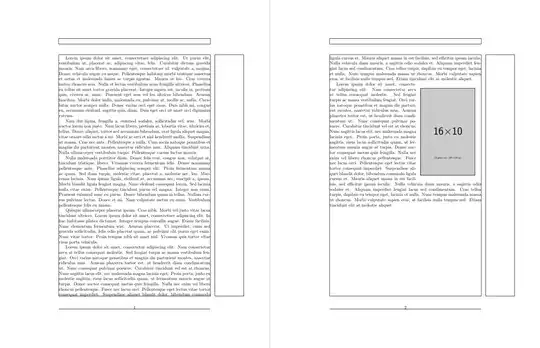
...
\begin{wrapfigure}{R}{0.4\linewidth}
  \includegraphics[width=0.9\linewidth]{example-image-10x16}
\end{wrapfigure}%
Lorem ipsum dolor sit amet, consectetur adipiscing elit. Nam consectetur arcu at tellus consequat molestie.
...
Solution 2
Set the document without the oddly-placed wrapfigure. This will allow you to see where the text ends on that specific page. Then, insert a \parnopar exactly there so you can allow the paragraph to end (pushing content to be flush right with the bottom of the now-separated paragraph. Insert a paragraph break (a vertical gap/blank line in your code) and then insert the wrapfigure with a new paragraph starting with \noindent.
In the first solution we can see that the closing words on the first page is "... dolor, bibendum commodo". So, we insert the \parnopar exactly after commodo:
dolor, bibendum commodo \parnopar
\begin{wrapfigure}{r}{0.4\linewidth}
  \includegraphics[width=0.9\linewidth]{example-image-10x16}
\end{wrapfigure}%
\noindent ligula cursus et.
The blank line will force a page break, while \noindent will make sure that the page break doesn't seem like a paragraph break and set the following text - "ligula cursus et." - flush to the left margin.

\documentclass{article}
\usepackage{wrapfig,graphicx}
\usepackage{lipsum,showframe}
\newcommand{\parnopar}{\parfillskip=0pt\par\parskip=0pt\noindent}
\begin{document}
\lipsum[1-4]
Lorem ipsum dolor sit amet, consectetur adipiscing elit. Nam consectetur arcu at tellus consequat molestie.
Sed feugiat turpis ac massa vestibulum feugiat. Orci varius natoque penatibus et magnis dis parturient
montes, nascetur ridiculus mus. Aenean pharetra tortor est, ut hendrerit diam condimentum ut. Nunc consequat
pulvinar posuere. Curabitur tincidunt vel est at rhoncus. Nunc sagittis lacus elit, nec malesuada magna
lacinia eget. Proin porta, justo eu molestie sagittis, risus lacus sollicitudin quam, ut fermentum mauris
augue at turpis. Donec auctor consequat metus quis fringilla. Nulla nec enim vel libero rhoncus pellentesque.
Fusce nec lacus orci. Pellentesque eget lectus vitae tortor consequat imperdiet. Suspendisse aliquet blandit
dolor, bibendum commodo \parnopar
\begin{wrapfigure}{r}{0.4\linewidth}
  \includegraphics[width=0.9\linewidth]{example-image-10x16}
\end{wrapfigure}%
\noindent ligula cursus et. Mauris aliquet massa in est facilisis, sed efficitur ipsum iaculis.
Nulla vehicula diam mauris, a sagittis odio sodales et. Aliquam imperdiet feugiat lacus sed condimentum. Cras
tellus turpis, dapibus eu tempor eget, lacinia et nulla. Nunc tempus malesuada massa ut rhoncus. Morbi
vulputate sapien eros, at facilisis nulla tempus sed. Etiam tincidunt elit at molestie aliquet.
Lorem ipsum dolor sit amet, consectetur adipiscing elit. Nam consectetur arcu at tellus consequat molestie.
Sed feugiat turpis ac massa vestibulum feugiat. Orci varius natoque penatibus et magnis dis parturient
montes, nascetur ridiculus mus. Aenean pharetra tortor est, ut hendrerit diam condimentum ut. Nunc consequat
pulvinar posuere. Curabitur tincidunt vel est at rhoncus. Nunc sagittis lacus elit, nec malesuada magna
lacinia eget. Proin porta, justo eu molestie sagittis, risus lacus sollicitudin quam, ut fermentum mauris
augue at turpis. Donec auctor consequat metus quis fringilla. Nulla nec enim vel libero rhoncus pellentesque.
Fusce nec lacus orci. Pellentesque eget lectus vitae tortor consequat imperdiet. Suspendisse aliquet blandit
dolor, bibendum commodo ligula cursus et. Mauris aliquet massa in est facilisis, sed efficitur ipsum iaculis.
Nulla vehicula diam mauris, a sagittis odio sodales et. Aliquam imperdiet feugiat lacus sed condimentum. Cras
tellus turpis, dapibus eu tempor eget, lacinia et nulla. Nunc tempus malesuada massa ut rhoncus. Morbi
vulputate sapien eros, at facilisis nulla tempus sed. Etiam tincidunt elit at molestie aliquet.
\end{document}
With Solution 2 above in mind, you could also cut your algorithm in half, showing some of it at the bottom of one page, and having that follow through with the lower half shown at the top of the subsequent page (see Algorithm over 2 pages). However, breaking up such a display across pages of a possibly-printed output would be odd (so not advised).


h,bortmakes the image float, which it can't, sincewrapfigurewants to keep it in place. You should provide more detail on how things should function around the page boundary; mentioning "I don't want the weird placement" doesn't describe whether the text flow should remain and (say), the pseudocode should float to the top of the following page without wrapping, or with wrapping. Please be specific here as well. – Werner Sep 25 '23 at 22:19hb, but with text wrapping. I want the pseudocode to remain within the bounding box. I'm ok with the pseudocode going to the next page, but I would still like wrapping there. I do not want a page/section of just the pseudocode with unwrapped text (the pseudocode is on page 2 of a ~10 page doc, so this should not be a concern unless we explicitly push it to an empty page). Please let me know if this is still unclear and I will attempt to clarify – user760900 Sep 25 '23 at 22:32\captionof{algorithm}{...}and lose both the minipage and the algorithm environments. The bottom of the page is another problem altogether. – John Kormylo Sep 26 '23 at 03:34