1

I want to draw a chart using a table using Pgfplots.

\documentclass{article}
\usepackage{tikz}
\usepackage{pgfplots}

\usepackage{filecontents} \begin{filecontents}{data1.txt} x y 0.01042 -4.98E-04 0.02084 -2.006E-03 0.03126 -4.487E-03 0.04167 -7.852E-03 0.05209 -1.179E-02 0.0625 -1.476E-02 0.07292 -1.56E-02 0.08334 -1.573E-02 0.09376 -1.581E-02 0.10417 -1.586E-02 0.11459 -1.592E-02 \end{filecontents}

\begin{document}

\begin{tikzpicture} \begin{axis}[ ymin=-0.02, ymax =0.0, xmin=0.0, xmax =0.1, ]
\addplot[] table {data1.txt}; \end{axis} \end{tikzpicture}

\end{document}

Now, the output looks like this.
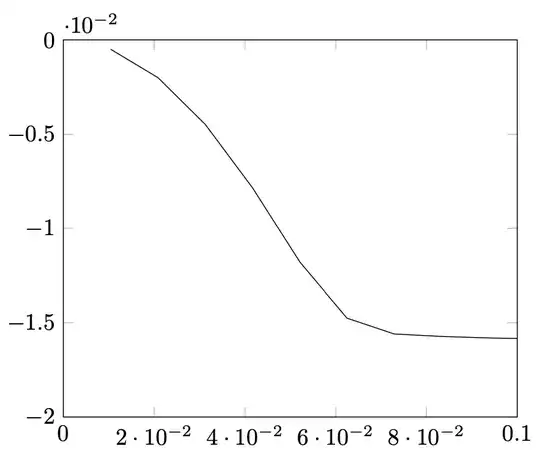
However, I want to multiply y axis step values by 100 without modifying the data itself, and want something like this.

Is there any way to do this? To clarify the context, in my original data, y is in metre, but the values are so small that I want to change it to centimetre.

Kaz
  • 23

1 Answers1

0

Welcome to TeX.SX! You can use the pgfplotstable package and add a virtual column to your table that contains the value from the y column multiplied by 100 (inspiration taken from this nice answer):

\documentclass[border=10pt]{standalone}
\usepackage{pgfplots, pgfplotstable}
\pgfplotsset{compat=newest}

\begin{filecontents}{data1.txt} x y 0.01042 -4.98E-04 0.02084 -2.006E-03 0.03126 -4.487E-03 0.04167 -7.852E-03 0.05209 -1.179E-02 0.0625 -1.476E-02 0.07292 -1.56E-02 0.08334 -1.573E-02 0.09376 -1.581E-02 0.10417 -1.586E-02 0.11459 -1.592E-02 \end{filecontents}

\pgfplotstableread{data1.txt}\datatable \pgfplotstableset{ create on use/multiplied y value/.style={ create col/expr={100*\thisrow{y}} } }

\begin{document} \begin{tikzpicture} \begin{axis}[ ymin=-2, ymax=0, xmin=0.0, xmax=0.1, ]
\addplot[] table [y=multiplied y value] {\datatable}; \end{axis} \end{tikzpicture} \end{document}

enter image description here