You can define a wrapper for these commands. This defines the command to print the text in italic and globally redefines the same command to print it normally. No need to define toggles for each such command.
\documentclass{article}
\newcommand{\makespecialcommand}[2]{%
  \newcommand{#1}{\textit{#2}\gdef#1{#2}}%
}
\makespecialcommand{\foo}{foo}
\makespecialcommand{\baz}{baz}
\begin{document}
Here \foo\ is called and \foo\ is called again.
\begin{quote}
Now \baz\ is called in an environment.
\end{quote}
And now \baz\ is called again.
\end{document}
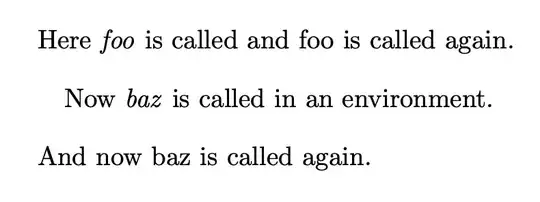
If you want to pursue the \propername strategy, globally define an internal macro when the command is executed the first time (when the internal macro is still undefined).
\documentclass{article}
\newcommand{\propername}[1]{%
  \ifcsname\detokenize{#1}@used\endcsname
    #1%
  \else
    \textit{#1}%
    \global\expandafter\let\csname\detokenize{#1}@used\endcsname\empty
  \fi
}
\begin{document}
Here \propername{foo} is called and \propername{foo} is called again.
\begin{quote}
Now \propername{baz} is called in an environment.
\end{quote}
And now \propername{baz} is called again.
\end{document}
The output is the same.
You can extend the code to count the occurrences.
\documentclass{article}
\newcommand{\propername}[1]{%
  \ifcsname\detokenize{#1}@used\endcsname
    #1%
    \global\expandafter\xdef\csname\detokenize{#1}@used\endcsname{%
      \the\numexpr\csname\detokenize{#1}@used\endcsname+1\relax
    }%
  \else
    \textit{#1}%
    \expandafter\gdef\csname\detokenize{#1}@used\endcsname{1}%
  \fi
}
\newcommand{\nameoccurred}[1]{%
  \ifcsname\detokenize{#1}@used\endcsname
    #1 occurred \csname\detokenize{#1}@used\endcsname\space times'' \else#1 didn't appear''
  \fi
}
\begin{document}
Here \propername{foo} is called and \propername{foo} is called again.
\begin{quote}
Now \propername{baz} is called in an environment.
\end{quote}
And now \propername{baz} is called again and \propername{baz} again.
\nameoccurred{foo}
\nameoccurred{baz}
\nameoccurred{gnu}
\end{document}


