Don't use allowframebreaks; the documentation of beamer has the following recommendation:
Using the allowframebreaks option invites the creation of horrible,
endless presentations that resemble more a "paper projected on the
wall" than a presentation. Nevertheless, the option does have its
uses. Most noticeably, it can be convenient for automatically
splitting bibliographies or long equations.
You can use overlay specifications instead; here's an example using \only:
\documentclass{beamer}
%---------------------------------------------------------------%
\usepackage{graphics,tikz}
%---------------------------------------------------------------%
\begin{document}
%---------------------------------------------------------------%
\begin{frame}
\frametitle{Common title, appearing on all slides in one frame}
%------------------------------------------------------------ 1
\only<1>{
\framesubtitle{The first frame subtitle}
\begin{itemize}
\item some text on slide 1
\item some text
\item some text
\item   \dots

\end{itemize}}
%------------------------------------------------------------ 2
\only<2>{
\framesubtitle{The second frame subtitle}
\begin{itemize}
\item some text on slide 2
\item some text
\item some text
\item   \dots

\end{itemize}}
%------------------------------------------------------------ 3
\only<3>{
\framesubtitle{The third frame subtitle}
\begin{itemize}
\item some text on slide 3
\item some text
\item some text
\item   \dots

\end{itemize}}
\end{frame}
%---------------------------------------------------------------%
\end{document}

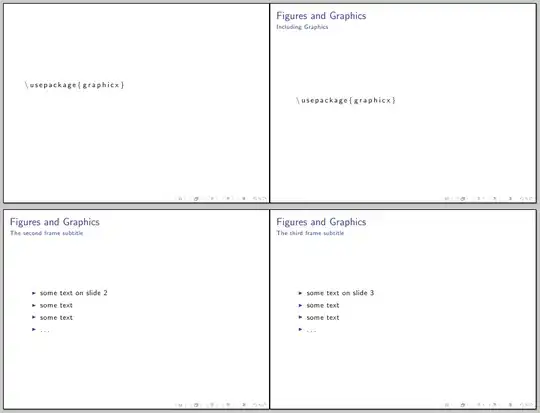
If verbatim material created with the listings package must be in the argument of \only (or any other command), then some precautions must be taken; the additional work is described in Section 5.1 Listings inside arguments of the listings documentation (notice that this is an experimental feature):
\documentclass[compress]{beamer}
\usepackage[english]{babel}
\usepackage{listings}


 %---------------------------------------------------------------%
\begin{document}
%---------------------------------------------------------------%

\begin{frame}[fragile]

\begin{lstlisting}
\usepackage{graphicx}
\end{lstlisting}

\end{frame}
%------------------------------------------------------------------------------------

\begin{frame}[fragile]
\frametitle{Figures and Graphics}

%------------------------------------------------------------------------------------
\only<1>{
\framesubtitle{Including Graphics}
\begin{lstlisting}^^J
\\usepackage\{graphicx\}^^J
\end{lstlisting}
}
%------------------------------------------------------------ 2
\only<2>{
\framesubtitle{The second frame subtitle}
\begin{itemize}
\item some text on slide 2
\item some text
\item some text
\item   \dots

\end{itemize}}
%%------------------------------------------------------------ 3
\only<3>{
\framesubtitle{The third frame subtitle}
\begin{itemize}
\item some text on slide 3
\item some text
\item some text
\item   \dots

\end{itemize}}
\end{frame}
%---------------------------------------------------------------%
\end{document}


\begin{frame}{Title}{Subtitle} ..... \end{frame}to ease the typing load. – percusse Jun 13 '12 at 17:54