Basically this is the same answer as Symbol 1 ones, but is a bit more "automated", which means, that you now only have one place to take care of for setting the xmin, xmax and xtick distance values.
% used PGFPlots v1.14
\documentclass[border=5pt]{standalone}
\usepackage{pgfplots}
\begin{document}
\begin{tikzpicture}
        % =====================================================================
        % state here the `xmin', `xmax' and `xtick distance' values
        \pgfmathsetmacro{\xmin}{0}
        \pgfmathsetmacro{\xmax}{5}
        \pgfmathsetmacro{\DeltaX}{0.5}
        % =====================================================================
        % calculate the `xtick' positions without drawing the `xmajorgrid' at
        % `xmin' and `xmax'
        \pgfmathsetmacro{\xmintick}{\xmin + \DeltaX}
        \pgfmathsetmacro{\nexttick}{\xmin + 2*\DeltaX}
        \pgfmathsetmacro{\lasttick}{\xmax - \DeltaX}
    \begin{axis}[
        % set `xmin' and `xmax'
        xmin=\xmin,
        xmax=\xmax,
        % set the `xtick' values using the defined variables
        xtick={\xmintick,\nexttick,...,\lasttick},
        xmajorgrids,
        major x grid style={
            dashed,
            red,
        },
        % add the extra ticks without using the grid lines at `xmin' and `xmax'
        % (for simplicity we can use the defined commands here ...
        extra x ticks={\xmin,\xmax},
%        %  ... but since we have set these values explicitly we can also call
%        %  the values)
%        extra x ticks={
%            \pgfkeysvalueof{/pgfplots/xmin},
%            \pgfkeysvalueof{/pgfplots/xmax}
%        },
        % set the style of the extra ticks
        extra tick style={
            % remove the grid
            % by default the `extra tick style' is the same as for the "normal" ticks
            grid=none,
        },
    ]
        \addplot [mark=none,blue] {x^2};
    \end{axis}
\end{tikzpicture}
\end{document}
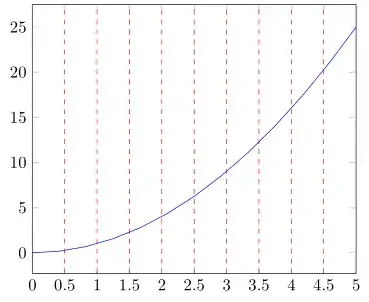


xtick distancealso doesn't make any sense when you are usingxtick. – Stefan Pinnow Apr 10 '17 at 20:40xtick distancewhen editing my MWE. – Diaa Apr 10 '17 at 20:45\pgfkeysvalueof{/pgfplots/xmin}, when I tried to test itextra x ticks={\pgfkeysvalueof{/pgfplots/xmin}}it threw an error: Dimension too large, what is the reason? – Diaa Apr 10 '17 at 20:53\pgfplotsset{compat=1.14}in the preamble:/– Diaa Apr 10 '17 at 21:11