40
\documentclass[12pt,a4paper]{mwrep}    
\renewcommand\baselinestretch{1.5}
\begin{document}
\chapter{Test}
Text text text text text text text text text text      
\begin{equation}
1 + 2 + 3 = 6
\end{equation}  
Text text text text text text text text text text  
\begin{equation}
1 + 2 + 3 = 6
\end{equation}
\begin{equation}
1 + 2 + 3 = 6
\end{equation}
\end{document}

Spaces between two equations and between equations and text are too big. How can I lower them? I know that using \renewcommand\baselinestretch{1.5} is responsible for that but I need this command.

Ichibann
  • 8,381

5 Answers5

42

I would recommend taking the following measures:

  1. Instead of \renewcommand\baselinestretch{1.5}, load the setspace package with the nodisplayskipstretch option, and execute the command setstretch{1.5} in your document's preamble:

    ...
    \usepackage[nodisplayskipstretch]{setspace}
    \setstretch{1.5}
    ...
    

    This way, you won't experience the excessive spacing between lines of text and displayed math material. Also, material in footnotes and in tabular-like environments will remain single-spaced.

  2. When you have consecutive equations, don't use separate equation environments; instead, use the gather environment provided by the amsmath package. (If the equations should be aligned along, say, their equal signs, use the align environment instead of the gather environment, and use the & (ampersand) character to mark the desired alignment points in each row.) Two consecutive equations could be entered as

    \begin{gather}
    1 + 2 + 3 = 6 \\
    2 + 4 + 6 = 12
    \end{gather}  
    
Mico
  • 506,678
  • \begin{gather} 1 + 2 + 3 = 6 \ 2 + 4 + 6 = 12 \end{gather} shows two equations in one line. – Ichibann Oct 27 '11 at 19:52
  • 1
    Ok, I figured on my own that I need to put \\ instead of \ – Ichibann Oct 27 '11 at 19:56
  • How can I align to = character in equations? When I use \begin{align} 1 + 2 + 3 = 6 \\ 2 + 4 + 6 = 12 \end{align} it aligns to the right. – Ichibann Oct 27 '11 at 20:01
  • 2
    You need an & character on each line for an alignment tab. You can put it anywhere, but I ususally put it in front of the =. – Brandon Kuczenski Oct 27 '11 at 20:03
  • Just because I'm curious. Why using two consecutive equations is wrong? – Ichibann Oct 27 '11 at 20:17
  • 3
    It's not wrong to have two consecutive equation environments. However, doing so will in general use more space than if you use an environment that "knows" that successive lines are equations rather than switches between text and equations. Moreover, if you use consecutive equation environments, you can't align them on, say, the equal sign -- something you could do if you'd use the align environment, say. – Mico Oct 27 '11 at 21:04
  • 1
    +1 for the gather environment. I didn't want to mess around with document-wide spacing parameters just because LaTeX didn't "know" I was providing a series of equations. – Warrick Mar 23 '12 at 09:42
  • But how can I label different equations if I use gather? – Dávid Natingga Aug 23 '15 at 09:34
  • 2
    @DávidTóth - You should insert \label directives at the end of each line (but before \\) in a gather environment. You can then \ref (or \eqref, etc) them just as you would a simple equation environment. – Mico Aug 23 '15 at 09:56
  • Well, and what if one need to switch from e.g. align to equation because the alignment tab has changed or must be changed for space related issues (equation will not fit in one line). Unfortunately using one line without indentation tab spoils the whole alignment. – benni Mar 18 '17 at 22:27
40

TeX uses \abovedisplayskip and \belowdisplayskip for the spacing above/below equations. There's also a short version of the former two commands for paragraphs ending/beginning with shorter lines. Here's an example showing the difference:

enter image description here

\documentclass{article}
\usepackage{amsmath}% http://ctan.org/pkg/amsmath
\begin{document}
Text text text text text text text text text text
\begin{equation}
1 + 2 + 3 = 6
\end{equation}  
Text text text text text text text text text text
\begin{align}
1 + 2 + 3 &= 6 \\
1 + 2 + 3 &= 6
\end{align}

\setlength{\belowdisplayskip}{0pt} \setlength{\belowdisplayshortskip}{0pt} \setlength{\abovedisplayskip}{0pt} \setlength{\abovedisplayshortskip}{0pt}

Text text text text text text text text text text \begin{equation} 1 + 2 + 3 = 6 \end{equation}
Text text text text text text text text text text \begin{align} 1 + 2 + 3 &= 6 \ 1 + 2 + 3 &= 6 \end{align} \end{document}​

The same effect is obtained with/without a modified \baselinestretch - it is just clearer when viewed without that set. Of course, you can modify these lengths as needed.

Edit: Heed @egreg's suggestion and/or @Mico's answer regarding two equations

wipet
  • 74,238
Werner
  • 603,163
  • 9
    One should never use two consecutive equation environment, but rather the gather environment provided by amsmath – egreg Oct 27 '11 at 19:47
13

you should use package setspace for the vertical spacing. The distance between two equations is set by the short skips!

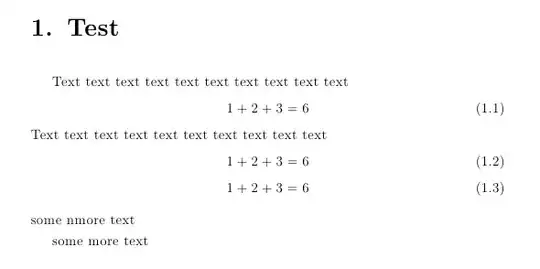
\documentclass[12pt,a4paper]{mwrep}    
\usepackage{setspace}\onehalfspacing
\AtBeginDocument{%
  \addtolength\abovedisplayskip{-0.5\baselineskip}%
  \addtolength\belowdisplayskip{-0.5\baselineskip}%
%  \addtolength\abovedisplayshortskip{-0.5\baselineskip}%
%  \addtolength\belowdisplayshortskip{-0.5\baselineskip}%
}

\begin{document}
\chapter{Test}
Text text text text text text text text text text      
\begin{equation}
1 + 2 + 3 = 6
\end{equation}  
Text text text text text text text text text text  
\begin{equation}
1 + 2 + 3 = 6
\end{equation}
\begin{equation}
1 + 2 + 3 = 6
\end{equation}
some nmore text\par
some more text

\end{document}

enter image description here

1

In my case below command fix the problem,

\usepackage[nodisplayskipstretch]{setspace}
0

You can simply use

\vspace{} or \hspace{}

with a negative value to reduce the vertical or horizontal spacing respectively.

Pankaj Singh
  • 107
  • 3