0

I'm writing a class for a document, that inherits from article, and I encountered a problem with this: the document should be all in two columns, except the abstract. For the two columns, I use the multicol package.

The asbtract would also display in two columns, and my first attempt was to redefine the abstract environment in the .cls file to the next:

\renewenvironment{abstract}
{\end{multicols}\begin{center}{\scshape Resúmen}\end{center} }
{\begin{multicols}{2}}

together with:

\AtBeginDocument{\begin{multicols}{2}}
\AtEndDocument{\end{multicols}}

I thought that would "pause" the multicols environment, allowing the abstract to be in one column.

The first problem is that I get the errors:

! LaTeX Error: \begin{abstract} on input line 9 ended by \end{multicols}.
! LaTeX Error: \begin{multicols} on input line 11 ended by \end{abstract}.

So it's not putting the \end{multicols} where I thought it would, but before the \end{abstract}, and so on.

The second problem, is that if a remove everything, the title from \maketitle also appears within a column.

How could I make that? Like pause the multicols environment from within a defined environment? If that can't be done I would appreciate any other more elegant solution.

I would like to make it as independent as possible from the .tex file. That is, I could just write the multicol environment in the text in the tex file, but I would like the .cls file to deal with this.

Thank you

MyUserIsThis
  • 1,201

2 Answers2

1

Don't do this at home ;-)

The trick is to fake the current environment to be multicols right at the start of abstract, then stopping the multicols environment, setting the abstract environment correctly and using \AfterEndDocument from etoolbox package to resume the \begin{multicols}{2}.

\documentclass{article}


\usepackage[utf8]{inputenc}
\usepackage{multicol}
\usepackage{blindtext}
\usepackage{etoolbox}

\makeatletter
\let\latexabstractend\endabstract

\renewenvironment{abstract}
{\def\@currenvir{multicols}\end{multicols}\def\@currenvir{abstract}\begin{center}{\scshape \abstractname}\end{center} }
{\latexabstractend}%

\AfterEndEnvironment{abstract}{\begin{multicols}{2}}

\AtBeginDocument{\begin{multicols}{2}}
\AtEndDocument{\end{multicols}}

\begin{document}
\blindtext
\begin{abstract}
\blindtext
\end{abstract}

\blindtext

\end{document}

enter image description here

  • 1
    @Sigur: Wouldn't it be more useful to make that comment at the OP? ;-) –  Jun 14 '15 at 09:38
  • @Sigur: Thanks anyway, I used your suggestion! –  Jun 14 '15 at 09:46
  • It would be better to store the usual abstract stuff. This can still be done, but for the moment, I omitted this –  Jun 14 '15 at 09:48
  • Thank you. I can see that faking the current environment could be a bit dangerous... I will use this, I think. I didn't know though of the package etoolbox. I saw that it also has an \BeforeBeginEnvironment function, so I tried to make the same interruption I was trying to make, but using those function (BeforeBegin and AfterEnd), and it worked. It only messed up the title (it still tries to put it in two columns), but it looks like it advances. I will try to fix the title, and if I can't I will use your solution. The "don't do this at home" scares me a bit xD. Thank you again – MyUserIsThis Jun 14 '15 at 09:58
  • @MyUserIsThis: Yes, BeforeBeginEnvironment would be an alternative, of course –  Jun 14 '15 at 10:00
  • I just copied the maketitle definition adding the \end{multicols} at the begining, and \begin{multicols}{2} at the end and it works very smoothly. The only problem I see with this is that the structure of the document will be:

    \begin{multicols}{2}\end{multicols} %TITLE HERE% \begin{multicols}{2}\end{multicols} %ABSTRACT%\begin{multicols}{2} %REST OF DOCUMENT%...

    I find it a bit dirty, although I don't see it introduces any vertical unncecesary spacing or anything in each empty multicols environment... Is there some deep problem with that?

    – MyUserIsThis Jun 14 '15 at 10:05
  • @MyUserIsThis: Well, that's again another question. You should perhaps not start just copying other code from other classes in your class document. Try to make an ordinary document and then transform that to a class file. You've not shown a single file yet, what is really in your document. –  Jun 14 '15 at 10:09
0

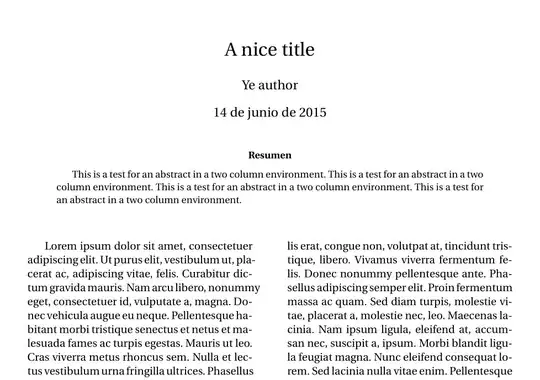
If you want to consider using the twocolumn option of the documentclass, you can use either the @twocolumnfalse environment, or the strip environment, from the cuted package (sttools bundle).

@twocolumnfalse environment:

\documentclass[a4paper, twoside, spanish]{article}%
\usepackage[utf8]{inputenc}
\usepackage[T1]{fontenc}
\usepackage{babel} 
\usepackage{geometry}
\usepackage{fourier, erewhon}
\usepackage{lipsum}
\title{A nice title}
\author{Ye author}
\date{\today}
\setlength\columnsep{3em}

\begin{document}

\twocolumn[%
  \begin{@twocolumnfalse}
    \maketitle
    \begin{abstract}
      This is a test for an abstract in a two column environment. This is a test for an abstract in a two column environment. This is a test for an abstract in a two column environment. This is a test for an abstract in a two column environment.
    \end{abstract}
    \vskip2\baselineskip
  \end{@twocolumnfalse}

]% {%

  \lipsum[1-6]

}%

\end{document} 

enter image description here

strip environment: \documentclass[a4paper, twocolumn, twoside, spanish]{article}% \usepackage[utf8]{inputenc} \usepackage[T1]{fontenc} \usepackage{babel} \usepackage{geometry} \usepackage{fourier, cuted, erewhon} \usepackage{lipsum} \title{A nice title} \author{Ye author} \date{\today} \setlength\columnsep{3em}

\begin{document}

\begin{strip}
  \vspace*{\dimexpr-\baselineskip-\stripsep\relax}
  \centering
  \maketitle
  \begin{abstract}
    \begin{minipage}{0.9\linewidth}
      This is a test for an abstract in two column mode. This is a test for an abstract in two column mode. This is a test for an abstract in two column mode. This is a test for an abstract in two column mode. This is a test for an abstract in two column mode.
    \end{minipage}
  \end{abstract}
  \vskip2\baselineskip
\end{strip}

\lipsum[1-6]

\end{document} 

enter image description here

Bernard
  • 271,350