12

I would like to cite so that the reference shows up in the footer and in a bibliography, with the number of the reference in the text. I tried to do so with the following code:

\documentclass[11pt]{article}
\usepackage{biblatex}
\begin{document}

This is the text from some book. \footcite{lit1}

\begin{thebibliography}{1} \bibitem{lit1} Author, \textit{Title}, publisher, location, year. \end{thebibliography}

\end{document}

The problem is that the footnote says "lit1" instead of "Author, Title, ..."

Tommi
  • 142
Janine
  • 123
  • Welcome to TeX.SX! You are better off using an external .bib file for the publications and processing with biber. Then you can specify an authoryear style. – Andrew Swann May 04 '15 at 14:00

1 Answers1

15

Welcome to TeX SE! The problem is that you are mixing two different ways of managing citations and bibliography. One is to use \cite{} etc. and thebibliography. The other is to use biblatex with a database of bibliography entries and \printbibliography.

Here's one way of doing it which uses biblatex/biber with an external .bib file of entries. (The filecontents environment just creates the external .bib file.)

\documentclass[11pt]{article}
\usepackage[backend=biber]{biblatex}
\bibliography{\jobname}
\begin{filecontents}{\jobname.bib}
  @book{lit1,
    author      =   {Author, A. N.},
    title       =   {Title},
    publisher   =   {Publisher},
    address     =   {Location},
    year        =   {1066}}
\end{filecontents}

\begin{document}

This is the text from some book. \footfullcite{lit1}

\printbibliography

\end{document}
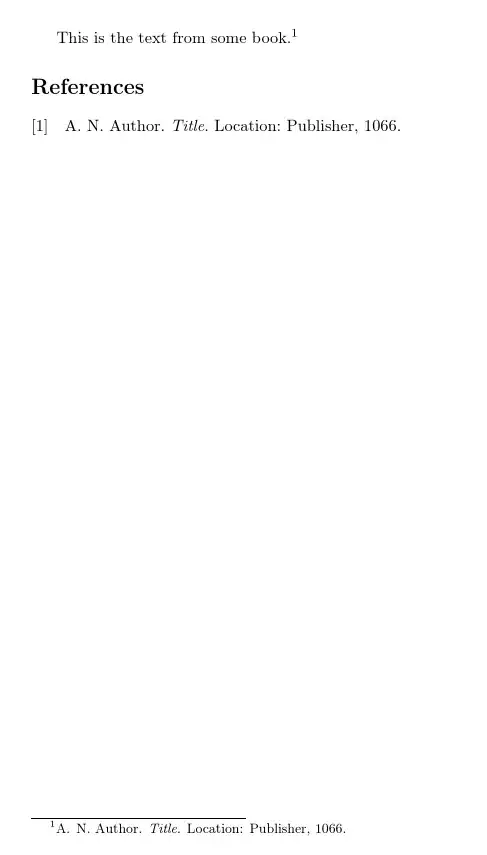
biblatex with full citation in footnote

This is just for purposes of demonstration: you wouldn't normally want a full citation in the footnote and a separate bibliography. Although I have seen undergraduate submission requirements which actually demanded just this.

Another way, As Andrew Swann suggested is to use

\usepackage[backend=biber,style=authoryear]{biblatex}

with the \footcite{lit1} which would give
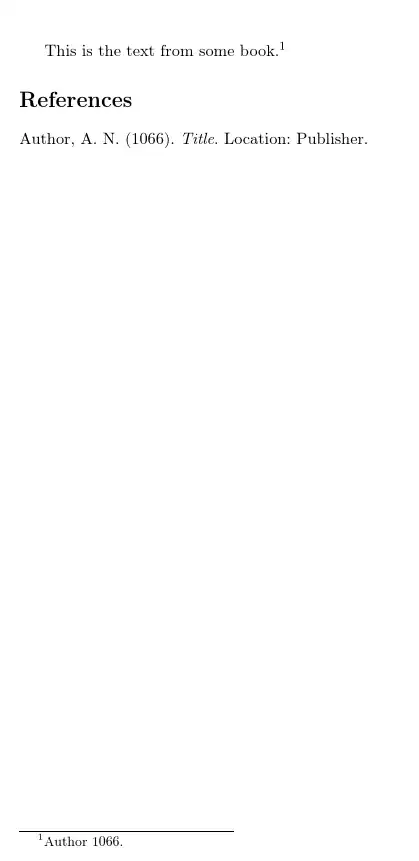
author-year

Or you can use \footfullcite{} and simply remove the \printbibliography command if you don't need a separate bibliography.

cfr
  • 198,882
  • Thank you a lot for your response, it was very helpful! I copied your first code, but still have only "lit1" in the footer. I read that in order to get the correct output, i have to run first Latex, then Biber, then Latex twice. But I don't get how to do this in TexnicCenter, as it has no command line. – Janine May 04 '15 at 15:09
  • @Janine I don't know TexnicCenter specifically but there should be options which allow you to configure the commands which are run when you typeset. It might be worth compiling from the command line first, just to test, outside your editor. Once you know it works, you can then try to figure out how to configure the editor. – cfr May 04 '15 at 15:11
  • It now worked after I changed the line \usepackage[backend=biber]{biblatex} to \usepackage[backend=bibtex]{biblatex} – Janine May 04 '15 at 16:22
  • 1
    @Janine That will work. But it is not a great solution because there are features of biblatex which require biber. So you will probably want to figure out how to use it sooner rather than later. – cfr May 04 '15 at 16:34