4

I would like to plot a rational function in LaTeX. I tried different ways with Tikz or pgfplots... nothing works. There are many different ways. Often there are problems with poles / asymptotes etc.

\frac{1}{x^2 - 7x - 30}

I'm looking for an easy way of plotting, but I also like the design of \usetikzlibrary{datavisualization.formats.functions} which gives me many useful graphical options.

Thank you

--

Some of my code:

\documentclass[13pt,a4paper,headlines=6,headinclude=true]{scrartcl}
\usepackage{tikz,pgfplots}
\usetikzlibrary{datavisualization.formats.functions}

\begin{document}
\begin{tikzpicture}[yscale=.5, xscale=.5, scale=2]
\datavisualization
[school book axes,
legend={below,rows=1},
visualize as smooth line/.list={f1},
f1={style=blue, style=very thick,label in legend={text=$\frac{1}{x-1}$}},
%f2={style=green, style=very thick,label in legend={text=$\frac{1}{x^2 - 7x - 30}$}}
]
data [set=f1, format=function] {
var x : interval[-4:0.5];
func y = 1/(\value{x} - 1);
}data [set=f1, format=function] {
var x : interval[1.5:4];
func y = 1/(\value x - 1);
};
data [set=f2, format=function] {
var x : interval[12:20];
func y = 1/(\value{x}^2 - 7 \value{x} - 30);
};
\end{tikzpicture}   
\end{document}

This results in

enter image description here

Next step, I now have:

\begin{tikzpicture}[scale=1.5]
  \begin{axis}[axis lines=middle,xmin=-20,xmax=20,ymin=-1.5,ymax=1.5,
    extra x ticks={-2,2},
    xlabel=$\scriptstyle x$,
    ylabel=$\scriptstyle y$,
    tick label style={font=\tiny},
    legend style={font=\small,legend pos=outer north east,}]
    \addplot+[no marks,blue,domain=-15:0.8,samples=150, thick] {1/(x - 1)};
        \addplot+[no marks,blue,domain=1.2:15,samples=150, thick] {1/(x - 1)};
    \addlegendentry{$\frac{1}{x-1}$}
    \addplot+[no marks,red,domain=-15:-3.02,samples=150, thick] {1/((x)^2 - 7*x-30)};
    \addplot+[no marks,red,domain=-2.98:9.98,samples=150, thick] {1/((x)^2 - 7*x-30)};
    \addplot+[no marks,red,domain=10.02:15,samples=150, thick] {1/((x)^2 - 7*x-30)};
    \addlegendentry{$\frac{1}{x^2 - 7x - 30}$}
  \end{axis}
\end{tikzpicture}
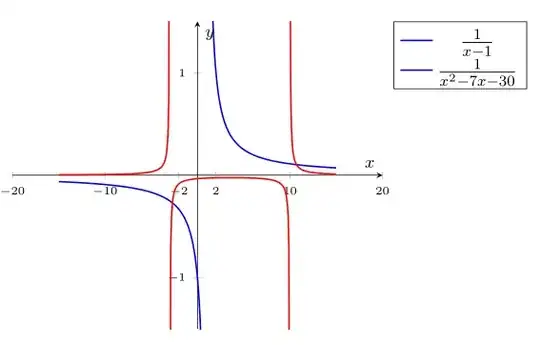
enter image description here

How can I add more numbers in between the xmin/xmax axis interval? For example, write every 2 integers?

Mac
  • 1,611
  • 3
  • 17
  • 42
  • You'll get more help if you show your failed attempt with Tikz or pgfplots. And have you even taken time to search this site for rational functions? There are examples out there, such as this. – DJP Apr 27 '15 at 19:21

2 Answers2

5

With pgfplots

\documentclass[13pt,a4paper,headlines=6,headinclude=true]{scrartcl}
\usepackage{pgfplots}
\pgfplotsset{compat=1.12}
\begin{document}
\begin{tikzpicture}
  \begin{axis}[axis lines=middle,xmin=-7,xmax=17,ymin=-1.5,ymax=1.5,xlabel=$\scriptstyle x$,ylabel=$\scriptstyle y$,tick label style={font=\tiny},legend style={font=\tiny,legend pos=outer north east,}]
    \addplot+[no marks,domain=-10:0.5,samples=150] {1/(x - 1)};
    \addlegendentry{$\frac{1}{x-1}$}
    \addplot+[no marks,olive,domain=-7:-3.02,samples=150] {1/((x)^2 - 7*x-30)};
    \addplot+[no marks,olive,domain=-2.98:9.98,samples=150] {1/((x)^2 - 7*x-30)};
    \addplot+[no marks,olive,domain=10.02:15,samples=150] {1/((x)^2 - 7*x-30)};
    \addlegendentry{$\frac{1}{x^2 - 7x - 30}$}
  \end{axis}
\end{tikzpicture}
\end{document}

enter image description here

With restrict y to domain=-10:10,, you get this:

\documentclass[13pt,a4paper,headlines=6,headinclude=true]{scrartcl}
\usepackage{pgfplots}
\pgfplotsset{compat=1.12}
\begin{document}
\begin{tikzpicture}
  \begin{axis}[axis lines=middle,xmin=-7,xmax=17,ymin=-1.5,ymax=1.5,xlabel=$\scriptstyle x$,ylabel=$\scriptstyle y$,tick label style={font=\tiny},legend style={font=\tiny,legend pos=outer north east,},restrict y to domain=-10:10,]
    \addplot+[no marks,domain=-10:0.5,samples=150] {1/(x - 1)};
    \addlegendentry{$\frac{1}{x-1}$}
    \addplot+[no marks,olive,domain=-7:15,samples=150] {1/((x)^2 - 7*x-30)};
    \addlegendentry{$\frac{1}{x^2 - 7x - 30}$}
  \end{axis}
\end{tikzpicture}
\end{document}

enter image description here

For critical situations, you may also need unbounded coords=jump, just after restrict y to domain=-10:10,.

For the edit, you can do this:

\documentclass[13pt,a4paper,headlines=6,headinclude=true]{scrartcl}
\usepackage{pgfplots}
\pgfplotsset{compat=1.12}
\begin{document}
\begin{tikzpicture}
  \begin{axis}[axis lines=middle,
    xmin=-8,xmax=18,
    ymin=-1.6,ymax=1.6,
    xtick={-6,-4,...,16},
    ytick={-1.4,-1.2,...,1.4},
    xlabel=$\scriptstyle x$,
    ylabel=$\scriptstyle y$,
    tick label style={font=\tiny},
    legend style={font=\tiny,legend pos=outer north east,}
    ]
    \addplot+[no marks,line width=1pt,domain=-10:0.5,samples=150] {1/(x - 1)};
    \addlegendentry{$\frac{1}{x-1}$}
    \addplot+[no marks,line width=1pt,olive,domain=-7:-3.02,samples=150] {1/((x)^2 - 7*x-30)};
    \addplot+[no marks,line width=1pt,olive,domain=-2.98:9.98,samples=150] {1/((x)^2 - 7*x-30)};
    \addplot+[no marks,line width=1pt,olive,domain=10.02:15,samples=150] {1/((x)^2 - 7*x-30)};
    \addlegendentry{$\frac{1}{x^2 - 7x - 30}$}
  \end{axis}
\end{tikzpicture}
\end{document}

enter image description here

  • Ok the first version looks best yet. Now i need to change the axes scale and make the lines more thick. Why does the "restrict domain" ruins the plot? – Mac Apr 28 '15 at 15:12
  • @Mac You have to adjust the values in restrict y to domain=-10:10,, say -4:4. Just try changing the values. To change line width, use line width=1pt in \addplot options. See the edit. –  Apr 28 '15 at 15:51
  • Ok, still some unresolved issues: how can I add an extra tick fraction? "extra y ticks={-4/164}" seems not to work. I want to make this maximum more clear. Atm one cannot see this in the plot. Thank you very much Harish – Mac Apr 28 '15 at 16:06
  • @Mac: Use the computed value like extra y ticks={-0.02439}, not 4/164 –  Apr 28 '15 at 16:15
  • But that does not look very nice :/ this was much easier in "\usetikzlibrary{datavisualization.formats.functions}". Last question: I still need to stretch the y-axis in order to make the maximum visible. How can I achieve this? – Mac Apr 28 '15 at 16:18
  • @Mac extra y ticks={-0.02439},extra y tick labels = $-4/164$, To scale y axis, you may use yscale=2 or y post scale=2 etc. Change 2 suitably. –  Apr 28 '15 at 22:51
3

Just in case you'd be interested, it's also easy with pst-plot:

\documentclass[12pt, svgnames,x11names, pdf]{standalone}
\usepackage[utf8]{inputenc}
\usepackage[T1]{fontenc}
\usepackage{nccmath}
\usepackage{lmodern}

\usepackage{pst-plot}

\begin{document}

 \def\F{1/(x^2-7*x-30)}
\def\G{1/(x-1)}
 \footnotesize\everymath{\scriptstyle}
\psset{xunit=0.6, yunit=3, linewidth=0.6pt, ticksize=-2pt 2pt, labels=y, Dx=5, arrowinset=0.2}
\begin{pspicture*}(-7,-1.25)(15,1.6)
\psaxes[arrows=->](0,0)(-7,-1.25)(15,1.6)[ $ x $, -135][ $ y $,-135]%
\uput[-120](0,0){$ 0 $}% asymptotes
\psline(10,-1.25)(10,1.6)\uput[dr](10,0){$10$}
\psline(-3,-1.25)(-3,1.6)\uput[dl](-3,0){$-3$}
\psline(1,-1.25)(1,1.6)\uput[dr](1,0){$1$}
\psset{linewidth=1pt, linecolor =IndianRed ,plotpoints=100,plotstyle=curve, algebraic, labelsep = 0.5em}
\psplot{-7}{-3.02}{\F}
\psplot{-2.98}{9.98}{\F}
\psplot{10.02}{14.75}{\F}
\psset{linecolor=LightSkyBlue4!80!}
\psplot{-7}{0.98}{\G}
\psplot{14.75}{1.02}{\G}
\end{pspicture*}

\end{document}

enter image description here

Bernard
  • 271,350