0

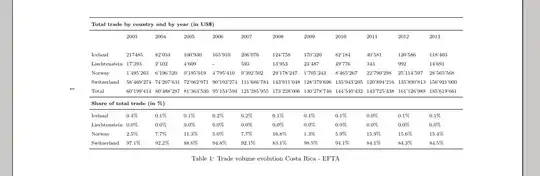
I'm writing a paper and need to insert various tables. I already created a table in Latex and I inserted it into a subsection, but when checking the pdf, the table doesn't appear in that subsection, but at the end of the pdf. The code is the following:

\usepackage{booktabs}
\usepackage{tabularx}
\newcolumntype{Y}{>{\raggedleft\arraybackslash}X}

\begin{table}[htb]
  \caption{Trade volume evolution Costa Rica - EFTA}
  \label{tbl:tradeevo-costa-efta}
  \begin{tabularx}{\linewidth}{l*{6}{Y}}
    \toprule
    \multicolumn{7}{l}{\textbf{Total trade by country and by year (in US\$)}} \\
    \midrule
               & 2003 & 2004 & 2005 & 2006 & 2007 & 2008 & 2009 & 2010 & 2011 & 2012 & 2013 \\[0pt]
               &      &        &           &     &         &  & & & & &\\
Iceland & 217485 &  82'034 & 100'930 &   165'910   &  206'076   &  124'758 &  170'320 &  82'184 &  40'581 &  120'586  &  118'403   \\

    Liechtenstein &  17'393  &   2'102   &   4'609   &   - &  593 &  13'953 &   23'487  &   49'776  &  343 &  992  &  14'691   \\

    Norway &  1'495'263  &   6'196'520     &   9'195'019        &    4'795'410    &   9'392'502                            &   29'178'247  &   1'705'243  &   8'465'267  &  22'790'298  &   25'114'597   &   28'565'568   \\

    Switzerland &  58'469'274  &   74'207'631     &   72'062'971        &    90'193'274    &   111'686'784                            &   143'911'048  &   128'379'696  &   135'943'205  &    120'894'216   &    135'890'813    &    156'921'000     \\

     Total &   60'199'414   &    80'488'287 &    81'363'530 &    95'154'594     & 121'285'955 &      173'228'006 &   130'278'746 &   144'540'432 &   143'725'438 &   161'126'988 &   185'619'661      \\
  \end{tabularx}
  \begin{tabularx}{\linewidth}{l*{7}{Y}}
    \toprule
    \multicolumn{7}{l}{\textbf{Share of total trade (in \%)}} \\
    \midrule
    Iceland &    0.4\% &    0.1\%   & 0.1\% & 0.2\% & 0.2\% & 0.1\% & 0.1\% & 0.1\% & 0.0\% & 0.1\% & 0.1\% \\
    Liechtenstein &    0.0\% &  0.0\% & 0.0\% & 0.0\% & 0.0\% & 0.0\% & 0.0\% & 0.0\% & 0.0\% & 0.0\% & 0.0\% &   \\
    Norway &    2.5\% & 7.7\%   & 11.3\%    & 5.0\% & 7.7\% & 16.8\%    & 1.3\% & 5.9\% & 15.9\%    & 15.6\%    & 15.4\% \\
    Switzerland &    97.1\% &   92.2\%  & 88.6\%    & 94.8\%    & 92.1\%    & 83.1\%    & 98.5\%    & 94.1\%    & 84.1\%    & 84.3\%    & 84.5\%  \\
    \bottomrule
  \end{tabularx}
\end{table}

It would be great if someone could help me out with the following issues:

a) The table isn't at the spot I inserted it in, but at the end of the pdf. How can this be changed?

b) As it is a rather wide table, the data doesn't appear sorted. For example, the years (2003 till 2013) should be displayed all in just one row and the 4 countries in just one column. The corresponding numbers should be sorted underneath those years. How can this be changed? Must the table be smaller? Or must it be landscape? Maybe it is too big for just one page?

c) How can the title "Table 1: xxxxxx" be underneath the whole table?

Null
  • 1,525
  • 2
    does this code compile correctly for you? please post a compilable code – touhami Mar 19 '15 at 20:39
  • To have LaTeX place the table nearer to the call-out, try adding p to the list of location specifiers. The table's placement, though, is going to the be least of your problems. Both tabularx environments should contain far more than 6 or 7 columns of type Y. Separately, do ask yourself what possible informational purpose may be served by reporting the dollar data down to the last $? This likely specious accuracy is virtually assures that the table cannot ever fit inside a normal-width text block. In fact, even in sidewaystable format (and 12 cols of type Y) the table doesn't fit. – Mico Mar 19 '15 at 20:53
  • a): A table is a floating environment, meaning that LaTeX can move it around e.g. to avoid bad page breaks. See Keeping tables/figures close to where they are mentioned for some options of what you can do. c) Move the \caption and \label to after the tabularx. – Torbjørn T. Mar 19 '15 at 20:53

1 Answers1

1

Here is a solution. Some comments:

  • You wrote two tables when in fact you only need one
  • You were defining 8 columns (\begin{tabularx}{\linewidth}{l*{7}{Y}}) when in fact you have 13! I wrote l*{12}l because...
  • ...I don't think you need tabularx or the Y column for anything here.
  • Even landscape, the table is way too large. I set \footnotesize and \setlength{\tabcolsep}{3pt} so that the font and column separation are smaller, but consider the possibility of transposing the table (so that the rows become columns).
  • To have the table landscape, you can use the package pdflscape and write the table in a \begin{landscape}...\end{landscape} environment. Surrounding everything in\afterpage{...} (afterpage package) ensures that the text before/after the table wraps up correctly.
  • As others have said in the comments, a table is a floating environment, so it will not be displayed exactly at the position that you write it in the code. Even though there are solutions to achive that behaviour, it could lead to severe layout problems (especially with a table as large as this one). That said, if you don't use \afterpage{...} it might be (check it) that the table lies exactly where you want (but the page before would be underfull)
  • To have the caption below... well, write it below ;-)
  • I added \renewcommand{\arraystretch}{1.5} so that thre is more space between rows.

CODE

\documentclass{article}
\usepackage{booktabs}
\usepackage{pdflscape}
\usepackage{afterpage}
\renewcommand{\arraystretch}{1.5}
\begin{document}
\afterpage{
\begin{landscape}        
\begin{table}
\footnotesize
\setlength{\tabcolsep}{3pt}
\begin{tabular}{l*{12}l}
    \toprule
    \multicolumn{12}{l}{\textbf{Total trade by country and by year (in US\$)}} \\
    \midrule
               & 2003 & 2004 & 2005 & 2006 & 2007 & 2008 & 2009 & 2010 & 2011 & 2012 & 2013 \\[0pt]
               &      &        &           &     &         &  & & & & &\\
Iceland & 217485 &  82'034 & 100'930 &   165'910   &  206'076   &  124'758 &  170'320 &  82'184 &  40'581 &  120'586  &  118'403   \\

    Liechtenstein &  17'393  &   2'102   &   4'609   &   - &  593 &  13'953 &   23'487  &   49'776  &  343 &  992  &  14'691   \\

    Norway &  1'495'263  &   6'196'520     &   9'195'019        &    4'795'410    &   9'392'502                            &   29'178'247  &   1'705'243  &   8'465'267  &  22'790'298  &   25'114'597   &   28'565'568   \\

    Switzerland &  58'469'274  &   74'207'631     &   72'062'971        &    90'193'274    &   111'686'784                            &   143'911'048  &   128'379'696  &   135'943'205  &    120'894'216   &    135'890'813    &    156'921'000     \\

     Total &   60'199'414   &    80'488'287 &    81'363'530 &    95'154'594     & 121'285'955 &      173'228'006 &   130'278'746 &   144'540'432 &   143'725'438 &   161'126'988 &   185'619'661      \\
\midrule
\multicolumn{7}{l}{\textbf{Share of total trade (in \%)}} \\
    \midrule
    Iceland &    0.4\% &    0.1\%   & 0.1\% & 0.2\% & 0.2\% & 0.1\% & 0.1\% & 0.1\% & 0.0\% & 0.1\% & 0.1\% \\
    Liechtenstein &    0.0\% &  0.0\% & 0.0\% & 0.0\% & 0.0\% & 0.0\% & 0.0\% & 0.0\% & 0.0\% & 0.0\% & 0.0\% &   \\
    Norway &    2.5\% & 7.7\%   & 11.3\%    & 5.0\% & 7.7\% & 16.8\%    & 1.3\% & 5.9\% & 15.9\%    & 15.6\%    & 15.4\% \\
    Switzerland &    97.1\% &   92.2\%  & 88.6\%    & 94.8\%    & 92.1\%    & 83.1\%    & 98.5\%    & 94.1\%    & 84.1\%    & 84.3\%    & 84.5\%  \\
    \bottomrule
  \end{tabular}
\caption{Trade volume evolution Costa Rica - EFTA}
\label{tbl:tradeevo-costa-efta}
\end{table}
\end{landscape}}
\end{document}

enter image description here

summer
  • 1,474
  • If you want the numbers right aligned, use {l*{12}r} instead of {l*{12}l} – summer Mar 19 '15 at 21:46
  • Thanks again "Summer"!!! Very helpful. It looks exactly as I had it in mind!! I will check the tabular configurations in order to learn more about how to manipulate this type of table. – escazu wtf Mar 19 '15 at 21:50
  • Given that the header row of the second part of the table provides the explanation "(in %)", all subsequent % symbols can probably be safely omitted. – Mico Mar 19 '15 at 22:55
  • Hey Mico, yes that's more than true. I copied it from my excel table and that's why they were still there. Can easily be omitted. Thanks for the hint! – escazu wtf Mar 20 '15 at 13:11