12

I need to typeset a list like the following:

  1. item 1

  2. item 2

  3. item 3

4-6. The same as previous ones

  1. Something else

Currently, I have typeset it using description environment as

\documentclass{article}
\begin{document}
   \begin{description}
      \item[1.] item 1
      \item[2.] item 2
      \item[3.] item 3
      \item[4-6.] The same as previous ones
      \item[7.] Something else
   \end{description}
\end{document}

However, I wonder if this is possible using enumerate or something else which does the numbering itself. Is it possible to create this list using enumerate?

In other words, can we do some thing like this to get the desired output

\documentclass{article}
\begin{document}
   \begin{enumerate}
      \item item 1
      \item item 2
      \item item 3
      \item[4-6.] The same as previous ones
      \item Something else
   \end{enumerate}
\end{document}

or even using something like \item[len=3] The same as previous ones where by len, I mean the number of enumerative items after the current one.

  • Please help us to help you and add a minimal working example (MWE) that illustrates your problem. It will be much easier for us to reproduce your situation and find out what the issue is when we see compilable code, starting with \documentclass{...} and ending with \end{document}. –  Feb 15 '15 at 12:34
  • \begin{enumerate} \item ...\end{enumerate} does not work ? Or should \item[4.-6.] automatically expand \item ...? –  Feb 15 '15 at 12:36
  • @ChristianHupfer Thanks for your comment. I have modified it accordingly. However, I do not have a problem with this result, but just was curious if the same result is possible with enumerate or not? I have googled for an hour, but could not find it out, so decided to post it here. – Ali Shakiba Feb 15 '15 at 12:38
  • @ChristianHupfer The second case is the one I am seeking for. Is there any way for that? – Ali Shakiba Feb 15 '15 at 12:39
  • To get it right: \item[4.-6.] should expand to 4. item 4 etc. Or \item[1.-6.] should do the tedious typing? Essentially a loop? –  Feb 15 '15 at 12:43
  • @ChristianHupfer I have modified the question to reflect my idea better, sorry for ambiguous sentences. – Ali Shakiba Feb 15 '15 at 12:50
  • @AndrewSwann I have changed the question statement accordingly. The reason that I am curious to get the desired output using enumerate although I am fulfilled with the description environment is the following situation. Consider I need to add a new item between items 2 and 3, then I should correct all the numbering down to the end! :( It is not a good idea, I think. – Ali Shakiba Feb 15 '15 at 12:52
  • @ChristianHupfer Your post was quite good, I have learned a new thing, the for loop. Thanks. However, the desired one is the one which combines items 4-6, giving the label 4-6. to that item and the next item starts at 7. Unfortunately, you have deleted it. – Ali Shakiba Feb 15 '15 at 12:56
  • @AliShakiba: I just undeleted it, but it's of no use for your question. –  Feb 15 '15 at 12:57
  • 2
    You can use \addtocounter{enumi}{3} just after \item[4-6.] The same as previous ones – karlkoeller Feb 15 '15 at 12:59
  • @ChristianHupfer You are right, but I am thankful for learning the new stuff, even if it is not the one I want. That's why I came to graduate school ... :D – Ali Shakiba Feb 15 '15 at 13:00
  • @karlkoeller That's right. Thank you. You have give me the answer. Would you mind post it separately, so I can accept it as answer? – Ali Shakiba Feb 15 '15 at 13:02
  • @AliShakiba: Well, I deleted the answer finally. It was not clear to me what you asked until the latest comments –  Feb 15 '15 at 13:03
  • @AliShakiba Not at all. I've answered. – karlkoeller Feb 15 '15 at 13:05
  • @ChristianHupfer Sorry for wasting your precious time. English is not my first language, and I have trouble communicating my ideas even in my mother tongue. ;-) – Ali Shakiba Feb 15 '15 at 13:05

3 Answers3

12

The only way I know to achieve what you want is to increment the enumi counter.

MWE:

\documentclass{article}
\begin{document}
   \begin{enumerate}
      \item item 1
      \item item 2
      \item item 3
      \item[4--6.] The same as previous ones\addtocounter{enumi}{3}
      \item Something else
   \end{enumerate}
\end{document} 

Output:

enter image description here

karlkoeller
  • 124,410
7

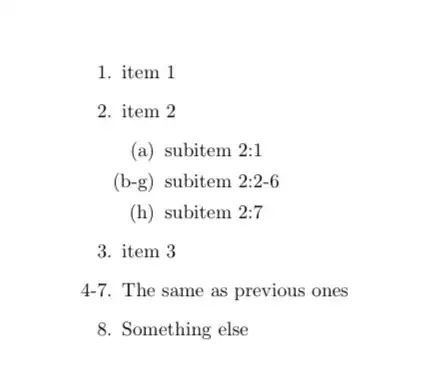
A version similar to Symbol 1's, but that doesn't require changing all the levels, since \@enumctr expands to the current counter.

The argument to \itemx is the number of items to unify.

\documentclass{article}
\usepackage{etoolbox}

\makeatletter
\newcounter{shakiba@temp}
\newcommand\itemx[1]{%
  \letcs\shakiba@save{the\@enumctr}
  \stepcounter{\@enumctr}%
  \protected@edef\shakiba@label{\csuse{the\@enumctr}--}
  \addtocounter{\@enumctr}{-1}%
  \addtocounter{\@enumctr}{#1}%
  \protected@edef\shakiba@label{\shakiba@label\csuse{the\@enumctr}}%
  \addtocounter{\@enumctr}{-1}
  \cslet{the\@enumctr}\shakiba@label
  \item
  \cslet{the\@enumctr}\shakiba@save
}
\makeatother

\begin{document}

\begin{enumerate}
\item item 1
\item item 2
  \begin{enumerate}
  \item subitem 2:1
  \itemx{5}\label{X} subitem 2:2-6
  \item subitem 2:7
  \end{enumerate}
\item item 3
\itemx{3}\label{Y} The same as previous ones
\item Something else
\end{enumerate}

References: \ref{X} and \ref{Y}

\end{document}

enter image description here

egreg
  • 1,121,712
6

A very brute way, but no need to calculate counters yourself

\documentclass{article}

\def\itemx#1{
    \let\oldtheenumi\theenumi
    \let\oldtheenumii\theenumii
    \let\oldtheenumiii\theenumiii
    \let\oldtheenumiv\theenumiv
    \def\theenumi{\oldtheenumi-\addtocounter{enumi}{#1}\oldtheenumi}
    \def\theenumii{\oldtheenumii-\addtocounter{enumii}{#1}\oldtheenumii}
    \def\theenumiii{\oldtheenumiii-\addtocounter{enumiii}{#1}\oldtheenumiii}
    \def\theenumiv{\oldtheenumiv-\addtocounter{enumiv}{#1}\oldtheenumiv}
    \item
    \let\theenumi\oldtheenumi
    \let\theenumii\oldtheenumii
    \let\theenumiii\oldtheenumiii
    \let\theenumiv\oldtheenumiv
}

\begin{document}
    \begin{enumerate}
        \item item 1
        \item item 2
        \begin{enumerate}
            \item subitem 2:1
            \itemx5 subitem 2:2-6
            \item subitem 2:7
        \end{enumerate}
        \item item 3
        \itemx3 The same as previous ones
        \item Something else
    \end{enumerate}
\end{document}
Symbol 1
  • 36,855