2

I tried very hard to convert pre-formatted IPA characters to pdf using xelatex but failed so far. I use Debian and latexmk command. The report is from the database and is formatted and paginated so that I use

\end{verbatim}
\clearpage
\begin{verbatim}

to keep the format.

The titles are to represent Vietnamese, Korean, Persian, Russian, French, Greek, Chinese and others and shown below. If I use 'Linux Libertine O', Russian and Persian and some other characters not converted properly to pdf giving, for example, "missing character: there is no ͡ in font[lmmono10-regular]. I also tried 'Charis SIL Compact' along with many others but no success.

I want to take care of all fonts in the header section before \begin{document} because it is very difficult to switch font in the middle of the pre-formated report.

Is this possible to do or am I trying something impossible?

Thank you very much. The sample titles of many languages follows.

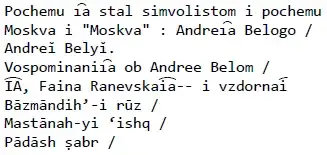
Pochemu i͡a stal simvolistom i pochemu       
Moskva i "Moskva" : Andrei͡a Belogo /       
Andreĭ Belyĭ.                                
Vospominanii͡a ob Andree Belom /            
I︠A︡, Faina Ranevskai︠a︡-- i vzdornai︠      
Bāzmāndihʼ-i rūz /                          
Mastānah-yi ʻishq /                         
Pādāsh ṣabr /                               
Qiṣih yi man va aū /                        
Bād mā rā khvāhad burd /                    
Ṭaʻm-i gas-i khurmālū /                     
Nīyāzam-- /                                 
¿Muerta?-- ¡pero de la risa! /              
El poder curativo de la mente : técnic      
Más allá de Conny Méndez 4 en 1 : de l      
Libro del juego de las suertes nuevame      
Qué es la wicca? : brujería de hoy /        
Đông cỏ /                                   
Ai nơ ép duyên /                             
Gió ngàn phương : tiêu thuyêt tình cảm      
Đạo đưc kinh : Quôc văn giải thích /        
Thiên học Viêt Nam /                        
Sinwŏn misang yŏja : Pʻatʻŭrik Modiano      
Tongmul nongjang ; 1984-yŏn /               
Tʻawŏ : Pae Myŏng-hun yŏnjak sosŏl.         
Kŭ kŏri ŭi hyŏnjae nŭn /                    
Nobou ŭi sŏng = Nobō no shiro /             
Renée Pélagie, marquise de Sade /           
Anna Karénine.                              
La cour des miracles.                        
Chagrin d'école /                           
Ssu-chʻuan tsʻai = Chinese cuisine Sze      
Tʻai-wan tsʻai /                            
Riben nü ren bu hui pang ye bu hui lao      
egreg
  • 1,121,712
  • I get no missing font if I use Liberation Serif/Sans/Mono. – egreg Feb 03 '15 at 21:12
  • Could you try with the sample that I posted? Could you also give some hint on what I should have in the header section? Thank you very much. – Jason Min Feb 03 '15 at 21:15
  • font[lmmono10-regular] means that you haven't declared a monospaced font, so XeLaTeX is resort to the default, Latin Modern Mono (lmmono). You should use \setmonofont from fontspec to use a monospaced font with wider Unicode coverage. See the discussion at complete, monospaced Unicode font? for ideas on fonts to try. – Jason Zentz Feb 03 '15 at 21:50
  • Jason Zentz, thank you very much for the reply. I will read your link and try again and let you know. Thank you. – Jason Min Feb 03 '15 at 22:03

1 Answers1

1

There are two issues at play here:

  1. Finding a font that has all the characters you need and places diacritics properly.
  2. Declaring the font properly.

Finding a font

As egreg pointed out, it's not clear from the question whether you actually want all these characters to show up in a monospaced font, or if you are simply using the verbatim environment so that you don't have to do any reformatting of the output from your database.

If you do want a monospaced font:

  • Consolas has all the characters in your MWE and has good diacritic handling: enter image description here
  • Liberation Mono, Unifont, and Courier New have all the characters in your MWE. However, they don't handle the positioning of the combining tie bar (U+0361) or the left/right combining tie bar characters (U+FE20 and U+FE21) well.
  • DejaVu Sans Mono and Linux Libertine Mono O are missing several characters.

If you want a proportional font:

  • DejaVu Sans, Arial, and Times New Roman have all the characters in your MWE and have decent handling of the relevant diacritics:
    enter image description here
  • Charis SIL, Doulos SIL, Gentium Plus have all the characters in your MWE. However, they don't handle the positioning of the left/right combining tie bar characters (U+FE20 and U+FE21) well.
  • Liberation Serif and Liberation Sans have all the characters in your MWE. However, they don't handle the positioning of the combining tie bar (U+0361) or the left/right combining tie bar characters (U+FE20 and U+FE21) well.
  • Linux Libertine O, Brill, and DejaVu Serif are missing the left/right combining tie bar characters (U+FE20 and U+FE21).

Declaring the font

The error message you report in the question refers to the font lmmono10-regular. This means that Latin Modern Mono, the default XeLaTeX monospaced font, was being used for the text in the verbatim environment. (So it's not surprising that so many characters weren't found.)

Declaring the main font to Linux Libertine O using \setmainfont isn't enough—the verbatim environment uses the mono font, not the main font, and fontspec doesn't automatically change the mono font to match the main font (it won't use Linux Libertine Mono O for the mono font even if the main font is Linux Libertine O unless you explicitly tell it to do so).

If you really need to use verbatim, then you could use \setmonofont{font name} to specify the font you want to use that environment, whether it's actually monospaced or not.

\documentclass{article}
\usepackage{fontspec}

\setmonofont{Consolas}

\begin{document}
\begin{verbatim}
Pochemu i͡a stal simvolistom i pochemu       
Moskva i "Moskva" : Andrei͡a Belogo /       
Andreĭ Belyĭ.                                
Vospominanii͡a ob Andree Belom /            
I︠A︡, Faina Ranevskai︠a︡-- i vzdornai︠      
Bāzmāndihʼ-i rūz /                          
Mastānah-yi ʻishq /                         
Pādāsh ṣabr /                               
Qiṣih yi man va aū /                        
Bād mā rā khvāhad burd /                    
Ṭaʻm-i gas-i khurmālū /                     
Nīyāzam-- /                                 
¿Muerta?-- ¡pero de la risa! /              
El poder curativo de la mente : técnic      
Más allá de Conny Méndez 4 en 1 : de l      
Libro del juego de las suertes nuevame      
Qué es la wicca? : brujería de hoy /        
Đông cỏ /                                   
Ai nơ ép duyên /                             
Gió ngàn phương : tiêu thuyêt tình cảm      
Đạo đưc kinh : Quôc văn giải thích /        
Thiên học Viêt Nam /                        
Sinwŏn misang yŏja : Pʻatʻŭrik Modiano      
Tongmul nongjang ; 1984-yŏn /               
Tʻawŏ : Pae Myŏng-hun yŏnjak sosŏl.         
Kŭ kŏri ŭi hyŏnjae nŭn /                    
Nobou ŭi sŏng = Nobō no shiro /             
Renée Pélagie, marquise de Sade /           
Anna Karénine.                              
La cour des miracles.                        
Chagrin d'école /                           
Ssu-chʻuan tsʻai = Chinese cuisine Sze      
Tʻai-wan tsʻai /                            
Riben nü ren bu hui pang ye bu hui lao      
\end{verbatim}
\end{document}

enter image description here

If you do choose to set a proportional font as the mono font, be aware that other commands and environments that access the mono font (like \texttt{}) will also use this proportional font. If this isn't desirable, you can use this code (adapted from this answer) instead of \setmonofont to set the verbatim font but not the overall mono font:

\newfontfamily\tnr{Times New Roman} % defines a new font family that can be accessed by \tnr

\usepackage{verbatim}% http://ctan.org/pkg/verbatim
\makeatletter
\newcommand{\verbatimfont}[1]{\def\verbatim@font{#1}}%
\makeatother

\verbatimfont{\tnr}
Jason Zentz
  • 4,158
  • Jason, thank you very much for detailed info. I found out that Consolas font is not readily available in linux Debian, so I will try DejaVu Sans Mono font first. I think I should use Mono font not to mess up the column alignments. The above example is just an extract of many column report. I think I tried \setmonofont but failed due to incorrect font I used probably. I will post the result. Thank you very much. – Jason Min Feb 04 '15 at 18:19
  • With \setmainfont{DejaVu Sans} and \setmonofont{DejaVu Sans Mono}, I get less errors but still have errors like below. Missing character: There is no ︠ in font DejaVu Sans Mono/ICU! Missing character: There is no ︡ in font DejaVu Sans Mono/ICU! Missing character: There is no ế in font DejaVu Sans Mono/ICU! Missing character: There is no ả in font DejaVu Sans Mono/ICU! Missing character: There is no ỏ in font DejaVu Sans Mono/ICU! Missing character: There is no ủ in font DejaVu Sans Mono/ICU! Missing character: There is no ỷ in font DejaVu Sans Mono/ICU! Thank you. – Jason Min Feb 04 '15 at 19:28
  • Right. As I mentioned in the answer, DejaVu Sans Mono is missing several of the characters you need. (DejaVu Sans has all the characters, but DejaVu Sans Mono doesn't.) The only monospaced fonts I tested that do have all the characters are Consolas, Liberation Mono, Unifont, and Courier New, although the last three don't handle the tie bars well. – Jason Zentz Feb 04 '15 at 19:45
  • Jason, thank you very much. So, then with DejaVu Sans(Mono), there is no way to get all characters correctly in pdf? I use Linux Debian, and I tried \setfmonofont{Insonsolata}, and I got more errors, saying "Missing character: There is no ā in font Inconsolata/ICU!" Other error chars are ī ā ū ā Ṭ ʻ ͡ ʹ and many others. I guess it is differernt from Consolas. Is there a way to put Consolas font into Debian? Thank you very much. – Jason Min Feb 04 '15 at 19:50
  • Consolas.ttf is available for free from fontpalace, although I'm not a Linux user and don't know how easily you could install that. It also ships with all Microsoft Office/Windows products. If you google for install consolas on linux there are several sites that look relevant, but I can't vouch for any of them. – Jason Zentz Feb 04 '15 at 20:08
  • Jason, I copied windows Consolas font to linux font folder, and ran again as you showed. Viola! at least I did not get font errors, but those Russian characters show a little differently. The 2 top lines of my example shows as some of the characters overlapping. I copied and pasted here. 'Pochemu aı͡ stal simvolistom i pochemu' 'Moskva i "Moskva" : Andreaı͡ Belogo'. But this is not exactly how it shows in pdf. I wish I could show screen print of the characters here. Another thing is the column after title are all messed up. Is this because monofont is not correctly written in pdf? Thank you – Jason Min Feb 04 '15 at 22:05
  • Jason Z., you solved my problem. If Russian characters can not be shown more completely, it is fine. Also fine is column alignment after the title because this is the one only font that gives no font error so that it most truly converts the utf8 unicode to pdf. Although I am still a novice in latex, I spent months trying to find the right solution of converting utf8 to pds. I started this because it looks easily doable at first, but then, I have to experiment lots of fonts to find the correct one. After several month, I thought this might not be possible, so I posted this question. Thank you. – Jason Min Feb 04 '15 at 22:43
  • Jason Z, FYI, I found out that Vietnamese and Hinu as well as Russian also overlap in some characters. Thank you. – Jason Min Feb 05 '15 at 00:07
  • Jason Z, FYI. From your link above,"complete, monospaced Unicode font", I found out that the 'unifont' also gives no font errors and has less overlapping Russian and Vietnamese characters, although the font look is not as good as the Consolas font. Thank you very much. – Jason Min Feb 06 '15 at 21:41