2

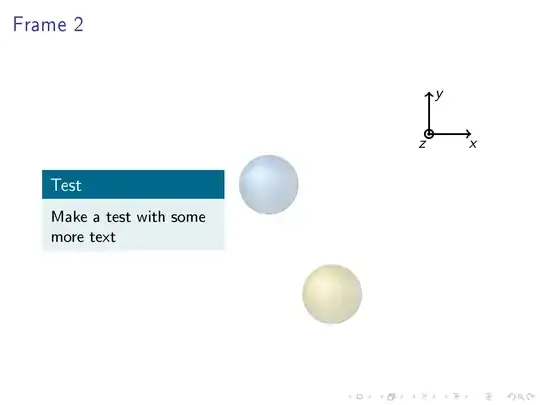
As the title says I have problems keeping the tikz picture in my right column at the same position.

Here a MWE so you can see for yourself.

\documentclass[xcolor=x11names,compress]{beamer}

\usepackage{graphicx}
\usepackage{tikz}


\setbeamercolor{block title}{use=structure,fg=white,bg=DeepSkyBlue4}
\setbeamercolor{block body}{use=structure,fg=black,bg=DeepSkyBlue4!10!white}


\begin{document}


\subsection*{Test 1}
\begin{frame}{Frame 1}
    \begin{columns}[onlytextwidth]
        \begin{column}{.4\textwidth}
            Test: A really long line of text for a presentation\\
        \end{column}
        \begin{column}{.6\textwidth}
            \centering
            \begin{tikzpicture}
                \draw[->,very thick,cap=rect] (3.8,1.2)--(4.8,1.2);
                \node at (4.85,0.95) {$x$};
                \draw[->,very thick, cap=rect] (3.8,1.2)--(3.8,2.2);
                \node at (4.05, 2.1) {$y$};
                \draw[very thick] (3.8,1.2) circle (0.1);
                \draw[very thick] (3.8,1.2) circle (0.02);
                \node at (3.65, 0.95) {$z$};


                \draw[opacity=0.15] (1.5,-2.59861) circle (0.7cm);
                \shade[ball color=Gold3,opacity=0.105] (1.5,-2.59861) circle (0.7cm);

                \draw[opacity=0.15] (0.0,0) circle (0.7cm);
                \shade[ball color=DodgerBlue3,opacity=0.105] (0.0,0) circle (0.7cm);

                \end{tikzpicture}
        \end{column}
    \end{columns}


\end{frame}

%%%%%%%%%%%%%%%%%%%%%%%%%%%%%%%%%%%%%%%%%%%%%%%%%%%%%%
\subsection*{Test 2}
\begin{frame}{Frame 2}
    \begin{columns}[onlytextwidth]
        \begin{column}{.4\textwidth}
            \begin{block}{Test}
                Make a test with some more text
            \end{block}
        \end{column}
        \begin{column}{.6\textwidth}
            \centering
            \begin{tikzpicture}
                \draw[->,very thick,cap=rect] (3.8,1.2)--(4.8,1.2);
                \node at (4.85,0.95) {$x$};
                \draw[->,very thick, cap=rect] (3.8,1.2)--(3.8,2.2);
                \node at (4.05, 2.1) {$y$};
                \draw[very thick] (3.8,1.2) circle (0.1);
                \draw[very thick] (3.8,1.2) circle (0.02);
                \node at (3.65, 0.95) {$z$};


                \draw[opacity=0.15] (1.5,-2.59861) circle (0.7cm);
                \shade[ball color=Gold3,opacity=0.105] (1.5,-2.59861) circle (0.7cm);

                \draw[opacity=0.15] (0.0,0) circle (0.7cm);
                \shade[ball color=DodgerBlue3,opacity=0.105] (0.0,0) circle (0.7cm);

            \end{tikzpicture}
        \end{column}
    \end{columns}


\end{frame}


\end{document}

I would need a solution where I keep the two frames, so \only etc. is not an option.

NOhs
  • 858

2 Answers2

1

block has some inner separation that somehow deosn't get restricted inside the width. Use

\end{column}
\hfill
\begin{column}{.55\textwidth}

instead.

\documentclass[xcolor=x11names,compress]{beamer}

\usepackage{graphicx}
\usepackage{tikz}


\setbeamercolor{block title}{use=structure,fg=white,bg=DeepSkyBlue4}
\setbeamercolor{block body}{use=structure,fg=black,bg=DeepSkyBlue4!10!white}


\begin{document}


\subsection*{Test 1}
\begin{frame}{Frame 1}
    \begin{columns}[onlytextwidth]
        \begin{column}{.4\textwidth}
            Test: A really long line of text for a presentation\\
        \end{column}\hfill
        \begin{column}{.55\textwidth}
            \centering
            \begin{tikzpicture}
                \draw[->,very thick,cap=rect] (3.8,1.2)--(4.8,1.2);
                \node at (4.85,0.95) {$x$};
                \draw[->,very thick, cap=rect] (3.8,1.2)--(3.8,2.2);
                \node at (4.05, 2.1) {$y$};
                \draw[very thick] (3.8,1.2) circle (0.1);
                \draw[very thick] (3.8,1.2) circle (0.02);
                \node at (3.65, 0.95) {$z$};


                \draw[opacity=0.15] (1.5,-2.59861) circle (0.7cm);
                \shade[ball color=Gold3,opacity=0.105] (1.5,-2.59861) circle (0.7cm);

                \draw[opacity=0.15] (0.0,0) circle (0.7cm);
                \shade[ball color=DodgerBlue3,opacity=0.105] (0.0,0) circle (0.7cm);

                \end{tikzpicture}
        \end{column}
    \end{columns}


\end{frame}

%%%%%%%%%%%%%%%%%%%%%%%%%%%%%%%%%%%%%%%%%%%%%%%%%%%%%%
\subsection*{Test 2}
\begin{frame}{Frame 2}
    \begin{columns}[onlytextwidth]
        \begin{column}{.4\textwidth}
            \begin{block}{Test}
                Make a test with some more text
            \end{block}
        \end{column}\hfill
        \begin{column}{.55\textwidth}
            \centering
            \begin{tikzpicture}
                \draw[->,very thick,cap=rect] (3.8,1.2)--(4.8,1.2);
                \node at (4.85,0.95) {$x$};
                \draw[->,very thick, cap=rect] (3.8,1.2)--(3.8,2.2);
                \node at (4.05, 2.1) {$y$};
                \draw[very thick] (3.8,1.2) circle (0.1);
                \draw[very thick] (3.8,1.2) circle (0.02);
                \node at (3.65, 0.95) {$z$};


                \draw[opacity=0.15] (1.5,-2.59861) circle (0.7cm);
                \shade[ball color=Gold3,opacity=0.105] (1.5,-2.59861) circle (0.7cm);

                \draw[opacity=0.15] (0.0,0) circle (0.7cm);
                \shade[ball color=DodgerBlue3,opacity=0.105] (0.0,0) circle (0.7cm);

            \end{tikzpicture}
        \end{column}
    \end{columns}


\end{frame}


\end{document}
user43963
  • 1,570
1

Inspired by @cfr's solution here -- https://tex.stackexchange.com/a/217885/34618, With some modifications to the block template seems to do the trick.

enter image description here enter image description here

Code

\documentclass[xcolor=x11names,compress]
{beamer}

\usepackage{graphicx}
\usepackage{tikz}
%

\setbeamertemplate{block begin}{
  \vskip\baselineskip
  \begin{beamercolorbox}[wd=\textwidth, ht=0.5cm, dp=0.2cm, leftskip=0.2cm]{block title}%
    \usebeamerfont*{block title}%
    {\rule[-0.4ex]{0mm}{2ex}\insertblocktitle}%
  \end{beamercolorbox}%
  {\nointerlineskip\vskip-0.5pt}%
  \usebeamerfont{block body}%
  \begin{beamercolorbox}[wd=\textwidth, leftskip=0.2cm,dp=0.2cm]{block body}%
    \vskip-.75ex\vspace*{0.2cm}%
  }
  \setbeamertemplate{block end}{
  \end{beamercolorbox}
  \vspace*{.25cm}
}

\setbeamercolor{block title}{use=structure,fg=white,bg=DeepSkyBlue4}
\setbeamercolor{block body}{use=structure,fg=black,bg=DeepSkyBlue4!10!white}

\begin{document}

\subsection*{Test 1}
\begin{frame}{Frame 1}
    \begin{columns}[onlytextwidth]
        \begin{column}{.4\textwidth}
            Test: A really long line of text for a presentation\\
        \end{column}
        \begin{column}{.6\textwidth}
            \centering
            \begin{tikzpicture}
                \draw[->,very thick,cap=rect] (3.8,1.2)--(4.8,1.2);
                \node at (4.85,0.95) {$x$};
                \draw[->,very thick, cap=rect] (3.8,1.2)--(3.8,2.2);
                \node at (4.05, 2.1) {$y$};
                \draw[very thick] (3.8,1.2) circle (0.1);
                \draw[very thick] (3.8,1.2) circle (0.02);
                \node at (3.65, 0.95) {$z$};
                \draw[opacity=0.15] (1.5,-2.59861) circle (0.7cm);
                \shade[ball color=Gold3,opacity=0.105] (1.5,-2.59861) circle (0.7cm);

                \draw[opacity=0.15] (0.0,0) circle (0.7cm);
                \shade[ball color=DodgerBlue3,opacity=0.105] (0.0,0) circle (0.7cm);

                \end{tikzpicture}
        \end{column}
    \end{columns}
\end{frame}

%%%%%%%%%%%%%%%%%%%%%%%%%%%%%%%%%%%%%%%%%%%%%%%%%%%%%%
\subsection*{Test 2}
\begin{frame}{Frame 2}
    \begin{columns}[onlytextwidth]
        \begin{column}{.4\textwidth}
            \begin{block}{Test}
                Make a test with some more text
            \end{block}
        \end{column}
        \begin{column}{.6\textwidth}
            \centering
            \begin{tikzpicture}
                \draw[->,very thick,cap=rect] (3.8,1.2)--(4.8,1.2);
                \node at (4.85,0.95) {$x$};
                \draw[->,very thick, cap=rect] (3.8,1.2)--(3.8,2.2);
                \node at (4.05, 2.1) {$y$};
                \draw[very thick] (3.8,1.2) circle (0.1);
                \draw[very thick] (3.8,1.2) circle (0.02);
                \node at (3.65, 0.95) {$z$};
                \draw[opacity=0.15] (1.5,-2.59861) circle (0.7cm);
                \shade[ball color=Gold3,opacity=0.105] (1.5,-2.59861) circle (0.7cm);

                \draw[opacity=0.15] (0.0,0) circle (0.7cm);
                \shade[ball color=DodgerBlue3,opacity=0.105] (0.0,0) circle (0.7cm);

            \end{tikzpicture}
        \end{column}
    \end{columns}
\end{frame}

\end{document}
Jesse
  • 29,686
  • Would I need to do this for all blocks? alertblock, exampleblock? – NOhs Jan 08 '15 at 08:35
  • This definition causes a problem with an align inside. There is no spacing between the block-border and the numbering of the equation. – NOhs Jan 08 '15 at 08:38
  • On the first concern, you could define a new block for such purpose. Please check http://tex.stackexchange.com/a/152580/34618 – Jesse Jan 08 '15 at 11:28
  • On the second concern, this is my take. Use of minipage as showh what follows, which goes inside block environment. This is a long very text. \setlength\abovedisplayskip{0pt} \begin{minipage}{3cm} \begin{align} &x+y=z \\ &x*y=zz \end{align} \\ \end{minipage} – Jesse Jan 08 '15 at 12:13
  • Thanks for the link. On the second concern, I would need to include a minipage everytime I place an align inside a block. How does align determine where to place the equation number. Maybe one could reduce the corresponding width for all blocks globally? Or if I were to define a new block-environment which always includes a minipage, how do I get the autoscaling for the minipage,too? – NOhs Jan 08 '15 at 15:11
  • Maybe you need this. The varwidth package provides varwidth environment (dynamic width), which is exactly like minipage, but shrinks to the natural width of it's contents. – Jesse Jan 08 '15 at 16:10