If you're comfortable to not let the algorithm float, then you can put it in a box that you can readjust to suit your needs:
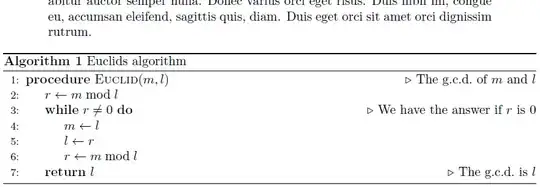
\documentclass{article}

\usepackage{algorithm,lipsum,changepage}
\usepackage[noend]{algpseudocode}

\begin{document}

\lipsum[1]

\noindent\hspace*{-.1\textwidth}%
\begin{minipage}{1.2\textwidth}%
  \begin{algorithm}[H]
    \caption{Euclid’s algorithm}\label{alg:euclid}
    \begin{algorithmic}[1]
      \Procedure{Euclid}{$m,l$}\Comment{The g.c.d.\ of $m$ and $l$}
        \State $r \gets m \bmod l$
        \While{$r \neq 0$}\Comment{We have the answer if $r$ is $0$}
        \State $m \gets l$
        \State $l \gets r$
        \State $r \gets m \bmod l$
        \EndWhile
        \State \textbf{return} $l$\Comment{The g.c.d.\ is $l$}
      \EndProcedure
    \end{algorithmic}
  \end{algorithm}
\end{minipage}

\end{document}
For adjusting the width of the float in general, you can use the following preamble modifications:

\documentclass{article}

\usepackage{algorithm,lipsum,etoolbox}
\usepackage[noend]{algpseudocode}

\makeatletter
\newif\if@algorithm
\patchcmd{\@float@Hx}% <cmd>
  {\@nodocument}% <search>
  {\@nodocument%
   \ifnum\pdfstrcmp{#1}{algorithm}=0 % Check whether using algorithm float
     \@algorithmtrue% Inside algorithm environment
     \setlength{\columnwidth}{\algorithmwidth}% Update column width
   \fi}% <replace>
  {}{}% <success><failure>
\renewcommand\float@makebox[1]{%
  \hbox{%
    % Adjust horizontally to give a centred look
    \if@algorithm\hspace*{-.5\dimexpr\algorithmwidth-\textwidth}\fi%
    \vbox{\hsize=#1 \@parboxrestore
      \@fs@pre\@fs@iftopcapt
        \ifvoid\@floatcapt\else\unvbox\@floatcapt\par\@fs@mid\fi
        \unvbox\@currbox
      \else\unvbox\@currbox
        \ifvoid\@floatcapt\else\par\@fs@mid\unvbox\@floatcapt\fi
      \fi\par\@fs@post\vskip\z@}}}

\makeatother

\newlength{\algorithmwidth}
\AtBeginDocument{\setlength{\algorithmwidth}{1.2\textwidth}}

\begin{document}

\lipsum[1]

\begin{algorithm}[t]
  \caption{Euclid’s algorithm}
  \begin{algorithmic}[1]
    \Procedure{Euclid}{$m,l$}\Comment{The g.c.d.\ of $m$ and $l$}
      \State $r \gets m \bmod l$
      \While{$r \neq 0$}\Comment{We have the answer if $r$ is $0$}
      \State $m \gets l$
      \State $l \gets r$
      \State $r \gets m \bmod l$
      \EndWhile
      \State \textbf{return} $l$\Comment{The g.c.d.\ is $l$}
    \EndProcedure
  \end{algorithmic}
\end{algorithm}

\lipsum[2]

\setlength{\algorithmwidth}{.8\textwidth}

\begin{algorithm}[b]
  \caption{Euclid’s algorithm}
  \begin{algorithmic}[1]
    \Procedure{Euclid}{$m,l$}\Comment{The g.c.d.\ of $m$ and $l$}
      \State $r \gets m \bmod l$
      \While{$r \neq 0$}\Comment{We have the answer if $r$ is $0$}
      \State $m \gets l$
      \State $l \gets r$
      \State $r \gets m \bmod l$
      \EndWhile
      \State \textbf{return} $l$\Comment{The g.c.d.\ is $l$}
    \EndProcedure
  \end{algorithmic}
\end{algorithm}

\lipsum[3]
\end{document}
The preamble modifications includes patches to the float builder that is specific to the algorithm environment. The width of the float box is adjusted to \algorithmwidth (which can be set/changed throughout the document), again only while using the algorithm float.
Since the treatment of traditional floats and (non-)floats using a [H]ERE placement is completely different, the above-mentioned methods are exclusive. If you wish to combine them, you'd have to combine both methods. A non-float-ish alternative to [H] would be [h!].


