2

I have the following LATEX document:

\documentclass[a4paper,12pt]{article}

\begin{document}


\section{Enemies}

\begin{table}[ht]
\begin{tabular}{c c c c c} % centered columns (4 columns)
First Name & Last Name & Phone & Address & Category \\ [0.5ex] % inserts table
%heading
\hline  % inserts single horizontal line
Grey&Beard&1234567890&the ocean&Enemies\\
\hline %inserts single line
\end{tabular}
\end{table}

\section{Friends}

\begin{table}[ht]
\begin{tabular}{c c c c c} % centered columns (4 columns)
First Name & Last Name & Phone & Address & Category \\ [0.5ex] % inserts table
%heading
\hline  % inserts single horizontal line
John&Doe&1234567890&1424 Brooklyn Ave.&Friends\\
\hline %inserts single line
\end{tabular}
\end{table}

\section{Relatives}

\begin{table}[ht]
\begin{tabular}{c c c c c} % centered columns (4 columns)
First Name & Last Name & Phone & Address & Category \\ [0.5ex] % inserts table
%heading
\hline  % inserts single horizontal line
My&Self&1234567890&My current location&Relatives\\
\hline %inserts single line
\end{tabular}
\end{table}

\section{Mythical Beasts}

\begin{table}[ht]
\begin{tabular}{c c c c c} % centered columns (4 columns)
First Name & Last Name & Phone & Address & Category \\ [0.5ex] % inserts table
%heading
\hline  % inserts single horizontal line
Puff&Dragon&1234567890&cave by the ocean&Mythical Beasts\\
\hline %inserts single line
\end{tabular}
\end{table}

\section{Public Figures}

\begin{table}[ht]
\begin{tabular}{c c c c c} % centered columns (4 columns)
First Name & Last Name & Phone & Address & Category \\ [0.5ex] % inserts table
%heading
\hline  % inserts single horizontal line
Santa&Claus&10234987&North Pole&Public Figures\\
\hline %inserts single line
\end{tabular}
\end{table}


\end{document}

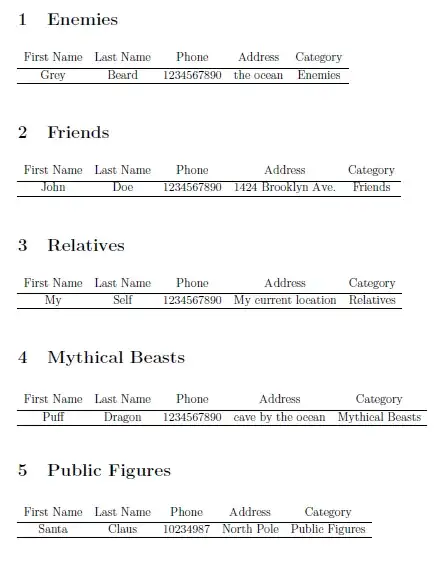
This is what it looks like after being compiled:

enter image description here

As you can see, the first few sections render properly, but after the first three the other sections' content appears outside of the sections. I tried reordering the sections and the same thing happens.

What is the problem?

EDIT:

New example:

\documentclass[a4paper,12pt]{article}


\title{Contact List}
\date{\today}

\begin{document}
\maketitle


\section{Enemies}

\begin{table}[!h] % note the !
\begin{tabular}{c c c c c} % centered columns (4 columns)
First Name & Last Name & Phone & Address & Category \\ [0.5ex] % inserts table
%heading
\hline  % inserts single horizontal line
Grey&Beard&1234567890&the ocean&Enemies\\
\hline %inserts single line
\end{tabular}
\end{table}

\section{Friends}

\begin{table}[!h] % note the !
\begin{tabular}{c c c c c} % centered columns (4 columns)
First Name & Last Name & Phone & Address & Category \\ [0.5ex] % inserts table
%heading
\hline  % inserts single horizontal line
John&Doe&1234567890&1424 Brooklyn Ave.&Friends\\
\hline %inserts single line
\end{tabular}
\end{table}

\section{Relatives}

\begin{table}[!h] % note the !
\begin{tabular}{c c c c c} % centered columns (4 columns)
First Name & Last Name & Phone & Address & Category \\ [0.5ex] % inserts table
%heading
\hline  % inserts single horizontal line
My&Self&1234567890&My current location&Relatives\\
\hline %inserts single line
\end{tabular}
\end{table}

\section{Mythical Beasts}

\begin{table}[!h] % note the !
\begin{tabular}{c c c c c} % centered columns (4 columns)
First Name & Last Name & Phone & Address & Category \\ [0.5ex] % inserts table
%heading
\hline  % inserts single horizontal line
Puff&Dragon&1234567890&cave by the ocean&Mythical Beasts\\
\hline %inserts single line
\end{tabular}
\end{table}

\section{Public Figures}

\begin{table}[!h] % note the !
\begin{tabular}{c c c c c} % centered columns (4 columns)
First Name & Last Name & Phone & Address & Category \\ [0.5ex] % inserts table
%heading
\hline  % inserts single horizontal line
Santa&Claus&10234987&North Pole&Public Figures\\
\hline %inserts single line
\end{tabular}
\end{table}


\end{document}

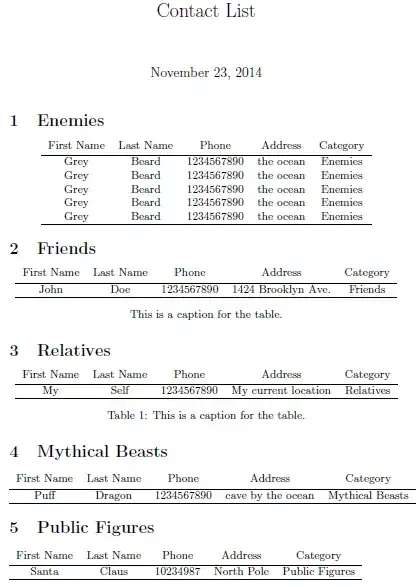
enter image description here enter image description here

Werner
  • 603,163
Nate
  • 123

2 Answers2

5

The table environment is a float environment. LaTeX puts the content of floats where it deems best, which might not correspond directly to where you put the float in your code. See Floating with table.

Unless you really need float functionality for your tables (but given your question it sounds like you don't), you can just remove the \begin{table} and \end{table} lines from each of your tables. The tabular environment does not need to be wrapped in a table environment.

\section{Enemies}

\begin{tabular}{c c c c c} % centered columns (4 columns)
First Name & Last Name & Phone & Address & Category \\ [0.5ex] % inserts table
%heading
\hline  % inserts single horizontal line
Grey&Beard&1234567890&the ocean&Enemies\\
\hline %inserts single line
\end{tabular}

\section{Friends}

\begin{tabular}{c c c c c} % centered columns (4 columns)
First Name & Last Name & Phone & Address & Category \\ [0.5ex] % inserts table
%heading
\hline  % inserts single horizontal line
John&Doe&1234567890&1424 Brooklyn Ave.&Friends\\
\hline %inserts single line
\end{tabular}

\section{Relatives}

\begin{tabular}{c c c c c} % centered columns (4 columns)
First Name & Last Name & Phone & Address & Category \\ [0.5ex] % inserts table
%heading
\hline  % inserts single horizontal line
My&Self&1234567890&My current location&Relatives\\
\hline %inserts single line
\end{tabular}

\section{Mythical Beasts}

\begin{tabular}{c c c c c} % centered columns (4 columns)
First Name & Last Name & Phone & Address & Category \\ [0.5ex] % inserts table
%heading
\hline  % inserts single horizontal line
Puff&Dragon&1234567890&cave by the ocean&Mythical Beasts\\
\hline %inserts single line
\end{tabular}

\section{Public Figures}

\begin{tabular}{c c c c c} % centered columns (4 columns)
First Name & Last Name & Phone & Address & Category \\ [0.5ex] % inserts table
%heading
\hline  % inserts single horizontal line
Santa&Claus&10234987&North Pole&Public Figures\\
\hline %inserts single line
\end{tabular}

\end{document}

enter image description here

If you do decide you need table (for a caption, for instance), you can add ! to the options declaration, which forces the float to appear where you specify:

\documentclass[a4paper,12pt]{article}

\begin{document}


\section{Enemies}

\begin{table}[!h] % note the !
\begin{tabular}{c c c c c} % centered columns (4 columns)
First Name & Last Name & Phone & Address & Category \\ [0.5ex] % inserts table
%heading
\hline  % inserts single horizontal line
Grey&Beard&1234567890&the ocean&Enemies\\
\hline %inserts single line
\end{tabular}
\end{table}

\section{Friends}

\begin{table}[!h] % note the !
\begin{tabular}{c c c c c} % centered columns (4 columns)
First Name & Last Name & Phone & Address & Category \\ [0.5ex] % inserts table
%heading
\hline  % inserts single horizontal line
John&Doe&1234567890&1424 Brooklyn Ave.&Friends\\
\hline %inserts single line
\end{tabular}
\end{table}

\section{Relatives}

\begin{table}[!h] % note the !
\begin{tabular}{c c c c c} % centered columns (4 columns)
First Name & Last Name & Phone & Address & Category \\ [0.5ex] % inserts table
%heading
\hline  % inserts single horizontal line
My&Self&1234567890&My current location&Relatives\\
\hline %inserts single line
\end{tabular}
\end{table}

\section{Mythical Beasts}

\begin{table}[!h] % note the !
\begin{tabular}{c c c c c} % centered columns (4 columns)
First Name & Last Name & Phone & Address & Category \\ [0.5ex] % inserts table
%heading
\hline  % inserts single horizontal line
Puff&Dragon&1234567890&cave by the ocean&Mythical Beasts\\
\hline %inserts single line
\end{tabular}
\end{table}

\section{Public Figures}

\begin{table}[!h] % note the !
\begin{tabular}{c c c c c} % centered columns (4 columns)
First Name & Last Name & Phone & Address & Category \\ [0.5ex] % inserts table
%heading
\hline  % inserts single horizontal line
Santa&Claus&10234987&North Pole&Public Figures\\
\hline %inserts single line
\end{tabular}
\end{table}


\end{document}

enter image description here

EDIT

For an even stronger effect, use the float package and the [H] option on the tables.

\documentclass[a4paper,12pt]{article}
\usepackage{float}

\title{Contact List}
\date{\today}

\begin{document}
    \maketitle


    \section{Enemies}

    \begin{table}[H] % note the H
        \begin{tabular}{c c c c c} % centered columns (4 columns)
            First Name & Last Name & Phone & Address & Category \\ [0.5ex] % inserts table
            %heading
            \hline  % inserts single horizontal line
            Grey&Beard&1234567890&the ocean&Enemies\\
            Grey&Beard&1234567890&the ocean&Enemies\\
            Grey&Beard&1234567890&the ocean&Enemies\\
            Grey&Beard&1234567890&the ocean&Enemies\\
            Grey&Beard&1234567890&the ocean&Enemies\\
            \hline %inserts single line
        \end{tabular}
    \end{table}

    \section{Friends}

    \begin{table}[H] % note the H
        \begin{tabular}{c c c c c} % centered columns (4 columns)
            First Name & Last Name & Phone & Address & Category \\ [0.5ex] % inserts table
            %heading
            \hline  % inserts single horizontal line
            John&Doe&1234567890&1424 Brooklyn Ave.&Friends\\
            \hline %inserts single line
        \end{tabular}
    \end{table}

    \section{Relatives}

    \begin{table}[H] % note the H
        \begin{tabular}{c c c c c} % centered columns (4 columns)
            First Name & Last Name & Phone & Address & Category \\ [0.5ex] % inserts table
            %heading
            \hline  % inserts single horizontal line
            My&Self&1234567890&My current location&Relatives\\
            \hline %inserts single line
        \end{tabular}
    \end{table}

    \section{Mythical Beasts}

    \begin{table}[H] % note the H
        \begin{tabular}{c c c c c} % centered columns (4 columns)
            First Name & Last Name & Phone & Address & Category \\ [0.5ex] % inserts table
            %heading
            \hline  % inserts single horizontal line
            Puff&Dragon&1234567890&cave by the ocean&Mythical Beasts\\
            \hline %inserts single line
        \end{tabular}
    \end{table}

    \section{Public Figures}

    \begin{table}[H] % note the H
        \begin{tabular}{c c c c c} % centered columns (4 columns)
            First Name & Last Name & Phone & Address & Category \\ [0.5ex] % inserts table
            %heading
            \hline  % inserts single horizontal line
            Santa&Claus&10234987&North Pole&Public Figures\\
            \hline %inserts single line
        \end{tabular}
    \end{table}


\end{document}

enter image description here

Jason Zentz
  • 4,158
3

Float placement in LaTeX is not always easy, as things may not end up where you want them to go. This is discussed in detail in the two FAQs How to influence the position of float environments like figure and table in LaTeX? and Keeping tables/figures close to where they are mentioned.

From what it seems like you're not interested in content floating around in your document. Instead, you just want a tabular representation of some data that should be contained within the section. For that you do not need a table environment. Indeed, a tabular can survive on its own without being placed inside a table float. So, just don't use it.

Secondly, the reason for your current limit of "three tables" stems from LaTeX's float setup. In fact, the total number of floats that you can have on any page is set to a default of 3 via a counter totalnumber. Increasing this number might be of help, but it's not necessarily the best idea, since other counters keep track of how much space is occupied by floats at the top/bottom of the page. This, in turn, might cause movement of floats beyond your control.

Taking the above into consideration, I would suggest using a tabular-only implementation. If you want captions, you can add them in the text like you would anything else. If you want numbered captions (like a regular table), you can include the capt-of package. And, finally, for tables that need to break across the page boundary, you can consider using longtable.

Here is a minimal example showing a possible setup:

enter image description here

\documentclass{article}
\usepackage{capt-of}

\title{Contact List}
\date{\today}

\begin{document}
\maketitle

\section{Enemies}

\begin{center}
  \begin{tabular}{c c c c c} % centered columns (4 columns)
    First Name & Last Name & Phone & Address & Category \\ [0.5ex] % inserts table
    %heading
    \hline  % inserts single horizontal line
    Grey&Beard&1234567890&the ocean&Enemies\\
    Grey&Beard&1234567890&the ocean&Enemies\\
    Grey&Beard&1234567890&the ocean&Enemies\\
    Grey&Beard&1234567890&the ocean&Enemies\\
    Grey&Beard&1234567890&the ocean&Enemies\\
    \hline %inserts single line
  \end{tabular}
\end{center}

\section{Friends}

\begin{center}
  \begin{tabular}{c c c c c} % centered columns (4 columns)
    First Name & Last Name & Phone & Address & Category \\ [0.5ex] % inserts table
    %heading
    \hline  % inserts single horizontal line
    John&Doe&1234567890&1424 Brooklyn Ave.&Friends\\
    \hline %inserts single line
  \end{tabular}

  \vspace{\abovecaptionskip}%
  This is a caption for the table.
\end{center}

\section{Relatives}

\begin{center}
  \begin{tabular}{c c c c c} % centered columns (4 columns)
    First Name & Last Name & Phone & Address & Category \\ [0.5ex] % inserts table
    %heading
    \hline  % inserts single horizontal line
    My&Self&1234567890&My current location&Relatives\\
    \hline %inserts single line
  \end{tabular}
  \captionof{table}{This is a caption for the table.}% Placed inside a (center) group
\end{center}

\section{Mythical Beasts}

\noindent
\begin{tabular}{c c c c c} % centered columns (4 columns)
  First Name & Last Name & Phone & Address & Category \\ [0.5ex] % inserts table
  %heading
  \hline  % inserts single horizontal line
  Puff&Dragon&1234567890&cave by the ocean&Mythical Beasts\\
  \hline %inserts single line
\end{tabular}

\section{Public Figures}

\noindent
\begin{tabular}{c c c c c} % centered columns (4 columns)
  First Name & Last Name & Phone & Address & Category \\ [0.5ex] % inserts table
  %heading
  \hline  % inserts single horizontal line
  Santa&Claus&10234987&North Pole&Public Figures\\
  \hline %inserts single line
\end{tabular}

\end{document}
Werner
  • 603,163