I would like to know if renaming a command is possible in LaTeX.
For instance, could I change the \section by \sec ?
I read that some people used something called "alias".
There are a number of ways, depending on what you're after:
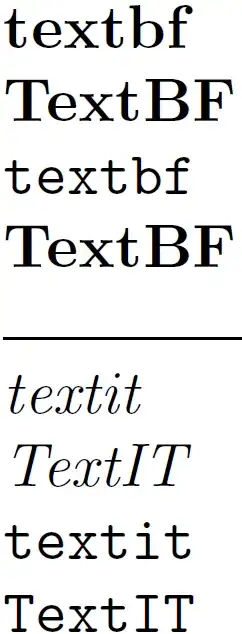
\documentclass{article}
\setlength{\parindent}{0pt}% Just for this example
\begin{document}
\let\TextBF\textbf% Copy definition of \textbf into \TextBF

\textbf{textbf}\par
\TextBF{TextBF}

\let\textbf\texttt% Change original \textbf to now be equivalent to \texttt

\textbf{textbf}\par
\TextBF{TextBF}% \TextBF remains unchanged

\hrulefill

\newcommand{\TextIT}{\textit}% \TextIT will be replaced with \textit

\textit{textit}\par
\TextIT{TextIT}

\let\textit\texttt% Change original \textit to now be equivalent to \texttt

\textit{textit}\par
\TextIT{TextIT}% \TextIT changes with \textit

\end{document}
\let<csnameA><csnameB> makes a copy of the definition of <csnameB> and places it into <csnameA> (like a regular copy-and-paste). It has the advantage that you can now redefine <csnameB> without affecting the copy you just made (<csnameA>).
\newcommand{<csnameA>}{<csnameB>} merely points <csnameA> to <csnameB>. To that end, updates to <csnameB> will still be reflected in <csnameA>.
Related questions:
Note that if you want to copy (i.e. if the original command is modified the new command keeps the old value), you can use:
\NewCommandCopy\newMacro\oldMacro
\RenewCommandCopy\newMacro\oldMacro
\DeclareCommandCopy\newMacro\oldMacro
that is more robust on commands created via \NewDocumentCommand for instance.


\let\sec\sectionand then use\sec. That way you don't loose\sectionyou just copy its definition to\sec. – Manuel Jul 26 '14 at 15:00\newcommand{\sec}{\section}. But the best way is not doing it. Using an alias for a command might confuse your editor (code folding features, for instance). – egreg Jul 26 '14 at 17:04