10

I am new to the Emacs world. I did this transition from one of the best latex editors and despite of the complexity of Emacs at every turn, I can still see there is future in learning it on the long run. I installed windows version of GNU Emacs24 as it offers all-in-one bundle kindly authored by Vincent Goulet.

I installed the AUCTeX according to its manual. I wrote a small tex file, but I did not figure out how to get a side-by-side preview like that of TeXStudio for example.

I found one here called latex-preview-pane. It works but still do not get a PDF only bohemic script instead (see image below).

Another issue when I put the code (latex-preview-pane-enable) in the .emacs default.el, it throws an error, so this means I have to activate it each time from mini buffer area.

When I press M-P (Alt + Shift + p) it opens pdf in the default external pdf viewer I have on machine which is Foxit in this case without any problem. So what am I missing here? How can I get a decent side-by-side preview in Emacs24?

By the way I want to compile every time with xelatex and not pdflatex is it possible to define this option in the .el file?

Screenshot

enter image description here

Note

  • Window seven 32bit
  • Texlive 2013 distribution
  • Emacs 24.3.1
  • AUCTeX 11.87.5

Update The latex-preview-pane worked by when I press M-p it does not update the preview. Other issue the right margin is partially hidden whreas too much white space on the left (see screenshot below). How to fix that?
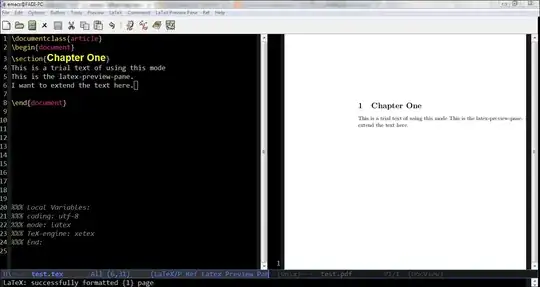
enter image description here

doctorate
  • 4,173
  • 7
    Standard usage is an external viewer – Andrew Swann Jul 10 '14 at 13:09
  • I'm pretty sure this is not the expected behavior of latex-preview-pane. What happens if you try to turn docview-mode on in the preview pane? – T. Verron Jul 10 '14 at 13:15
  • About your error for turning preview-pane automatically on, you could try adding that function to LaTeX-mode-hook. – T. Verron Jul 10 '14 at 13:16
  • About xelatex instead of pdflatex, yes it is possible: http://tex.stackexchange.com/questions/21200/auctex-and-xetex – T. Verron Jul 10 '14 at 13:16
  • And in any case, you should try to post only one question per question. – T. Verron Jul 10 '14 at 13:17
  • when I ran doc-view-mode on the preview pane -> unable to render file. View extracted text instead (y or n)? when chose y -> DocView: process pdf->txt changed status to exited abnormally with code 255 any idea what's going on? – doctorate Jul 10 '14 at 14:07
  • @T.Verron do you know any better side-by-side previewer? – doctorate Jul 10 '14 at 14:50
  • @T.Verron this hook worked for me: (add-hook 'LaTeX-mode-hook 'latex-preview-pane-mode) – doctorate Jul 10 '14 at 14:58
  • 3
    What @AndrewSwann said. For windows, there aren't many pdf viewers which respect latex workflows (in particular, not locking opened files), you should have a look at SumatraPDF. "Side by side" is then achieved by the window manager. Don't forget that emacs is a text editor, which just happens to include a (basic) viewer. For most situations, using emacs to edit the code and a full-featured pdf viewer to view the output is way more convenient. – T. Verron Jul 10 '14 at 15:12
  • @T.Verron, do you know any weblink for window manager to implement your suggestion of using pdf preview side-by-side? if not I will start another question for this fine, yet worthy detail. – doctorate Jul 11 '14 at 15:02
  • With windows 7 and later, you can simply drag each window to one side of the screen to have it fill 50% of the screen. – T. Verron Jul 11 '14 at 15:10

1 Answers1

7

I installed the AUCTeX according to its manual. I wrote a small tex file, but I did not figure out how to get a side-by-side preview like that of TeXStudio for example.

I found one here called latex-preview-pane. It works but still do not get a PDF only bohemic script instead (see image below).

Author of latex-preview-pane here. It looks like (as T. Verron pointed out) you do not have doc-view-mode installed. On Windows Emacs installs this is sometimes the case. Here's a link to a guide for getting doc-view-mode working on Windows:

http://emacsworld.blogspot.com/2009/08/getting-docview-to-work-on-windows.html

Also, be sure to read through the latex-preview-pane Wiki page, here: http://www.emacswiki.org/emacs/LaTeXPreviewPane

In particular, make sure that you are getting it from MELPA, not elsewhere.

jsinglet
  • 476
  • you may want to update the code or hook for automatic load of the latex-preview-pane in the wiki webpage for the tool. the working hook is mentioned in the comments above or you may've noticed it already in github. – doctorate Jul 10 '14 at 15:51
  • finally worked when I followed the instructions here: http://www.emacswiki.org/emacs/DocViewMode – doctorate Jul 10 '14 at 18:24
  • Now I use DocView sb option -- bounding box and push the pane a little to the right to make it occupy only 1/3 of screen and leaving about 2/3 for writing latex. Besides, coming from TexStudio, I miss the magnifying loop! – doctorate Dec 27 '14 at 07:26
  • Latex-preview-pane occupies half of screen by default. I liked the feature of preview on saving the .tex document, Thank You. Preview pane can be customized from DocView options, but I have to adjust it manually each time I open a LaTeX document. Is there a way to set a preferred preview adjustment at startup of Emacs? Would adjustment be more friendly had I installed XPDF pdf viewer as indicated by http://www.emacswiki.org/emacs/DocViewMode? – doctorate Dec 27 '14 at 07:50
  • does latex-preview-pane-mode support forward and reverse search? – doctorate Dec 29 '14 at 06:57
  • @doctorate no, not AFAICT. I wish it used pdftools instead of docview, and I wish it didn't pollute the global namespace with names like shell-escape-mode. – Clément May 22 '18 at 18:15