9

I'm getting odd spacing/indentation behavior when the \textcolor command is combined with the \[ ... \] environment. I did find a fix by putting % in a couple places, as outlined below, but I'd like to know if anyone has a better solution. The picture below, followed by a MWE, explains the problem in more detail.

Output:

enter image description here

Code:

\documentclass[a4paper,11pt]{article}
\usepackage{amsmath, amsfonts, amssymb, parskip, dsfont, amsthm, wasysym, mathrsfs}
\usepackage{graphicx}
\usepackage[usenames, dvipsnames]{xcolor}
\usepackage[top=1in, bottom=1in, left=1in, right=1in]{geometry}
\usepackage{mathrsfs}
\usepackage[normalem]{ulem}
\usepackage[breaklinks=true]{hyperref}
\usepackage{soul, color} % for highlighting
\usepackage{pifont} % for cool symbols in text mode

\begin{document}

\textbf{No problems with spacing or indents when I don't use the 
\textbackslash[ ... \textbackslash] environment.}

\textcolor{NavyBlue}{Insert problem description here.}

Insert problem solution here.

%%%%%%%%%%%%%%%%%%%%%%%%%%%%%
%%%%%%%%%%%%%%%%%%%%%%%%%%%%%

\textbf{When I use the \textbackslash[ ... \textbackslash] environment, it
puts a large space after
the \textbackslash textcolor section.}

Insert problem solution here. %% this line should have been removed

\textcolor{NavyBlue}{Insert problem description here. Along with some math:
\[ 1 \neq 0 \]}

Insert problem solution here.

%%%%%%%%%%%%%%%%%%%%%%%%%%%%%
%%%%%%%%%%%%%%%%%%%%%%%%%%%%%

\textbf{I can sort of fix the problem by eliminating the space 
between the problem statement and the solution statement, but 
then there is an ugly little indent.}

\textcolor{NavyBlue}{Insert problem description here. Along with some math:
\[ 1 \neq 0 \]}
Insert problem solution here.

%%%%%%%%%%%%%%%%%%%%%%%%%%%%%
%%%%%%%%%%%%%%%%%%%%%%%%%%%%%

\textbf{Finally, I realized that I could ``fix'' the problem by putting a 
comment character at the end of the line and between the lines.}

\textcolor{NavyBlue}{Insert problem description here. Along with some math:
\[ 1 \neq 0 \]}%
%
Insert problem solution here.

%%%%%%%%%%%%%%%%%%%%%%%%%%%%%
%%%%%%%%%%%%%%%%%%%%%%%%%%%%%

\textbf{But this seems incredibly hacky, and I'm hoping someone can point 
me to a more elegant fix.}

\end{document}

EDIT: So after using your suggestions (Johannes), it no longer has the indent, but it that space is still there. Here's what I'm talking about:

Code:

enter image description here

Output:

enter image description here

EDIT #2: It's a very minor difference, but I'm seeing a larger gap between the math and the text than between the text and the text:
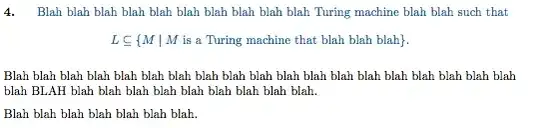
enter image description here

Here's the relevant code:

\textbf{4.} \hspace{5 pt} 
\begin{specialmathtwo}
Blah blah blah blah blah blah blah blah blah blah Turing machine blah blah such that
\[L \subseteq \{ M \mid \text{$M$ is a Turing machine that blah blah blah} \}.\]
\end{specialmathtwo}
Blah blah blah blah blah blah blah blah blah blah blah blah blah blah blah blah blah blah blah blah BLAH blah blah blah blah blah blah blah blah blah.

Blah blah blah blah blah blah blah.

and

\newenvironment{specialmathtwo}{
    \color{NavyBlue}
}{%
\par %Maybe you want to finish all of them off with a paragraph
}
  • 2
    Btw: good minimal example – Johannes_B Mar 31 '14 at 07:56
  • 1
    Note that the option is a4paper without spaces; it works with spaces, but just by chance. Also you shouldn't specify the pdftex option to graphicx. – egreg Mar 31 '14 at 08:53
  • "inverse question" (where \textcolor is preferred for single-line): https://tex.stackexchange.com/questions/91536/extra-space-added-after-equation-when-it-is-coloured – user202729 May 27 '22 at 15:41

1 Answers1

9

Better not to use \textcolor along with maths over multiple line. You can use \color{<colorname>} instead, and limit the scope by grouping. To be honest, \textcolor does grouping as well, but starts \leavevmode to get to horizontal mode, which makes a little mess for your example.

You can also define a new environment for the colors. That keeps the advantage of having everything in more semantic way. Meaning: What is shown, not how it is shown.

The extra amount of white space is caused by parskip. Parskips are ugly anyways.
The little indentation you noticed is caused by a space, that came from the \textcolor-grouping. \endgroup is hiding that space. Thanks @DavidCarlisle.

\documentclass[a4paper,11pt]{article}
\usepackage{ parskip }
\usepackage{ blindtext }
\usepackage[usenames, dvipsnames]{xcolor}
\usepackage{showframe}
\newenvironment{specialmath}{
    \color{NavyBlue}
}{%
\par %Maybe you want to finish all of them off with a paragraph
}
\begin{document}

\begingroup
\color{NavyBlue}
Insert problem description here. Along with some math:
\[ 1 \neq 0 \]
\endgroup
\blindtext

\blindtext
%just a visual separation, but no \par
\begin{specialmath}
    \[ \sum \int \sin 0 = a \]
        A little descriptive text
\end{specialmath}
\blindtext

\end{document}

That is giving me this output:

Output of the example

Johannes_B
  • 24,235
  • 10
  • 93
  • 248
  • Perhaps elaborate that \textcolor is really for 'text' (horizontal mode material: if features \leavevmode), and so it's fundamentally wrong for display math. – Joseph Wright Mar 31 '14 at 07:51
  • Thank you for your answer. I had no idea about using \color instead, nor about \begingroup and \endgroup. This fixes the indentation issue. However, it still adds a big space unless I put a comment character in between the \endgroup and the non-colored text. Any way to get around that? – AmadeusDrZaius Mar 31 '14 at 07:57
  • @AmadeusDrZaius I added a picture of the output. Please have a look. – Johannes_B Mar 31 '14 at 08:03
  • Ah, so did I! Lol. (In my answer.) I was just about to post a similar comment. – AmadeusDrZaius Mar 31 '14 at 08:04
  • So basically, I'm trying to be able to put an empty line [in the code, for readability] between the color section and the non-color section without it adding the extra space. (See my edit.) – AmadeusDrZaius Mar 31 '14 at 08:06
  • It's not really a big deal - I just was hoping I could get the parts with the math-mode to have the same spacing as the parts without math-mode, without having to hand-code the formatting each time. But I can simply leave out the space in the code or put a comment in. (Though if you know why the extra line/space is being inserted when math mode gets used, I'd love to know.) – AmadeusDrZaius Mar 31 '14 at 08:11
  • 1
    No, it's not the \color \textcolor difference. \textcolor starts with \leavevmode but the start of the coloured section isn't the problem. The problem is at the end where there was a space after the } by using \endgroup you avoid the issue a there is no space token after a control sequence name. – David Carlisle Mar 31 '14 at 08:14
  • 4
    @AmadeusDrZaius never use blank lines in the source for "readability" a blank line is a \par instruction and will change the layout in lots of ways. – David Carlisle Mar 31 '14 at 08:15
  • 1
    @AmadeusDrZaius Comment out package parskip and test with and without a blank line. The difference is more obvious. – Johannes_B Mar 31 '14 at 08:17
  • @DavidCarlisle Huh. I never knew that, thanks. The differences in parsing between LaTeX and a "real" programming language sometimes catch me by surprise. Also... woo! Talking to a TeX legend. Awesome. :O :) @ Johannes_B I did that and yes, I see what the blank lines were doing now. I'll simply comment lines out if I'm concerned about readability in the future. Thanks, both of you for the help! – AmadeusDrZaius Mar 31 '14 at 08:24
  • 2
    @AmadeusDrZaius tex is mostly designed for typesetting text and in natural language text white space is usually significant so the white space rules in tex are not at all like those in most programming languages. – David Carlisle Mar 31 '14 at 08:26
  • Uh oh... I'm trying to define a macro command called \textbook, with the following: \newcommand{\textbook}[1]{\begingroup\color{NavyBlue}#1\endgroup}, but when I use this instead of putting in the code directly, it gives that little indentation again. What am I missing? – AmadeusDrZaius Mar 31 '14 at 08:38
  • Have a look at my code, there already is a new environment defined. An environment is more suited here, imho. Maybe add your command to the question, as i don't see a white space right now. – Johannes_B Mar 31 '14 at 08:39
  • ending the textbook-macro introduces another new white space (a linebreak is treated as a space). You would have to comment that out again by putting the percent sign at the end of line. – Johannes_B Mar 31 '14 at 08:46
  • I updated my question with the current spacing issue (at the bottom). The space between the math and the text is larger than the space between the text and the text. It's because of the \par no doubt, but when I don't include the \par, I get that funky little indent. – AmadeusDrZaius Mar 31 '14 at 09:17
  • @Johannes_B -- better to not leave a blank line before the \begin{specialmath}. putting a single percent sign on that line to leave a visual separation in the input file would take care of it. and \noindent will get rid of the initial indent if the parskip package is removed. – barbara beeton Mar 31 '14 at 18:18