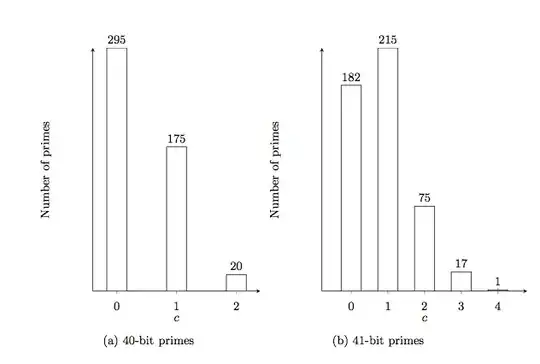
I would like to include 2 Tikz into one figure and caption each of the Tikz. I've explored subfigure but that did not seem to work. I'm trying to have the two diagrams appear side-by-side with a caption under each diagram. I appreciate any help rendered.
\begin{tikzpicture}[font=\small]
    \begin{axis}[
      ybar,
      height=8cm,
      width=6cm,
      bar width=15pt,
      xlabel={$c$},
      ylabel={Number of primes},
      ymin=0,
      ytick=\empty,
      xtick=data,
      axis x line=bottom,
      axis y line=left,
      enlarge x limits=0.2,
      symbolic x coords={0,1,2},
      xticklabel style={anchor=base,yshift=-\baselineskip},
      nodes near coords={\pgfmathprintnumber\pgfplotspointmeta}
    ]
      \addplot[fill=white] coordinates {
        (0,295)
        (1,175)
        (2,20)
      };
    \end{axis}
\end{tikzpicture}
%\caption{40-bit primes} \label{40bits}
\begin{tikzpicture}[font=\small]
    \begin{axis}[
      ybar,
      height=8cm,
      width=7cm,
      bar width=15pt,
      xlabel={$c$},
      ylabel={Number of primes},
      ymin=0,
      ytick=\empty,
      xtick=data,
      axis x line=bottom,
      axis y line=left,
      enlarge x limits=0.2,
      symbolic x coords={0,1,2,3,4},
      xticklabel style={anchor=base,yshift=-\baselineskip},
      nodes near coords={\pgfmathprintnumber\pgfplotspointmeta}
    ]
      \addplot[fill=white] coordinates {
        (0,182)
        (1,215)
        (2,75)
        (3,17)
        (4,1)
      };
    \end{axis}
\end{tikzpicture}
%\caption{41-bit primes} \label{41bits}



subfigorsubcaptioninstead? See subcaption vs. subfig: Best package for referencing a subfigure – Adam Liter Mar 10 '14 at 04:41subcaptionis probably the best to use, as it is actively maintained. – Adam Liter Mar 10 '14 at 04:47subfigureby naively enclosingtikzpictureand its caption into\begin{subfigure}and\end{subfigure}, but that didn't work. The complain is:Missing \endscname. – BlackAdder Mar 10 '14 at 04:52