25

So I kindof wanted to leave old and ugly ascii-art tabs and produce something nice, but found there's probably no method to typeset actual guitar tabs in TeX.

All I found was:

  • MusiXTeX for classical music notation
  • songbook for lyrics+chords above
  • guitar.sty for something similar.

Is there something that does tabs and I missed it?

edit: I need TeX text around, it's for a (kind of) guitar textbook.

cgnieder
  • 66,645

4 Answers4

23

My recommendation is to use LilyPond, which I believe was formerly based on TeX. It is possibly the best solution you can get for free. The file in my comment to your question is said to be typeset in it. Here is another possible output with displayed chords.

  • LilyPond seems like an excellent choice to me as well. There are also some very nice editors for it. – ipavlic Apr 23 '11 at 11:18
  • 4
    I believe LilyPond can be used along with LaTeX: http://lilypond.org/doc/v2.12/Documentation/user/lilypond-program/LaTeX – Cascabel Apr 23 '11 at 14:47
  • @Jefromi I have some experience with LilyPond, but I did not know this. Very useful for myself as well, thank you! – Harold Cavendish Apr 23 '11 at 15:04
13

In case anybody stumbles onto this question (like I just did):

I remembered having tried something like a tabulature with musixtex a little while ago. It is only a start and far from being perfect but shows that tabulatures can be done with a little effort.

\documentclass{article}
\usepackage{musixtex,graphicx}

% custom clef
\newcommand\TAB[1]{%
  \setclefsymbol{#1}{\,\rotatebox{90}{TAB}}%
  \setclef{#1}9}

% internal string choosing command
%  #1: string (a number from 1--6)
%  #2: finger
\makeatletter
\newcommand\@str[2]{%
  \ifcase#1\relax\@strerror
  \or\def\@strnr{-1}%
  \or\def\@strnr{1}%
  \or\def\@strnr{3}%
  \or\def\@strnr{5}%
  \or\def\@strnr{7}%
  \or\def\@strnr{9}%
  \else\@strerror
  \fi
  \zchar\@strnr{\footnotesize#2}}
% \@strerror could be defined to issue some warning/error

% User level commands
\newcommand\STr[2]{\@str{#1}{#2}\sk}  % with a full note skip
\newcommand\Str[2]{\@str{#1}{#2}\hsk} % with a half note skip
\newcommand\str[2]{\@str{#1}{#2}}     % with no skip
\makeatother
\begin{document}

\setlength\parindent{0pt}
\begin{music}
 \instrumentnumber{1}
 \nobarnumbers
 \TAB1
 \setlines1{6}
 \startpiece
   \Notes\hsk\STr37\en
   \Notes\Str45\en
   \Notes\Str55\en
   \Notes\Str65\en
 \bar
   \Notes\str67\Str36\en
   \Notes\Str45\en
   \Notes\Str55\en
   \Notes\Str67\en
 \bar
   \Notes\str68\Str35\en
   \Notes\Str45\en
   \Notes\Str55\en
   \Notes\Str68\en
  \bar
   \Notes\Str34\en
   \Notes\Str42\en
   \Notes\Str53\en
   \Notes\Str62\en
  \bar
   \Notes\Str33\en
   \Notes\Str42\en
   \Notes\Str51\en
   \Notes\itieu0r\Str60\en
  \bar
   \Notes\ttie0\Str60\en
   \Notes\Str51\en
   \Notes\Str42\en
   \Notes\Str33\en
  \bar
   \Notes\Str13\en
   \Notes\Str20\en
   \Notes\STr20\en
  \bar
   \Notes\STr20\en
   \Notes\Str28\en
   \Notes\STr27\en
  \endpiece
\end{music}

\end{document}

enter image description here

Any one able to spot the song? ;)

cgnieder
  • 66,645
  • Not sure about the song, but this compiles just like the posted image on a full TeXLive 2014 installation. The only notable difference I see is that the end of the tab columns are open, perhaps because my default paper size is letter. – pmagunia Oct 21 '14 at 01:05
  • Correction to my previous comment:no notable difference (I wasn't using multiple passes to compile. – pmagunia Oct 24 '14 at 03:05
  • 2
    Is that Stairway to Heaven? It looks a bit off. – Greg d'Eon Feb 28 '15 at 00:19
  • 1
    @Kynit it is :) – cgnieder Feb 28 '15 at 01:58
  • 1
    @Gregd'Eon it is off indeed. A lot of people get the arpeggio wrong, they reverse it like in this tab.. :'( Nice song choice, though, clemens :D – Joffrey Apr 21 '15 at 20:07
  • @Joffrey IIRC I typed this from memory without a) checking with the song and b) a guitar nearby. So, errors are bound to happen :) – cgnieder Apr 21 '15 at 20:13
  • @clemens no problem, I hope I didn't offend in any way ;-) As I said, a lot of people play it like this anyway ^^ – Joffrey Apr 21 '15 at 21:03
  • @Joffrey Don't worry :) I actually don't play it that way (when I play it) and had I written notes instead of tabs I'd probably seen the error... (it took me a while to spot it - I don't like tabs very much!) – cgnieder Apr 21 '15 at 21:11
  • @clemens how do you write this in 2 digit frets: above 9th tab? – nilon May 07 '16 at 04:35
  • 1
    @nilon \Str{2}{11} means eleventh fret of the second string. – cgnieder May 07 '16 at 09:04
  • @nilon \Notes\str{6}{7}\Str{3}{6}\en is a two-note chord. A third, fourth,… note can easily be added by using more \str. – cgnieder May 07 '16 at 09:07
  • @nilon I haven't used MusiXTeX in quite a while but I guess your installation is not complete and missing MusiXTeX fonts (all the symbols of MusiXTeX are characters of a font in the end) – cgnieder May 11 '16 at 17:43
  • @clemens many insights!! is there a way to make the distance between notes almost stick together? I tried that with a posted answer/mwe, but couldn't go all the way. Other option? I'm using an a6 paper width so it's rather small and I want to fill a sequence in one short "line" – nilon May 11 '16 at 21:00
  • musixtex does not seem to work anymore :( : kpathsea: Running mktexmf musix11 ! I can't find file 'musix11'. – steffen Sep 20 '16 at 13:41
9

I recently wanted to recreate chord tablature sheets that my guitar teacher used to use in his lessons. They were basically a grid of small tables with 5 times 4 cells. These tables were then filled by hand with the chords I was supposed to remember. Creating these tables is a piece of cake but I wanted the possibility to add the chord schemes with LaTeX, adding position, fingers, barrés, specify the root etc. with an easy syntax. I also wanted a similarly easy syntax for creating tablatures of scales.

I did what I always do in these cases: I wrote me a little package, guitarchordschemes, that allows to do that. Below are a few examples:

\documentclass{article}
\usepackage[T1]{fontenc}
\usepackage{guitarchordschemes}

\begin{document}

\chordscheme[
  name     = Gmi\textsuperscript{7($\flat$5)} ,
  position = IX ,
  finger   = {3/4, 2/3, 3/2} ,
  root     = {2/5} ,
  mute     = {1,6}
]

\end{document}
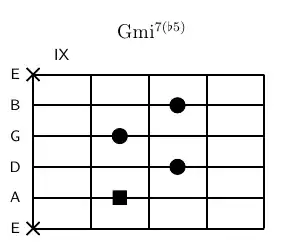
enter image description here

\documentclass{article}
\usepackage[T1]{fontenc}
\usepackage{guitarchordschemes}

\begin{document}

\chordscheme[
  name      = Gmi\textsuperscript{7($\flat$5)} ,
  position  = IX ,
  finger    = {3/4:3, 2/3:2, 3/2:4} ,
  root      = {2/5:1} ,
  show-root = {4/3} ,
  mute      = {1,6}
]

\end{document}

enter image description here

\documentclass{article}
\usepackage[T1]{fontenc}
\usepackage{guitarchordschemes}

\begin{document}

\scales[
  name      = D major/position II ,
  position  = I ,
  fingering = type 3
]

\end{document}

enter image description here

cgnieder
  • 66,645
7

Are you searching for something like this? http://www.texample.net/tikz/examples/guitar-chords/

Azoun
  • 2,317