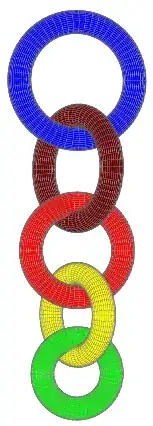
Is it possible to either remove the grid lines in a pst-solides3d object or make them thinner? Specifically, I'm thinking of the rings in Herbert's answer here.
I have had a look in the manual but I can't seem to find anything regarding the issue mentioned.
Update
This is a follow-up question: I think it should be
\psSolid[r1=1,  ngrid=20 100,        RotY=90,        fillcolor=blue,  name=R1](0,0,3)
\psSolid[r1=0.9,ngrid=20 90, RotX=90,        RotZ=30,fillcolor=green, name=R2](0,0,1.5)
\psSolid[r1=0.8,ngrid=20 80,         RotY=90,        fillcolor=red,   name=R3](0,0,0.2)
\psSolid[r1=0.7,ngrid=20 70, RotX=90,        RotZ=30,fillcolor=yellow,name=R4](0,0,-0.9)
\psSolid[r1=0.6,ngrid=20 60,         RotY=90,        fillcolor=Purple,name=R5](0,0,-1.8)
in Herbert's answer in the other question.
Then we have the following:
(1) The grid 'tiles' are square-looking.
(2) With the new coordinates for the rings, they are not 'floating' or overlapping when interlocked with one another.
Am I right on this?
Update 2
The rings can be smoothened even further but the code takes a very long time to compile (using XeLaTeX):
\documentclass[
  dvipsnames
]{article}

\usepackage{pst-solides3d}

\begin{document}

\begin{center}
  \begin{pspicture}[solidmemory](-2.9,-7.95)(2.9,10.45)
   \psset{
     lightsrc=viewpoint,
     viewpoint=40 -10 0 rtp2xyz,
     Decran=100,
     object=tore,
     r0=0.2,
     action=none
   }
    \psSolid[r1=1,  ngrid=66 330,        RotY=90,        fillcolor=blue,  name=R1](0,0,3)
    \psSolid[r1=0.9,ngrid=66 297,RotX=90,        RotZ=30,fillcolor=green, name=R2](0,0,1.5)
    \psSolid[r1=0.8,ngrid=66 264,        RotY=90,        fillcolor=red,   name=R3](0,0,0.2)
    \psSolid[r1=0.7,ngrid=66 231,RotX=90,        RotZ=30,fillcolor=gray,  name=R4](0,0,-0.9)
    \psSolid[r1=0.6,ngrid=66 198,        RotY=90,        fillcolor=yellow,name=R5](0,0,-1.8)
    \psSolid[r1=0.5,ngrid=66 165,RotX=90,        RotZ=30,fillcolor=Purple,name=R6](0,0,-2.5)
    \psSolid[
      object=fusion,
      base=R1 R2 R3 R4 R5 R6,
      linewidth=0.1pt,
      linecolor=black!60,
      action=draw**
    ]
  \end{pspicture}
\end{center}

\end{document}
P.S. I have added an extra ring and changed the colours.