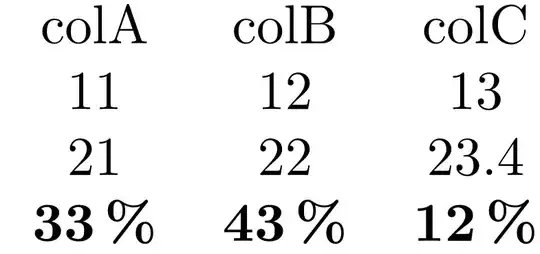
I have an array with three rows and I would like that the last row has a specific format.
There is a command every row no/.style, but it wouldn't work in our context because the processing is applied quite late, see PGFplotstable: Is it possible to set a number format for a *row* instead of a column?.
Here is the code from Jake with the result.
My question is now : how can I define, say precision=0 for the third row ?

    \documentclass{standalone}
\usepackage{pgfplotstable}

\begin{document}

\pgfplotstableset{
    row style/.style 2 args={
        postproc cell content/.append code={%
            \count0=\pgfplotstablerow
            \advance\count0 by1\relax
            \ifnum\count0=#1
                \pgfkeysalso{#2}%
            \fi
        }
    }
}


\pgfplotstabletypeset[
    row style={3}{@cell content=\bfseries #1\,\%},
    col sep=&,row sep=\\
]{
colA & colB & colC \\
11 & 12 & 13 \\
21 & 22 & 23.4 \\
33.3 & 43.3 & 12 \\
}

\end{document}