Let’s break it down:
The “older syntax” for the ellipse path operator is ellipse (<x radius> and <y radius>).
But, there is a newer and better syntax. I agree here with the manual:
Note: There also exists an older syntax for circles [and ellipses],
where the radius of the circle is given in parentheses right after the
circle command as in circle (1pt). Although this syntax is a bit
more succinct, it is harder to understand for readers of the code and
the use of parentheses for something other than a coordinate is
ill-chosen.
— PGF manual, section 14.7 “The circle and Ellipse Operations”, p. 148
The following syntax is much more readable:
\draw (axis cs:0,0) ellipse [x radius=1cm, y radius=1cm];
and you could also add scale and rotate options or can use them in the every circle style or …
But still, no output of an ellipse. :(
Reading section 4.16 “Custom Annotations”, pp. 263ff of the pgfplots manual we can find a few examples using the ellipse path operator, where axes limits are always given. These are needed if the axis environment does not contain one single plot.
So, this works:
\begin{axis}%[xmin=-1,xmax=1,ymin=-1,ymax=1]
  \addplot {x^2 - x + 4};
  \draw (axis cs:0,0) ellipse [x radius=1cm, y radius=1cm];
\end{axis}
This does not:
\begin{axis}%[xmin=-1,xmax=1,ymin=-1,ymax=1]
  \draw (axis cs:0,0) ellipse [x radius=1cm, y radius=1cm];
\end{axis}
But this:
\begin{axis}[xmin=-1,xmax=1,ymin=-1,ymax=1]
  \draw (axis cs:0,0) ellipse [x radius=1cm, y radius=1cm];
\end{axis}
You can also use radii given in pgfplots direction vectors, these automatically use the axis direction cs (cs stands for Coordinate System, which itself has a big chapter in the PGF manual). To do this you will need to set at least compat=1.5.1.
Simply omit the dimension units and pgfplots automatically assumes the axis direction cs:
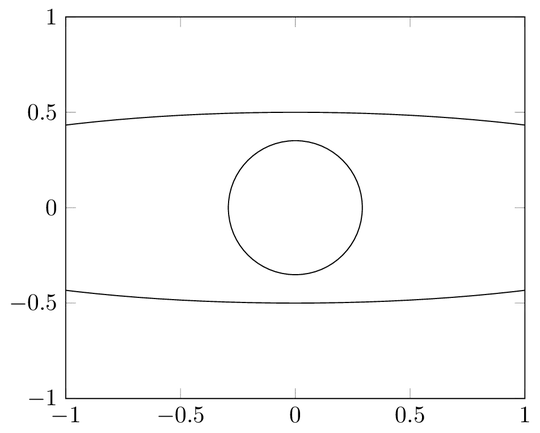
\draw (axis cs:0,0) ellipse [x radius=2, y radius=.5];
Code
\documentclass[tikz]{standalone}
\usepackage{pgfplots}
\pgfplotsset{compat=1.7}
\begin{document}
\begin{tikzpicture}
  \begin{axis}[xmin=-1,xmax=1,ymin=-1,ymax=1]
%    \addplot {x^2 - x +4};
    \draw (axis cs:0,0) ellipse [x radius=1cm, y radius=1cm];
    \draw (axis cs:0,0) ellipse [x radius=2,  y radius=.5];
  \end{axis}
\end{tikzpicture}
\end{document}
Output


xmin, etc.) and\pgfplotsset{compat=1.7}(the manual (section 4.16 “Custom Annotations”) demands for> 1.5.1).csstands for coordinate system. By the way, the (old) syntax for the ellipse is(1cm and 1cm), although I recommend[x radius=1cm, y radius=1cm]. – Qrrbrbirlbel Mar 27 '13 at 18:58pgfplotspackage, so I rather leave a comment or a suggestion (or wait for the author’s approval;)). – Qrrbrbirlbel Mar 28 '13 at 17:43axis cstikz pgf - Make "axis cs" the default coordinate system in a PGFPlots plot - TeX - LaTeX Stack Exchange – user202729 Jul 02 '22 at 13:26