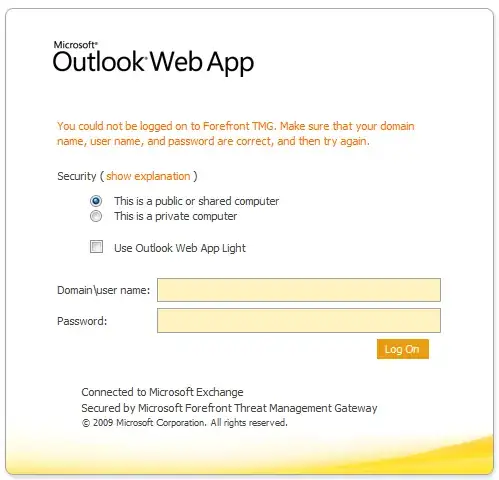
Does anyone have any ideas what could be going on here?
You may need to install a service pack and / or check the "Users Tab scope" settings if you are using OWA rules.
You could not be logged on to Forefront TMG" - Solution 1
SYMPTOMS
Consider the following scenario:
- You create a web publishing rule by using the New Web Publishing Rule Wizard.
- In the Authentication Settings options, you set the following settings:
- HTML Form Authentication
- LDAP (Active Directory)
- In the LDAP Servers options, you add the fully qualified domain name (FQDN) of a global catalog server. Then, you leave the Type the
Active Directory domain name (use the fully-qualified domain name)
setting blank.
- In the Authentication Delegation option, you select Basic authentication.
- When you access the web server that TMG published, you provide the user name without the domain prefix, and you provide the password.
In this scenario, when you try to log on to the published website, you
cannot log on. Additionally, you receive the following error message:
You could not be logged on to Forefront TMG. Make sure that your
domain name, user name, and password are correct, and then try again.
RESOLUTION
To resolve this problem, install the service pack that is described in
the following Microsoft Knowledge Base article: 2555840
Description of Service Pack 2 for Microsoft Forefront Threat
Management Gateway 2010
Source FIX: "You could not be logged on to Forefront TMG" error message
You could not be logged on to Forefront TMG - Solution 2
Post publishing OWA rule on a TMG server, clients get error “You could
not be logged on to Forefront TMG. Make sure that your domain name,
user name, and password are correct, and then try again.”
Information:
OWA rule is configured as per Microsoft guidelines with basic and form
based with windows active directory authentication.
Exchange 2010 is also configured to use basic authentication
Issue:
OWA page is coming but Login is not working and also giving the
following error:
“You could not be logged on to Forefront TMG. Make sure that your
domain name, user name, and password are correct, and then try again.”
This error defines that there is some issue in login but you will try
all the possible things to make it working.
Cause:
This will come because Threat Management Gateway server is part of
workgroup which can’t authenticate users and in OWA publishing rule
Users scope is selected to all authenticated users.
Resolution:
On OWA Publishing rule change the Users Tab scope from all
authenticated user to all users.
Or
Make the TMG part of domain but this will not be recommend to make a
firewall part of domain.
Source Error in Exchange 2010 OWA rule publishing on TMG