Next I turned on the computer. Amazingly it opened up the normal
screen but to the time 6 years ago - probably when the previous owner
started using the computer. I next reset to the current time. I am
glad that I can now use the computer again!
This all sounds to me like a CMOS battery issue or a BIOS password issue. How it appeared? Unclear. But I am pretty sure this is the case since you mention the system date going back to 6 years ago which is 2008 (2014 - 6 = 2008) and checking online review they seem to start to mention the Toshiba Satellite M300 starting in 2008. Toshiba has a support site which lists different ways of initially setting the BIOS password, but doesn’t clearly state how to reset a BIOS password. But this site explains in detail how to do it by removing the CMOS battery:
The simplest way to remove a BIOS password is to simply remove the
CMOS battery. A computer will remember its settings and keep the time
even when it is turned off and unplugged because these parts are
powered by small battery inside the computer called a CMOS battery. If
we pull out this battery, the computer will forget alot of its
hardware settings, including its BIOS password. This should not be
performed on Laptops if you are not experienced working with laptop
hardware.
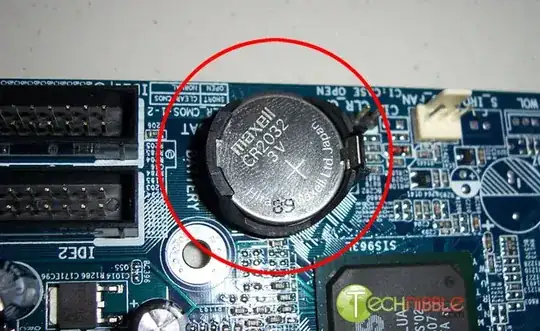
Anyway, open up the computer case using a screw driver and locate the
flat, circular and metallic CMOS battery. It should look something
like the picture to the right (NOTE: the picture is above in this
answer) . Some computers have this part standing upright. Once you
have located it, observe how the latches are holding it. There are
many different ways to remove a CMOS battery but the most common way
on newer computers can be seen in the picture below.
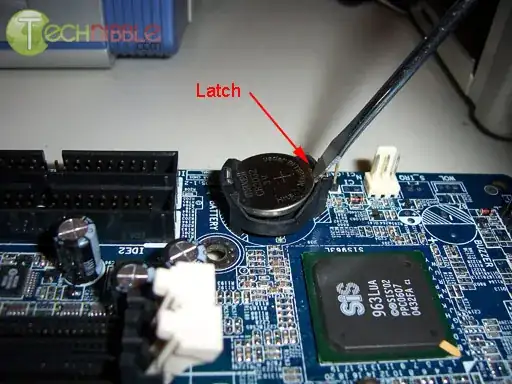
Removing the CMOS Battery
Make sure to power down the computer, unplug the power cables and
unplug any USB devices if they are powered. The computer must not be
able to get power from anywhere for this to work. Take out the CMOS
battery and wait 10 – 25 minutes before putting it back in. The reason
for this wait is because the computer can still store power in its
capacitors even though everything is unplugged. The waiting period
allows enough time for them to discharge.
Plug everything back in, power up the computer and enter the BIOS
again. If everything went well there should be no more password. In
some cases, if you get weird error messages during bootup now, you
will need to goto “Load BIOS Defaults” in BIOS and save the changes to
fix them.


