225

For anyone who's serious about storage performance, SSDs are always the fastest solution. However, WD still makes their 10,000 RPM VelociRaptor hard drives, and a few enthusiasts even use enterprise-grade 15,000 RPM SAS hard drives.

Aside from cost, is there still a reason to choose a 10,000 RPM (or faster) hard drive over an SSD?

Answers should reflect specific expertise, not mere opinion, and I'm not asking for a hardware recommendation.

bwDraco
  • 46,155
  • 4
    Even cheapo desktop motherboards support multi-tier storage, using an SSD to cache one or more spinning disks. Random-read should be better on a 10k HDD than a SSD-cached 7k2 HDD, since random-read will generally miss the cache a lot. Besides that, I can't think of any other reasons. – Mark K Cowan Nov 02 '14 at 18:47
  • 8
    Not all workloads are ramdom, think about CCTV setup so that the 20 streams are written so that. C1 is on B1, B21, B 41 etc hence no ramdom access in normal useage. – Ian Ringrose Nov 03 '14 at 19:47
  • 2
    @IanRingrose has a point. You can build a very large RAID array (ton of up-to-6TB 3.5" drives) with lots of streaming I/O capacity out of HDDs, like a http://aws.amazon.com/ec2/instance-types/#HS1 -- some applications like analytics databases (think Amazon Redshift) or genomic sequencing do a ton of I/O and need a ton of space but it's all streaming, and a big spinning-disk array is perfect. (With enough drives, 10K is still unnecessary, though: 100MB/s/"regular" drive * lots of drives will still max out the I/O interface, or you'll hit other bottlenecks.) – twotwotwo Nov 05 '14 at 05:28
  • 2
    Another way of spinning (ha) this: for your desktop, the price of a 256GB SSD is a fraction of the whole system's cost and the performance difference is huge; for a 48TB RAID array for an analytics database, the cost difference is bigger and there's less performance difference because it's mostly sequential access. Again, though, I'm really talking about whether regular HDDs (7.2K RPM) still have a niche in high-performance applications at all, not whether 10K RPM VelociRaptors are a good deal. For your desktop, I'd say def. not. – twotwotwo Nov 05 '14 at 17:16
  • 1
    Can't add this as as answer, so would just say that there's an article on The Register - "Why solid-state disks are winning the argument" (http://www.theregister.co.uk/2014/11/07/storage_ssds/) that covers the issues and (ignoring costs) finishes by saying "so long as you follow the instructions on the tin when selecting the right SSD for the job, there is absolutely no reason not to buy one." Of course, there's quite a discussion in the comments about some of the issues that may not have been addressed, but I felt it worth mentioning here. – Gwyn Evans Nov 08 '14 at 22:43
  • @DragonLord : What about a 30KRPM drive (yes they do exist)??? – user2284570 Feb 12 '15 at 12:41

9 Answers9

180

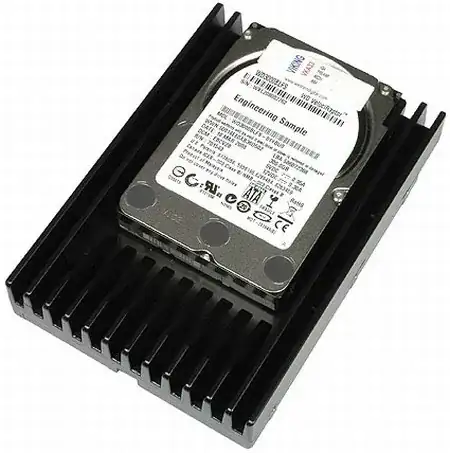
enter image description here

This is a velociraptor. As you may notice, it's a 1tb, 2.5 inch drive inside a massive heatsink meant to cool it down. In essence, it's an 'overclocked' 2.5 inch drive. You end up having the worst of all worlds. It's not as fast at random reads/writes as an SSD in many cases, it doesn't match the storage density of a 3.5 inch drive (which goes up to 3-4 tb on consumer drives, and there's 6 tb and bigger enterprise drives).

An SSD would run cooler, have better random access speeds, and probably have better performance, especially where the equivalent SSD, while costlier, is likely to be a higher end one, and SSDs generally have better speeds as they get bigger.

A normal HDD would also run cooler, have better storage density (With the same 1tb space fitting into a 2.5 inch slot easily), and cost per mb/gb would be lower. You might also have the option of running these as a raid array to make up for the performance deficiencies.

The comments also indicate that these hard drives are loud in general - SSDs have no moving parts (so, they are silent in normal operation), and my 7200 RPM drives seem quiet enough. Its something worth considering when building a system for personal use.

Taking all this into account, with a sensible planned upgrade path, and endurance tests demolishing the myth that SSDs die early, I wouldn't think so. The thinking enthusiast would use an SSD for boot, OS and software, and a regular spinning hard drive for bulk storage, rather than picking something that tries to do everything, but doesn't do it quite as well, or cheaply.

As an aside, in many cases, 10K RPM enterprise drives are getting replaced by SSDs, especially for things like databases.

Journeyman Geek
  • 129,178
  • 6
    Thank you for posting the endurance test link. I am so tired of everyone being afraid to use a SSD for fear it will wear out. Now I can point them to that. – Keltari Nov 01 '14 at 05:15
  • 8
    Thats a pretty big reason people sometimes go for a SSD over a HDD. Then again, all storage dies eventually, and if it matters to you, you ought to back it up. To me the big deciding factors ought to be price/gb and storage density, and these drives kinda suck on either count. – Journeyman Geek Nov 01 '14 at 05:19
  • @Keltari all storage has a tendency to die unexpectedly. The only way how SSD wear-out is relevant is when you do cost-of-ownership calculations, i.e., when you plan to replace HDDs every x months at x'$/year and SSDs every y months at y'/year. – Peteris Nov 01 '14 at 10:07
  • 4
    Well, I disagree. I have a 600 GB VelociRaptor and never regretted buying it. It’s not really loud and it’s not really that hot. The heatsink is only there to ensure proper operation in builds that lack ventilation. There’s nothing “overclocked” to it, most 10K HDDs are 2.5″. It’s also available without the heatsink, by the way. – Daniel B Nov 01 '14 at 18:10
  • 62
    @PeterHorvath the answer specifically states cost per mb/gb would be lower with a hard disk, and an SSD while costlier... the answer clearly addresses the fact that hard drives are cheaper per megabyte than SSDs. I don't think anyone in the IT sector at the time this question was asked would debate that. The final nail in the coffin is the question itself: Aside from cost, is there still a reason... –  Nov 02 '14 at 04:48
  • 1
    Another link you may want to add alongside the SSD endurance test one: Are SSD drives as reliable as mechanical drives (2013)? on ServerFault. – user Nov 02 '14 at 09:16
  • 2
    This answer is ignorant because it totally ignores the fact that this Velociraptor is avaialble in a 2.5" form factor. Yes, you will need to look up the part number at the WD site and find an enterprise reseller, but that is not an excuse for this ignorance. SSD are better - but I have a lot of real 2.5" Raptors even with 5 year warranty. – TomTom Nov 02 '14 at 18:08
  • Even in that case the best you get is the same storage density as a regular 2.5 inch disk with the need for better cooling than the average home desktop. Besides, I wrote this primarily based off enthusiast reviews - otherwise, I'd need to take into account proper 15K rpm and/or nearline drives as well. Unfortunately I don't have much experience with these. – Journeyman Geek Nov 03 '14 at 02:35
  • Part of my problem is physical capacity. Quantity of storage per rack and controller is a factor. (OK, so partly that's cost too, but ...) – Sobrique Nov 03 '14 at 15:05
  • 1
    The cost ratio of ssd to hdd with 10k rpm appears to be about 2.5:1. That really isn't terribly high, considering the benefits afforded to us by using ssd. – corsiKa Nov 03 '14 at 16:03
  • Don't forget about hybrids. A hybrid drive, e.g. this Seagate one could be a good choice on a budget (it can outperform the 10K RPM drives in many general-use situations, and provides 1TB for $85). – Jason C Nov 03 '14 at 23:00
  • I used to think these things were awesome, they break down pretty bad, performance goes out the window, wear and tear etc. Also, they oxidize really easily. My house wasn't even damp, very clean/dry and yet somehow the very little amount of moisture in the air managed to break down the casing pretty badly. Just FYI –  Nov 05 '14 at 05:03
  • TechReport also has a SSD endurance test running. Here is the latest update: http://techreport.com/review/27062/the-ssd-endurance-experiment-only-two-remain-after-1-5pb – Brad Patton Nov 05 '14 at 20:03
  • 1
    OS for boot? Most useless use for a SSD. I do boot from one, however, SSDs shine when running a huge Outlook account, a MySQL database or compiling hundreds of thousands of files of code. SSDs don't add much or anything for badly optimized game level loading, OS boots and many other scenarios (20 seconds faster PER DAY, useless). – oxygen Nov 05 '14 at 20:14
  • The Raptor disks are also really really noisy. Especially when it spins up after a rest. – papirtiger Nov 06 '14 at 02:34
  • 5
    I'm confused by the structure of this answer. "This is a velociraptor" does not answer the question directly, and neither do the next three paragraphs. It needs a TL;DR at the top. – Eldritch Conundrum Nov 06 '14 at 12:17
  • I'm not sure what's the issue with that. The image of the velociraptor provides context for when I talk about storage density and heat. – Journeyman Geek Nov 07 '14 at 03:38
  • 2
    Except that the heatsink is useless. It is done to make the raptr look cool and fit ina 3.5" slot. The 2.5" raptor has no heatsink and does not get hotter ;) You make a point about the "massive heatsink" which is utter marketing crap. – TomTom Jan 14 '15 at 16:34
  • As an aside, whilst SSD's are faster, I have never had cause to replace a velociraptor - and some of these have been installed for 7 years, They have effectively lasted the life of their hosts, and yes they chatter. (my kids have them in their PC's too as I needed to do something with the "spares"). My biggest problem with SSD's is short production life, so little chance of a like-for-like replacement. (Just try and buy a PATA example sometime). – mckenzm Jul 22 '15 at 16:27
  • SSDs are a lot cheaper now, you can pick up a 1TB SSD for $120-150 USD, compared to the $250 USD 1TB Velociraptor. – rgajrawala Feb 26 '19 at 19:41
74

Not sure these justify picking a hard drive over a NAND-Flash SSD, but they are certainly areas that a 10,000 rpm hard drive would offer benefits over one.

  1. Write amplification. Hard drives can directly over-write a sector, but NAND-Flash SSDs cannot overwrite a page. The entire block must be erased, and then the page can be re-used. If there is other data in the block's other pages, it must be moved to a different block, before the erase.

    A common block size is 512KiB, and a common page size is 4KiB. So if you write 4KiB of data, and that write needs to be done to a used block, that means at least 508 KiB of extra writes have to occur first; that's an inflation rate of 127x. You might be able to write 2x or 3x as fast as you can to your 10,000 rpm hard drive, but you may also end up writing 127x more data. If you are using your drive for small files, write amplification will hurt you in the long run.

    Due to the nature of flash memory's operation, data cannot be directly overwritten as it can in a hard disk drive.

    (Source: http://en.wikipedia.org/wiki/Write_amplification)

    Typical block sizes include:

    • 32 pages of 512+16 bytes each for a block size of 16 KiB
    • 64 pages of 2,048+64 bytes each for a block size of 128 KiB
    • 64 pages of 4,096+128 bytes each for a block size of 256 KiB
    • 128 pages of 4,096+128 bytes each for a block size of 512 KiB

    (Source: http://en.wikipedia.org/wiki/Flash_memory)

  2. Long-Term Storage. Magnetic storage mediums often retain data longer when un-powered, so hard drives are better for long term archiving than NAND-Flash SSDs.

    When stored offline (un-powered in shelf) in long term, the magnetic medium of HDD retains data significantly longer than flash memory used in SSDs.

    (Source: http://en.wikipedia.org/wiki/Solid-state_drive)

  3. Limited lifespan. A hard drive can be re-written to until the drive breaks from wear and tear, but a NAND-Flash SSD can only reuse its pages a certain number of times. The number varies, but let's say it's 5000 times: if you reuse that page one time per day it will take over 13 years to wear out the page. This is on par with a hard drive's lifespan but that's true only without factoring in write amplification. When the number is being halved or quartered it suddenly doesn't seem so big.

    MLC NAND flash is typically rated at about 5–10 k cycles for medium-capacity applications (Samsung K9G8G08U0M) and 1–3 k cycles for high-capacity applications

    (Source: http://en.wikipedia.org/wiki/Flash_memory)

  4. Power Failure. NAND-Flash drives don't do well with power-failures.

    Bit corruption hit three devices; three had shorn writes; eight had serializability errors; one device lost one third of its data; and one SSD bricked.

    (Source: http://www.zdnet.com/how-ssd-power-faults-scramble-your-data-7000011979/)

  5. Read Limits. You can only read data from a cell a certain number of times between erases before other cells in that block have their data damaged. To avoid this, the drive will automatically move data if the read threshold is reached. However, this contributes to write amplification. This likely won't be a problem for most home users because the read limit is very high, but for hosting websites that get high traffic it could have an impact.

    If reading continually from one cell, that cell will not fail but rather one of the surrounding cells on a subsequent read. To avoid the read disturb problem the flash controller will typically count the total number of reads to a block since the last erase

    (Source: http://en.wikipedia.org/wiki/Flash_memory)

Oliver Salzburg
  • 87,539
  • 63
  • 263
  • 308
Robin Hood
  • 3,451
  • @smci or backup you data. – Robin Hood Nov 02 '14 at 06:11
  • 1
    Unfortunately, a UPS for any decent gaming desktop PC would need to be a line-interactive or double-conversion unit with pure sine-wave output. These run anywhere from $300 to $750 or more; exceptionally high-powered systems may require a 20-amp socket. – bwDraco Nov 02 '14 at 06:19
  • 9
    @DragonLord A "decent gaming desktop PC" can easily cost $1500 or more by the time you add up all the hardware within the computer itself. Probably more if you add the external peripherals. Even a cheap UPS is likely to prolong the life of that equipment (because of mains filtering) and it'll save you when the inevitable power problem hits. It doesn't need to be able to keep the fully-powered system running for long; 3-4 minutes is plenty long enough in most cases to automatically execute a safe, orderly system shutdown if the power goes out. Seems an appropriate tradeoff either way to me. – user Nov 02 '14 at 09:42
  • 3
    @DragonLord Why would a gaming desktop, powered by a switch-mode power supply, require a "sine-wave" input? – AndrejaKo Nov 02 '14 at 12:20
  • 1
    @AndrejaKo - Some active PFC systems apparently don't play nice with modified sine. For example, some Seasonic supplies won't successfully switch to battery on a modified sine UPS when they're under high load. And I believe modified sine is generally inadvisable in countries that use 240V. – Compro01 Nov 02 '14 at 14:45
  • It seems to me that a device that is sensitive to power failures ought to have a built in "UPS" (think laptop's battery). You could then design it so that an external power failure immediately disables all non-essential circuitry (graphics etc) and use the capacity of the battery to execute appropriate safe shutdown. Such a solution should cost much less than $300... should at least be an option for a high end system. – Floris Nov 03 '14 at 14:58
  • @Floris Batteries degrade with time. It is far from trivial to determine what is "essential circuitry" in a general case. Some systems require a prolonged shutdown procedure. Batteries can develop problems (think Dreamliner for an extreme example; the same thing occasionally happens e.g. with cellphone batteries). And so on. – user Nov 03 '14 at 15:09
  • @MichaelKjörling - maybe it wasn't clear that I made my comment in response to the discussion on using UPS. It is precisely because it is far from trivial to determine what is "essential circuitry" that this would best be done by the manufacturer of the computer. And the issue of battery life is equally valid for a UPS (which is, after all, a battery powered device no?). Your point about vulnerability of LiPo batteries in particular (engineered for lightness rather than longevity) is well taken. But for a desktop system an extra 100 grams will not be a deal killer. – Floris Nov 03 '14 at 15:12
  • 1
    @DragonLord I heartily disagree with your cost estimate for a gaming PC UPS. Having built gaming PCs for many years, I find a $100 UPS is more than sufficient to buy me time to shut down. Additionally, the few minutes of capacity I have with it is enough to obviate any issues whatsoever from shorter outages/brownouts/spikes. – Doktor J Nov 06 '14 at 18:18
  • 3
    @AndrejaKo, I guess Seasonic makes bad power supplies and one should avoid that brand. I've never seen any trouble from a modified sine wave line interactive ups. – psusi Nov 10 '14 at 16:48
  • I think write amplification is overstated a lot in this answer; there's algorithms that do a lot better for real-world workloads than this worst-case scenario. You can easily guarantee that, regardless of workload, the write overhead is the inverse of the space overhead by simply going round robin; with an SSD that has a factor of 10% = 0.1 more space than it advertises to the OS, that means you get at most, regardless of workload, a write amplification factor of 1/0.1 = 10. – G. Bach Mar 03 '17 at 12:53
  • I think that Long Term Storage is one point. I think that is the major point (perhaps the only one) for choosing a 10k HDD over a SSD now – Fabiano Tarlao May 06 '19 at 13:51