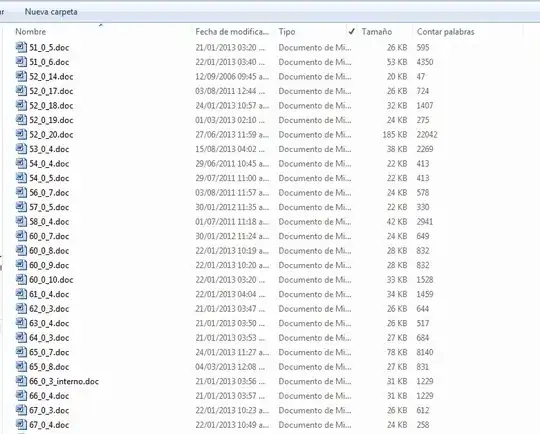
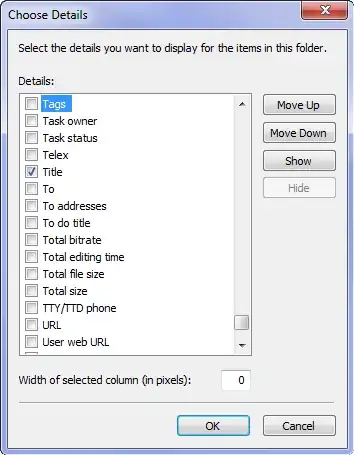
I need to obtain the document properties of every Office file in a folder, for about 35k files. The document properties are NOT the filesystem file properties that Windows Explorer exposes, but those that appear when you select "additional columns". That way you can see Word Count, Author, Number of Pages, Time Last Printed etc. (For media files they usually are Orientation, Bitrate, Resolution, etc.)
I need to export this in a tractable format (csv, Excel or any kind of table).
Example of Windows Explorer with a Word Count column added:
Example of Windows Explorer column selection UI:
Since I'm lazy/don't have time, I'd rather not use VBScript for the task.
How can I do it?
Thanks!

This is a legitimate question and its solution will prove extreamely valuable to many. Please leave it open.
– s_a Aug 26 '14 at 16:12+Zoredache I think there should be better ways to implement it, that script opens a document each time. There are ways that don't involve loading Word 35k times!
– s_a Aug 26 '14 at 17:00At USD 178 though, which is a week's salary here, I think I'll overcome my lazyness and write the script based on this: http://gallery.technet.microsoft.com/scriptcenter/c85e74a4-9c4c-45e0-81cd-b0bd33b2bd2c :)
Those files come from a database of company documents; I want to check if word count and other indicators are useful as a proxy for time spent working per user, so that I can measure how much work/time different types of documents require and then do some business intelligence.
– s_a Aug 26 '14 at 19:33