0

I have been using two USB display adapters (USB video cards) to connect windows 7 laptop to multiple monitors.

All worked well, then after I tried to connect it to different monitor, windows 7 no longer recognizes the USB display adapters as video adapters.

When I plug them in, I am told the drivers installed, its ready to use, but nothing after that.

In device manager, they appear briefly under Other devices, then disappear enter image description here
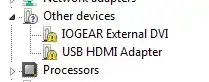
any ideas ??

  • Have you considered removing them from 'Other devices', then letting Windows recognize them and then install seperate drivers provided by manufacturer? – mwilczynski Aug 02 '14 at 16:02
  • If you have backup enabled, then just recover from last recovery point. It helps in such cases. Alternatively you can recover registry only (not files) and the problem will be solved. – Jet Aug 04 '14 at 20:01
  • Also try to plug your device to another PC to make sure it's not a hardware problem. – Jet Aug 04 '14 at 20:02

2 Answers2

1

In the first instance of faulting this I would go into Device manager and right click on the Iogear External DVI and USB HMDI entries and uninstall them. Then rescan and they will be added again if the correct hardware is connected it should reinstall the correct drivers If not try to manually reinstall the drivers from installation disks or C:Windows/system32

0

If you have recently installed anything originated from internet like some random software related to display or self proclaimed driver updater softwares, try uninstalling that. Sometimes some spam free softwares causes this issue, this is a good thing not to download anything if you are not sure what about the claim it is making about cleaning your PC or updating your driver or anything. Other then that I would suggest you to go ahead with the answer provided by @Mike.

Hope that Helps.

Encrypter
  • 181