0

A long, long time ago I bought an external hard disk. It worked fine, but now I have difficulty getting the thing powered up. When it started acting up, I opened the case, and saw this:

HardDiskTop

The thing is that that black thing to the right on the picture below has quite some wear, it doesn't hold on the adapter cable anymore so well, the pins are bend, etc.
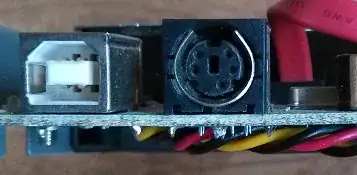
PowerAndUSBThingy

So, I'm thinking about buying a new casing. But I'm not sure if I need anything special, and with that I mean if I need a special e-SATA case, or that I could be fine with a "normal" 3.5" casing that's being powered with USB. Here's another picture telling a bit more about the hard disk:

HardDiskDetails

2 Answers2

1

Recently changed casing on one of my old disks (also WD5000AAJS-22TKA0) and it works great with a generic USB3 case.

  • Really? That's great to hear! Can't figure out what is going on with the chip board and the SATA though. It looks... special. But wait, this 3.5" disk, doesn't it need some extra power supply? How did you get it to work with the USB 3.0? – Garth Marenghi Jul 08 '14 at 19:14
  • It's not. It's the controller board for the USB. Another external case would have its own and/or it wouldn't be requires if used as an internal drive – Ramhound Jul 08 '14 at 19:19
  • Yes, It needs an external PSU. But as Ramhound says, an external case has its own USB controller so the only thing you need to worry about is getting another case. Regarding the USB 3, the case that you buy needs the USB Controllerboard to be USB3. Just check an online retailer like amazon and search for "usb 3 hdd enclosure". Choose an 3.5" one in the pricerange you are comfortable with. – Stoffe1776 Jul 08 '14 at 20:19
0

You can use any external enclosure that can house a 3.5" HDD with an internal SATA interface. You will not find one that is USB powered. Typical enclosures for 3.5" Drives come with a separate power supply.

The external connector that you have on your old enclosure is for USB. You can go with an enclosure that offers eSATA, USB, firewire or a comination of these or all of these ports.

Another option may be to pull it from the enclosure altogether and install it in your computer (desktop obviously) and connect directly to the SATA ports on your motherboard.

This is from Vantech sold at Newegg.com. firewire

Carl B
  • 6,650
  • Is that the Holy Hand Grenade of Entioch? Anyways, I do not own a desktop computer, so my options are slimmed down some. So, what I'm taking away from this is that I could either use USB or eSATA, etc., but it will be one with an extra power connector since it's a 3.5" disk. – Garth Marenghi Jul 08 '14 at 19:20
  • Yes to both...holy handgrenade as thou shall countith to three and not five and seperate PS (as far as I have seen so far). At lest this one has multiple input options. If you look around, you may find one with USB 3 and the other ports....Then there will be much rejoicing "yeaaaa". – Carl B Jul 09 '14 at 10:10