I have two desktops each with single vga monitor output. I am interested to have an extended monitor setup, where i can extend the desktop of one of my machines and that way i can also work on the other using remote desktop. Any idea how can i do that? I am running Windows 7 on one and Win Server 2k8 on another.
Asked
Active
Viewed 3,111 times

5 Answers
6
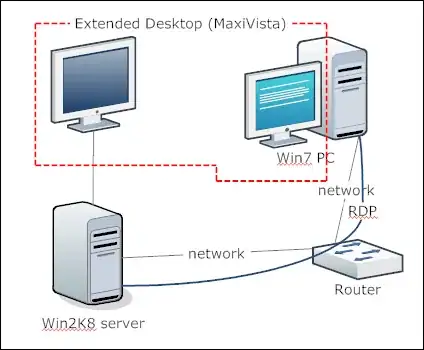
I think you're looking for a solution like MaxiVista, as already explained here (and in tons of other discussions on SU). Synergy is something else, where each computer keeps its screen, only the mouse and keyboard are redirected.
However, I think it's a bit strange to extend the desktop on the screen of the other computer, and do a RDP connection to access it? But it should work, as the RDP connection will access another session and the Maxivista extended screen will use the interactive session.


2
As Johannes Rössel writes, Synergy is the undoubtedly cheapest and perhaps even the best solution to this problem. It's cross platform (Windwos, OS X and Linux), open source and (after a bit of configuration) completely invisible and easy to use.

Asbjørn Ulsberg
- 270
-
Synergy seems not be be opensource nor free anymore ! – Benj Sep 14 '15 at 12:04
1
Take a look at Synergy.
Synergy is Free and Open Source Software that lets you easily share your mouse and keyboard between multiple computers, where each computer has its own display. No special hardware is required, all you need is a local area network. Synergy is supported on Windows, Mac OS X and Linux. Redirecting the mouse and keyboard is as simple as moving the mouse off the edge of your screen.


Gareth
- 18,809

Nick Bolton
- 3,400
-2
what you are asking cannot be done with (2) separate computers. You would need 1 computer with a dual monitor output video card to run extended monitor support. You can though use 2 monitors next to each other and have a KVM switch so you click back and forth between computer towers.
I recommend the dual video output solution, as I am using the same solution. I run 1 tower and dual monitors. Good luck with your setup, if you have any more questions please do ask!

AskaGamer
- 376
-
hi, i am already using the kvm switch to switch back and forth. I had heard there's a software which once installed on both machines can do that where i can achieve extended monitor support without having the split vga hardware. – Anirudh Goel Nov 18 '09 at 09:18
-
1Synergy the software that was listed below will allow that without hardware. – AskaGamer Nov 18 '09 at 09:18