2

I just installed Ubuntu 9.10 on my PC. I have Windows XP as the primary OS.

I am trying to set XP as the default OS with the following command in terminal:

sudo gedit /boot/grub/menu.lst

After that it should display something like this:
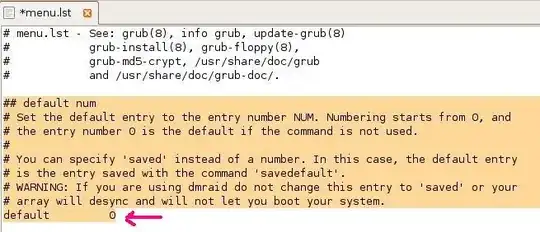
enter image description here

Instead it is showing a blank menu.lst file.

What's the problem? What should I do?

Gareth
  • 18,809
ravi
  • 237
  • This question could have some answers for you (though not a duplicate): http://superuser.com/questions/50684/how-to-fix-grub-after-windows-breaks-it-and-how-to-edit-the-grub-menu – Gnoupi Nov 09 '09 at 14:47
  • ("this question can have answers for you"... always a strange thing to say :]) – Gnoupi Nov 09 '09 at 14:48
  • @ Gnoupi Nothing helpful.My problem is different – ravi Nov 09 '09 at 14:49
  • nope. ubuntu 9.10 has switched to Grub2 which is just different. no menu.lst anymore. maybe look for a grub.cfg or similar? i haven't installed it yet so i can't tell you how to fix. :-/ – quack quixote Nov 09 '09 at 14:53
  • I thought that one of the given commands to re-setup it would as well regenerate the menu.lst, pity. – Gnoupi Nov 09 '09 at 14:53
  • @quack, then that explains the "empty" file, it's just not existing yet. Post it as answer, I think. – Gnoupi Nov 09 '09 at 14:54

2 Answers2

3

As the comments point out the new Grub is just setup differently. Now you'll want to make your personalized settings changes in the file: /etc/default/grub

At a terminal:

sudo gedit /etc/default/grub

Now you can change the relevant setting (just like the settings you were accustomed to in the previous version).

More information can be found at this helpful thread: Grub 2 Basics

Also take note of the section talking about the files contained in: /etc/grub.d/

codeLes
  • 1,852
  • 3
    Oh the joys of getting used to the new syntax of newer version of a bootloader. – Sathyajith Bhat Nov 09 '09 at 18:49
  • I hear ya, I didn't even know about this until researching this question... the custom file thing is a bit archaic in my eyes... but we're sure to see some helpful config tools built around this... the joy of F/OSS! – codeLes Nov 09 '09 at 21:22
  • 1
    thanks for the info, codeLes, my searches hadn't managed to turn up a handy link like that one. – quack quixote Nov 10 '09 at 00:12
  • +1 Thanks for the link.But I was too lazy to read it and in the meantime I found the exact answer.(See my answer) – ravi Nov 10 '09 at 01:25
  • @ravi: I guess I should have given a bit more info, I think the answer still fits the context of your question... I'll just organize it a little better... – codeLes Nov 10 '09 at 01:32
1

Following is the exact answer (worked for me perfectly):

Run following command

sudo gedit /etc/default/grub

change GRUB__DEFAULT=0 to 4

And then without forget run following command :

sudo update-grub

This will update the grub.

And you are done.

(Found this on this thread)

ravi
  • 237