0

Windows XP's Search Companion seems to be a lot more powerful than searching in Windows 7.

Particularly, I want to be able to search for filenames matching some pattern, containing a particular word.

For instance, how do I find files with the extension "sql" containing the word "view_customer"?

Jeff Roe
  • 333

2 Answers2

4

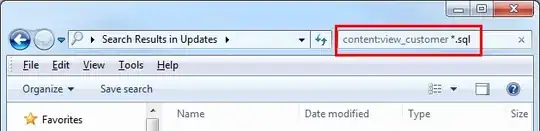
To find files with the extendion "sql" containing the word "view_customer" in Windows 7, enter this in the Search text box:

content:view_customer *.sql

In pictures, the equivalent of this search in XP Search Companion (dog): XP Search Companion

is this in Windows 7: Windows 7 Search

This question is similar to this question (though not exactly the same), but I wasn't allowed to add an answer to that because it is protected.

Jeff Roe
  • 333
  • I'm kind of confused.. How is this any different than other answers on that other question? Specifically http://superuser.com/a/180048/23133 tells you to use content: to filter by content, and putting in .sql is the usual way to specify what files you want to search. How is this new or different information? BTW, you can use type: instead of specifying an `.` style extension as well. ;) – Ƭᴇcʜιᴇ007 Nov 15 '13 at 17:45
  • The answer by Sean Sexton was pretty much what I was looking for, and I upvoted it. But what I wanted to add was a nice graphical answer which translates what I'm used to doing in XP to what I need to do now in Windows 7. Also, the answer I was looking for was 3rd down the list of a bunch of answers. In light of all that, and the fact that I wasn't able to add an answer to the other question, I added this one. I thought it would be a helpful contribution. Also, the other question's accepted answer is not what I was looking for at all, so this didn't seem like a duplicate. – Jeff Roe Nov 15 '13 at 18:02
0

this works only on indexed files, so using an app like aborage Searcher works better also you could use the powershell: take a look here: https://stackoverflow.com/questions/8153750/how-to-search-a-string-in-multiple-files-and-return-the-names-of-files-in-powers

konqui
  • 513