1

Without using AD GPOs (Active Directory Group Policy Objects), or similar, how would one go about creating a logoff script for Windows?

This would be for XP (home and pro), Vista, and 7, in a personal environment (ie, no Domain Controllers anywhere in sight).

warren
  • 10,090

3 Answers3

5

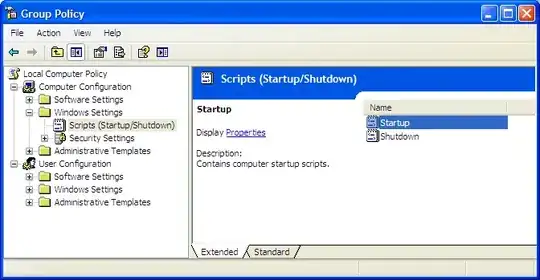
In the Run box type gpedit.msc and hit enter. This will open the Group Policy editor. This will allow you to edit the kind of things normally managed by an AD Policy directly on the local machine.

alt text

Under Windows Settings there is a Scripts (Startup/Shutdown) option where you can specify Startup and Shutdown scripts.

Gareth
  • 18,809
David Webb
  • 12,036
1

On Windows XP Pro, you can assign startup and shutdown scripts (i.e. batch files) using Group Policy. Open the Help And Support Center and search on 'shutdown script'.

Alan B
  • 337
0

The two previous answers explain how to execute scripts on startup/shutdown.

The answer to the actual question asked (logon/logoff) is to create a windows task scheduler task where you tie the trigger to be "On connect/disconnect from user session" instead of a more familiar scheduled time or date.

Run taskschd.msc --> create task --> Triggers --> New --> "On connection to user session" ...

Otto
  • 1
  • it would seem, though perhaps I'm mistaken, that this would run even if all you did was disconnect (but NOT logoff) from an RDP session and then reconnected later – warren Mar 07 '14 at 14:24